Sponsored

Intelligent Octopus Go

Leccy61

Well-Known Member
Joined
Nov 18, 2024
Threads
4
Messages
308
Reaction score
227
Location
United Kingdom
Vehicles
Taycan Cross Turismo, 986 Boxster S, VW ID.3 Pro S
Country flag
Yep, Porsche connect is needed for 3rd parties to be able to access the car, which makes sense if you think about it.

Zappi chargers are compatible with intelligent octopus go though, so yes, set it up so octopus controls your charger and get the smart charging benefits that way?
Sponsored


 

tophamn

Well-Known Member
First Name
Neil
Joined
Jul 17, 2024
Threads
1
Messages
708
Reaction score
474
Location
Bristol UK
Vehicles
Taycan ST GTS
Country flag
At the moment, I’m charging via my Zappi wall charger, which I control through the Zappi app and is fully connected to my home Wi-Fi.

so after reading the thread, it sounds like I need to get Optimus energy to control the charger and not the car if I am unable to connect?
Correct - much more reliable than having Octopus control the car directly, too.
 

psglas

Well-Known Member
First Name
Peter
Joined
Feb 18, 2020
Threads
12
Messages
116
Reaction score
74
Location
Aviemore
Vehicles
Taycan CT4, Audi RS4, Defender 90
Country flag
I just checked.. I'm still on Inteligence go and they said they would discontinue it 4-5 month ago.
 
Joined
Sep 23, 2025
Threads
1
Messages
16
Reaction score
19
Location
UK
Vehicles
Porsche Taycan Turbo
Country flag
I also have issues if I use Octo to control the car.
To get around this, I set Octo to charge to 100% and then control the charge amount via the Porsche app.
Works flawlessly every time.
And works perfectly for another EV (which isn't directly supported by Octo).

I only use the Oct app to look at charge schedules (curiosity not a necessity) and should I need a "bump" charge.

FYI, Octo app is set up to control the Hypervolt, which in effect means the Hypervolt is used as a "dumb" charger.
I do need the Hypervolt app to get my EV kW usage each month for company expenses.

Hope you get yours working.
You might want to check your EVSE usage report against the report from Octopus. You may well find that they’re different and the Octopus usage is higher. Particularly if you’re using it for your expense's
 

taycangt3

Member
Joined
Dec 16, 2025
Threads
1
Messages
7
Reaction score
1
Location
Leeds
Vehicles
Taycan 4S
Country flag
Do I need to contact Octopus to get it connected to the charger? The app seems to default to connecting to the car only. When you select Add car and then charger, it fails, which I assume is because it’s still trying to connect to the car rather than the charger.


tophamn

Well-Known Member
First Name
Neil
Joined
Jul 17, 2024
Threads
1
Messages
708
Reaction score
474
Location
Bristol UK
Vehicles
Taycan ST GTS
Country flag
Do I need to contact Octopus to get it connected to the charger? The app seems to default to connecting to the car only. When you select Add car and then charger, it fails, which I assume is because it’s still trying to connect to the car rather than the charger.
No, you don't need to contact Octopus. First delete the car as your device, then add a new device. I don't remember the steps exactly but I think you should specify the charger first. The process will ask about the car but only so it knows what size the battery is. If you're asked to log into your Porsche Connect account something isn't right.
 

taycangt3

Member
Joined
Dec 16, 2025
Threads
1
Messages
7
Reaction score
1
Location
Leeds
Vehicles
Taycan 4S
Country flag
Hi,
I’ve been onto the Octopus Energy up again this morning and the choices are – add device.

1. battery
2. Electric vehicle.
3. Heat pump.

Self selected electric vehicle.

Next prompt is are you at home and plugged in?

Next option is make of electric vehicle.

Next option is your model

The next option is brand of charger.

Next option is model of charger.

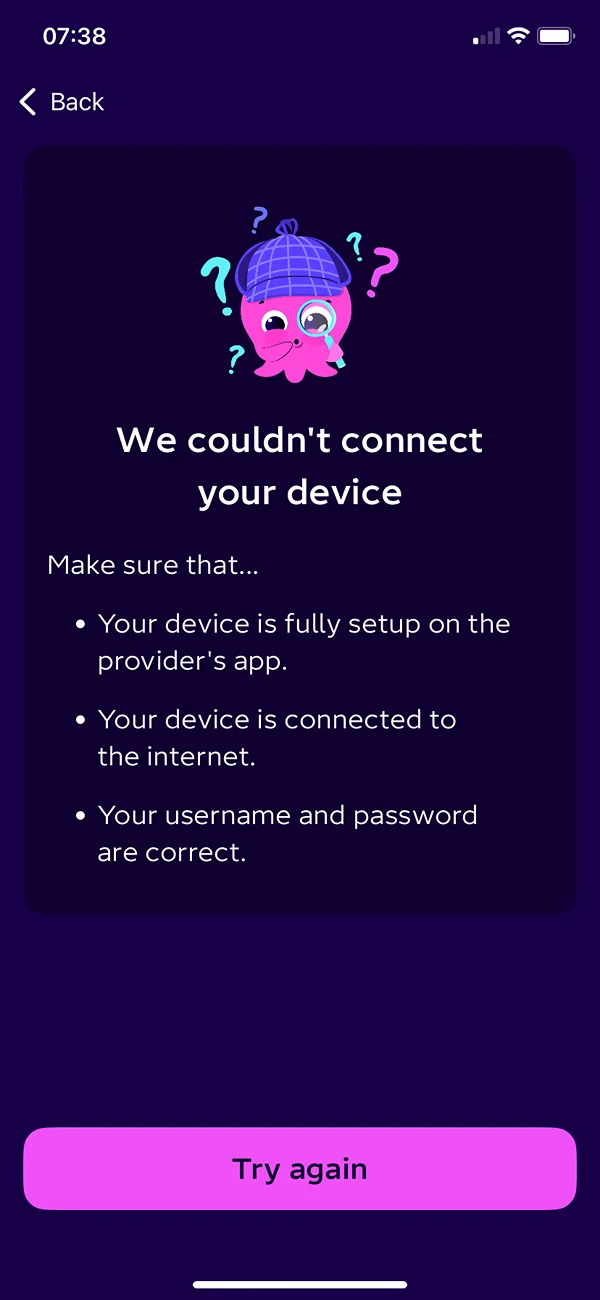
Once I’ve selected all these and then get the following error message.

Porsche Taycan Intelligent Octopus Go IMG_1351
 

tophamn

Well-Known Member
First Name
Neil
Joined
Jul 17, 2024
Threads
1
Messages
708
Reaction score
474
Location
Bristol UK
Vehicles
Taycan ST GTS
Country flag
Hi,
I’ve been onto the Octopus Energy up again this morning and the choices are – add device.

1. battery
2. Electric vehicle.
3. Heat pump.

Self selected electric vehicle.

Next prompt is are you at home and plugged in?

Next option is make of electric vehicle.

Next option is your model

The next option is brand of charger.

Next option is model of charger.

Once I’ve selected all these and then get the following error message.

IMG_1351.webp
Hmm, not sure how to proceed.

Octopus installed my Zappi so they already knew about it. I wonder if you need to let them know you have it before it gives you the option - might be worth pinging them or searching their FAQs.


Midlifecrisis

Well-Known Member
First Name
Ian
Joined
Jul 1, 2021
Threads
38
Messages
1,238
Reaction score
869
Location
Worcestershire
Vehicles
Taycan Turbo, Taycan 4S (sold). Macan SD (sold)
Country flag
Try choosing a make of car that is not supported then maybe it will connect via the charger. Tell it that it is a Land Rover PHEV
 

Jin

Well-Known Member
Joined
Oct 7, 2022
Threads
7
Messages
255
Reaction score
197
Location
London
Vehicles
Taycan 4S (MY24)
Country flag
Octopus changed their preference of onboarding into intelligent go back in November. They’ve now said they will try and integrate directly with the vehicle if its supported even if you have a compatible EVSE. With the vehicle integration they can see SoC from the car which they can’t via the zappi integration. All a part of their recent efforts to manage the off peak charging rates and those who have been gaming the system somewhat to extend the off peak rate for the whole house.

You can still integrate with the EVSE but you had to ask octopus CS to allow the option in the app.. I think they’ve now made it some what self serve and there was a link you could follow to do it… it was the octopus forums so can dig out the link if needed.

there was also a notice that their proposed changes to only allowing 6 hours a day of smart car charging (in or out of the off peak window) has been delayed as they ‘perfect’ the implementation somewhat
 

Boer13

Member
First Name
Jaco
Joined
Oct 12, 2025
Threads
0
Messages
21
Reaction score
18
Location
UK
Vehicles
Taycan 4S & Macan S
Country flag
You can still integrate with the EVSE but you had to ask octopus CS to allow the option in the app.. I think they’ve now made it some what self serve and there was a link you could follow to do it… it was the octopus forums so can dig out the link if needed.
Agreed.

Octo Intelligent Go, by default, wants to control the car, which forces a Porsche Connect subscription.

However @taycangt3 you need not accept the default process. Tell Octo that you do not wish to maintain a Porsche Connect subscription, and ask that they control your wall charger instead.
They've done this for me and it has solved integration problems.

Once you're connected to the charger then, on the car, you'll need to
- disable any active charging Timers
- fiddle the charging Profile - instead of setting a preferred charging window e.g. 2330-0530, select the option for intelligent control (so it can take instructions from Octo Intelligent Go)
- Set the charging Profile, noting that what used to be the 25% 'minimum charge' slider now becomes your charge limiter (max setpoint). Without this set to say 80 or 85%, Oct will charge the battery to 100%. Once set the car will terminate the session at the desired COS, as indeed mentioned already by others on this thread. (You'd wat Oct to do this, but unfort it doesnt work like that on my 2020 4S)
 

Jin

Well-Known Member
Joined
Oct 7, 2022
Threads
7
Messages
255
Reaction score
197
Location
London
Vehicles
Taycan 4S (MY24)
Country flag
However @taycangt3 you need not accept the default process. Tell Octo that you do not wish to maintain a Porsche Connect subscription, and ask that they control your wall charger instead.
They've done this for me and it has solved integration problems.
looks like you can follow this process to avoid having to call CS up..

IO Go - enable charger option

can take 24 hours to show in the app though
 

Boer13

Member
First Name
Jaco
Joined
Oct 12, 2025
Threads
0
Messages
21
Reaction score
18
Location
UK
Vehicles
Taycan 4S & Macan S
Country flag
Agreed.

Octo Intelligent Go, by default, wants to control the car, which forces a Porsche Connect subscription.

However @taycangt3 you need not accept the default process. Tell Octo that you do not wish to maintain a Porsche Connect subscription, and ask that they control your wall charger instead.
They've done this for me and it has solved integration problems.

Once you're connected to the charger then, on the car, you'll need to
- disable any active charging Timers
- fiddle the charging Profile - instead of setting a preferred charging window e.g. 2330-0530, select the option for intelligent control (so it can take instructions from Octo Intelligent Go)
- Set the charging Profile, noting that what used to be the 25% 'minimum charge' slider now becomes your charge limiter (max setpoint). Without this set to say 80 or 85%, Oct will charge the battery to 100%. Once set the car will terminate the session at the desired COS, as indeed mentioned already by others on this thread. (You'd wat Oct to do this, but unfort it doesnt work like that on my 2020 4S)
After testing it for few weeks, I can add that I have no problems leaving HEATING ONLY Timers active in the car - these do not mess around with the Octopus control of my Andersen charger. I plug in every night, Octopus tries to add 100% to the SOC, and the car's Profile terminates the charge at the setpoint, normally 85%.
 

ExM

Member
First Name
Peter
Joined
Dec 13, 2024
Threads
2
Messages
6
Reaction score
1
Location
Scotland
Vehicles
Mini JCW
Country flag
So I’ve just done a deal to buy a used 2021 Taycan TS and we already has Octopus standard tariff but obviously would benefit from their smart ev tarrif.

What charger is best to use these days with Octopus? Is it still the case that the Porsche charger doesn’t work with the smart tarrif?
WiFi to the garage is likely to be patchy at best but I can setup a WiFi booster.
I’m not planning on subscribing to Porsche connect.

So starting from a blank slate, what’s the best way to go?


Top