
Sponsored
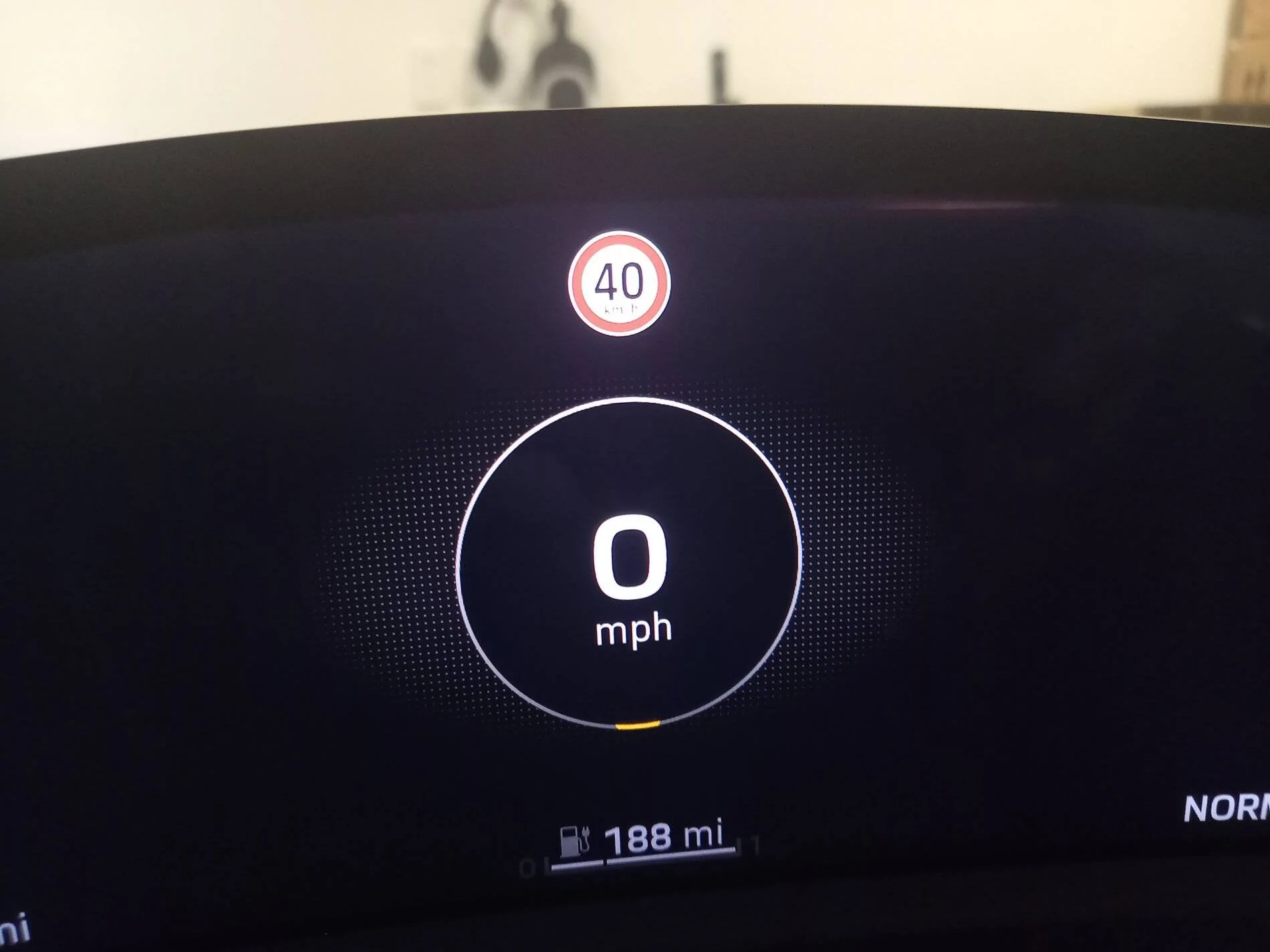
Please tell me there's a way to get rid of this speed limit sign!!
pcp1701
New Member
- First Name
- Peter
- Joined
- Apr 28, 2021
- Threads
- 1
- Messages
- 3
- Reaction score
- 3
- Location
- Fort Lauderdale, FL
- Vehicles
- Taycan 4S, Taycan 4S Gran Turismo

I've only had my 4S for a few days, so I'm hardly the authority. Have you done either of the following:
Use the right had steering wheel button to highlight that screen and the scroll wheel to scroll through and select other screens? You could have the map there for instance.
Gone into the menu in the center user screen that covers driver assist items (don't recall the exact name but easy to see) and deselected the traffic signs item? It's the screen where you indicate whether lane assist and whatnot should be on.
Use the right had steering wheel button to highlight that screen and the scroll wheel to scroll through and select other screens? You could have the map there for instance.
Gone into the menu in the center user screen that covers driver assist items (don't recall the exact name but easy to see) and deselected the traffic signs item? It's the screen where you indicate whether lane assist and whatnot should be on.
Oink
Well-Known Member
- Joined
- Sep 8, 2020
- Threads
- 11
- Messages
- 379
- Reaction score
- 271
- Location
- Norway
- Vehicles
- Taycan 4S+, M3P

What's wrong with it being there? Such a weird thing to fuss about.
I do, however, find it annoying as some of my Twitch streams are of me driving around, and the Twitch cops can be quite strict about driving "recklessly". No way I do an overtake while streaming.
I do, however, find it annoying as some of my Twitch streams are of me driving around, and the Twitch cops can be quite strict about driving "recklessly". No way I do an overtake while streaming.
fblm
Active Member
- First Name
- Francis
- Joined
- Oct 26, 2020
- Threads
- 7
- Messages
- 39
- Reaction score
- 5
- Location
- Caribbean
- Vehicles
- 964RS3.8, 964Turbo3.4

- Thread starter
- #5
Thanks, yes I've tried those things. Unfortunately the map doesn't work where I live because of Porsche's bizarre decision to use an esim rather than a replaceable sim card there doesn't appear to be a way to ever get it to work either. Doesn't matter I don't need it. It seems the speed limit sign is on every page! ArghI've only had my 4S for a few days, so I'm hardly the authority. Have you done either of the following:
Use the right had steering wheel button to highlight that screen and the scroll wheel to scroll through and select other screens? You could have the map there for instance.
Gone into the menu in the center user screen that covers driver assist items (don't recall the exact name but easy to see) and deselected the traffic signs item? It's the screen where you indicate whether lane assist and whatnot should be on.
fblm
Active Member
- First Name
- Francis
- Joined
- Oct 26, 2020
- Threads
- 7
- Messages
- 39
- Reaction score
- 5
- Location
- Caribbean
- Vehicles
- 964RS3.8, 964Turbo3.4
- Thread starter
- #6
Well, er, I find it annoying. Not least because it's hopelessly wrong. If it's going to force information I already know into my line of sight it would be nice if it was correct some of the time, but it's not so it can go. It's a hundred thousand dollar sports car, I don't think I'm being fussy wondering how I trigger a single line of code to make it disappear.What's wrong with it being there? Such a weird thing to fuss about.
I do, however, find it annoying...
XLR82XS
Well-Known Member
- First Name
- LXA
- Joined
- Mar 31, 2021
- Threads
- 9
- Messages
- 2,003
- Reaction score
- 1,406
- Location
- SW FL | Vegas
- Vehicles
- DMC & rotation of other fine vehicles
My 2021 does not show speed limit sign there. There is a way to disable it in one of the menus.

W1NGE
Well-Known Member
- First Name
- Adrian
- Joined
- Jan 11, 2021
- Threads
- 53
- Messages
- 11,017
- Reaction score
- 6,805
- Location
- Aberdeen, Scotland
- Vehicles
- 992.2, ex GTS ST & 4S owner, Macan T

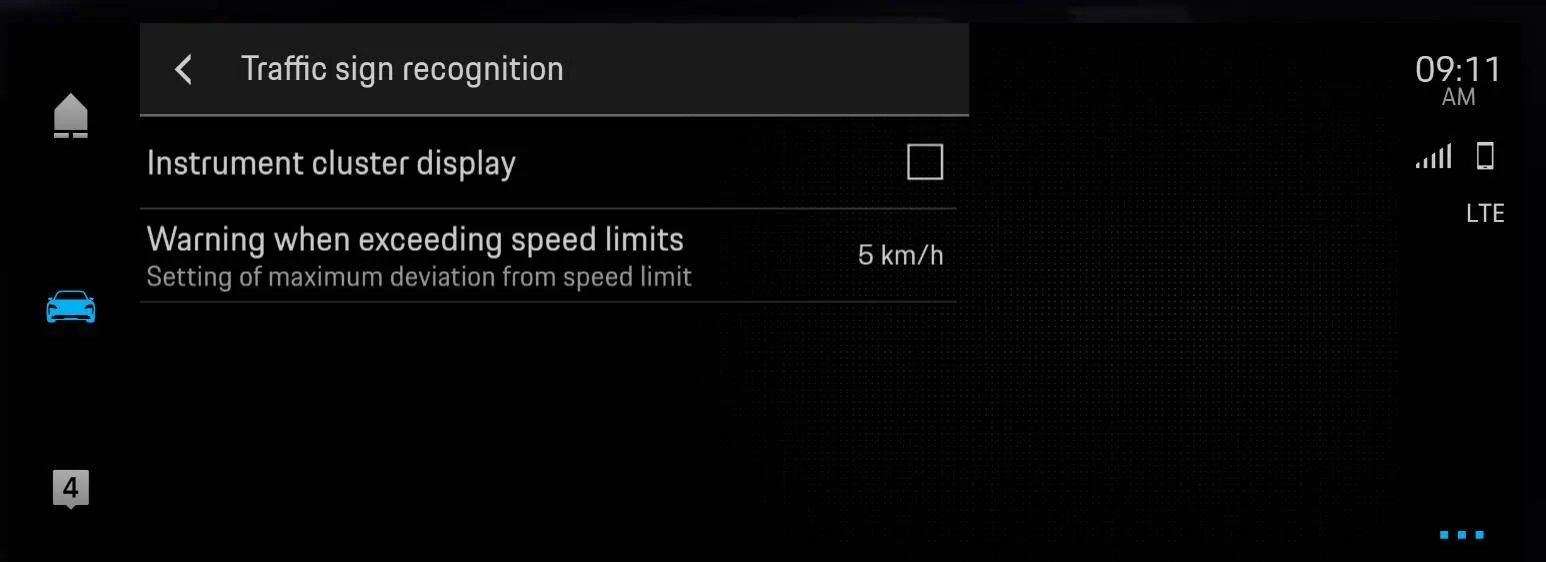
In PCM: Vehicle - Assistance - Options ( ... ) - Assistance System Settings - Traffic Sign Recognition - choose what you want (untick Instrument cluster display)

W1NGE
Well-Known Member
- First Name
- Adrian
- Joined
- Jan 11, 2021
- Threads
- 53
- Messages
- 11,017
- Reaction score
- 6,805
- Location
- Aberdeen, Scotland
- Vehicles
- 992.2, ex GTS ST & 4S owner, Macan T
Cayman Islands by the look.
fblm
Active Member
- First Name
- Francis
- Joined
- Oct 26, 2020
- Threads
- 7
- Messages
- 39
- Reaction score
- 5
- Location
- Caribbean
- Vehicles
- 964RS3.8, 964Turbo3.4
- Thread starter
- #11
Thanks Adrian appreciate it. Unfortunately mine looks like this...In PCM: Vehicle - Assistance - Options ( ... ) - Assistance System Settings - Traffic Sign Recognition - choose what you want (untick Instrument cluster display)
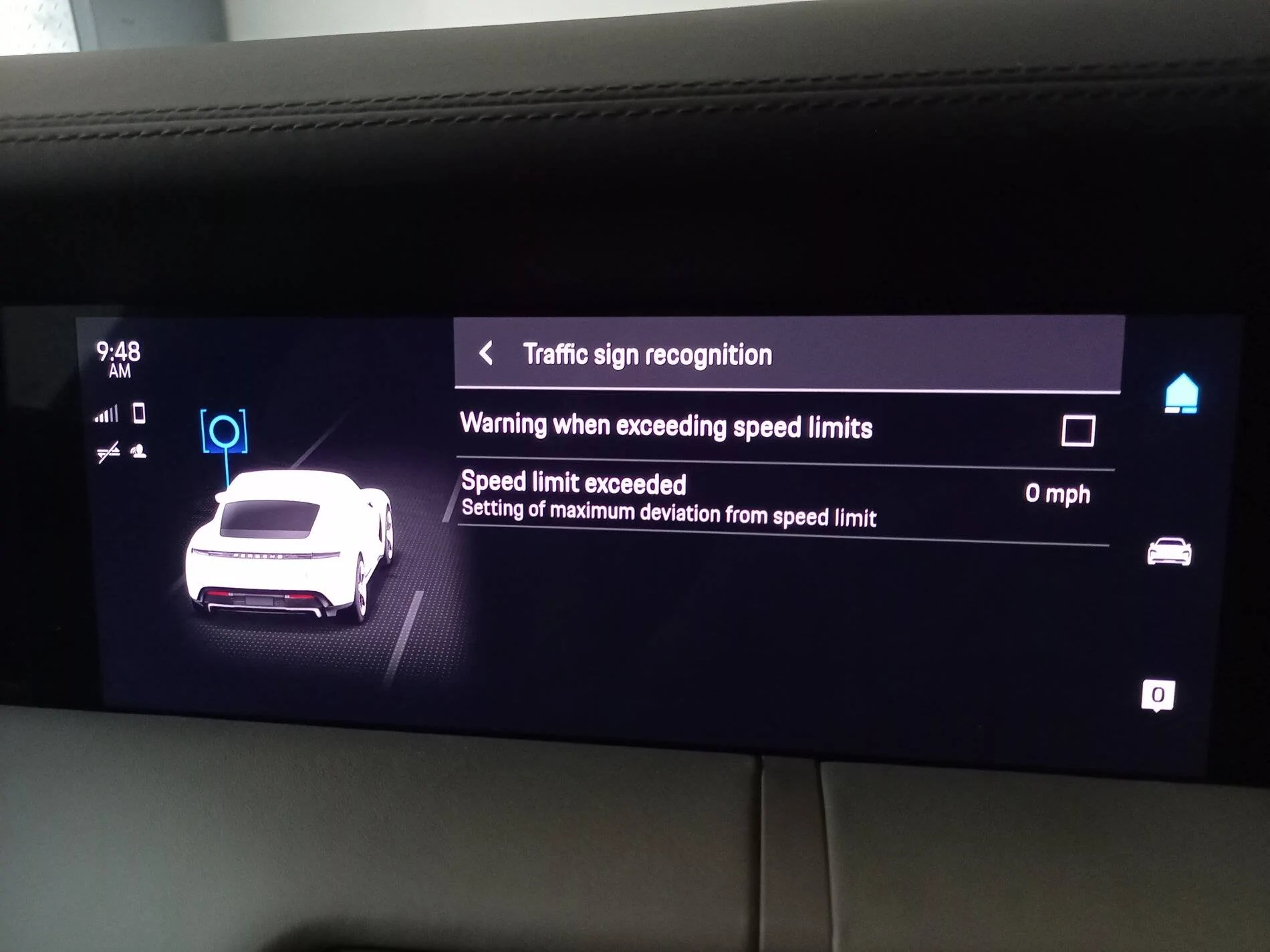
It's an early '21 UK car so quite surprised it has different options
W1NGE
Well-Known Member
- First Name
- Adrian
- Joined
- Jan 11, 2021
- Threads
- 53
- Messages
- 11,017
- Reaction score
- 6,805
- Location
- Aberdeen, Scotland
- Vehicles
- 992.2, ex GTS ST & 4S owner, Macan T
No worries. Scan through the Porsche Good to Know App and see if it can be permanently disabled - it may be that it can't due to some "safety" requirement.
Dave T
Well-Known Member
- Joined
- Jan 14, 2020
- Threads
- 76
- Messages
- 743
- Reaction score
- 375
- Location
- Boston
- Vehicles
- 2020 Taycan Turbo
I like the feature. It’s not doing anything to keep you from speeding, but sometimes it is good to know what the speed limit is. But it certainly would be annoying if it was inaccurate. I don’t understand how it could be, I thought that it worked by recognizing the speed limit signs you pass on the road. So when you pass a speed limit sign, it doesn’t update to show what the limit was on that sign? That’s how it works for me.
kort
Well-Known Member
- Joined
- Feb 7, 2021
- Threads
- 44
- Messages
- 2,296
- Reaction score
- 1,536
- Location
- 32082
- Vehicles
- '23 Lucid Air GT
it's not 100% accurate, I think that it is fed via map data rather than camera recognition and the data feed isn't always up to date.I like the feature. It’s not doing anything to keep you from speeding, but sometimes it is good to know what the speed limit is. But it certainly would be annoying if it was inaccurate. I don’t understand how it could be, I thought that it worked by recognizing the speed limit signs you pass on the road. So when you pass a speed limit sign, it doesn’t update to show what the limit was on that sign? That’s how it works for me.
struther
Well-Known Member
- First Name
- Brad
- Joined
- Jan 16, 2020
- Threads
- 8
- Messages
- 408
- Reaction score
- 461
- Location
- Toronto
- Vehicles
- Nissan GTR, Nissan 350z

I actually think it uses both. I have passed a temporary sign and it updated on the dash. Google Maps still had the old speed limit. I have been pleasantly surprised by its accuracy where I live. I do understand these things are very regional though.it's not 100% accurate, I think that it is fed via map data rather than camera recognition and the data feed isn't always up to date.
Sponsored


