Sponsored

New EV owner - Ovo Charge Anytime and wall charger help!!!???

Tango22

Well-Known Member
Joined
Jul 29, 2025
Threads
7
Messages
94
Reaction score
42
Location
Scotland UK
Vehicles
2024 Taycan GTS ST, 2019 McLaren 570S
Country flag
Hi all,

I've had my GTS ST for a couple of weeks now and have been using the Porsche mobile charger to top it up overnight as well as public chargers to charge the car.

However, I had a Zappi 2.1 wall charger fitted yesterday by Ovo. The engineer set up my Charge Anytime app and the MyEnergi app. Then we noticed that within the CA app, it said it was being discontinued and recommended using the new Ovo Charge app. So we I downloaded that and set it up.

Now, as I said I'm new to EV's and although the engineer went over everything with me yesterday and gave basic instructions on the Zappi, running through the different functions on the little screen on the box itself, fast forward to the next day and I'm struggling to remember everything he said.........DOH!!! I may be overthinking a lot of this and that the Charge Anytime system is maybe, actually as simple as it sounds - just plug in - set what time you want the car ready for the next day and let it do its thing? But there's a few other questions I had, which are below.

So for those who are with Ovo and Charge Anytime, I'm hoping you can assist an idiot with some info!!! Apologies for the long post.

  • When the technician first ran through the operation of the Zappi via the screen on the box, he showed me the different modes (Eco, Fast etc) by pressing one of the buttons. However, now I cant select any of those functions and it displays 'MNGD' with a little clock symbol next to it. I'm assuming this is the Charge Anytime system now 'managing' the charging? So does that mean I cant select any of the modes on the Zappi manually?


  • I can't see anywhere in either the Charge Anytime or Ovo Charge apps where I can set the maximum percentage to charge to? Obviously for most of the time I'd want to limit that to 80% ish, but there isnt anywhere in any of the apps I can see that I can change that? I can see an option to change the percentage in the My Porsche app, but I thought the Ovo system and app would ignore those and override the Porsche app and any setting in it?


  • Engineer said that if I wanted to instantly charge the car, I could press a 'Charge Now' (I think that was the name of it) button on the app, but again - now I'm looking at the app, I can't see a 'Charge Now' button anywhere?


  • Engineer said that if you did use the 'Charge Now' button/function it would charge at your standard electricity rate and not the cheaper Charge Anytime rate, but he did also say you can actually charge instantly by simply changing the timer (or the ready time) but I cannot for the life of me remember what he said and how to do that?


  • Again, on the subject of not being able to find anywhere in the apps to change the charge percentage, sometimes I may wish to charge to 100% rather than 80% - how do I do that?


  • Isn't there anywhere in any of the apps that you can push a button to stop charging? Say I get to 70% charge and decide that is enough, can I not tell the app to stop charging or do I need to physically go outside and unplug the car?


    I've probably asked a number of daft/obvious things there, but coming from the Porsche Mobile charger which all you had to do with was plug in and switch on, I'm finding this a bit more complex!! I may have forgotten some questions and if they pop into my head I will post them.

    Hoping someone who has been using this setup with Ovo can assist.

    Many thanks.
Sponsored
 

Dabz

Well-Known Member
First Name
James
Joined
Jun 21, 2022
Threads
34
Messages
878
Reaction score
918
Location
UK
Vehicles
J1.1 4S
Country flag
Happy to help!

First of all, the Charge Anytime app can sometimes take about 15 mins to communicate with your car after you plug it in to charge, so don't worry if it doesn't seem to be doing anything. This is a Porsche issue - doesn't happen with our Mini EV.

What you want to do is leave the Zappi being managed by Charge Anytime and use that for all settings. Leave the car charge planning settings alone too.

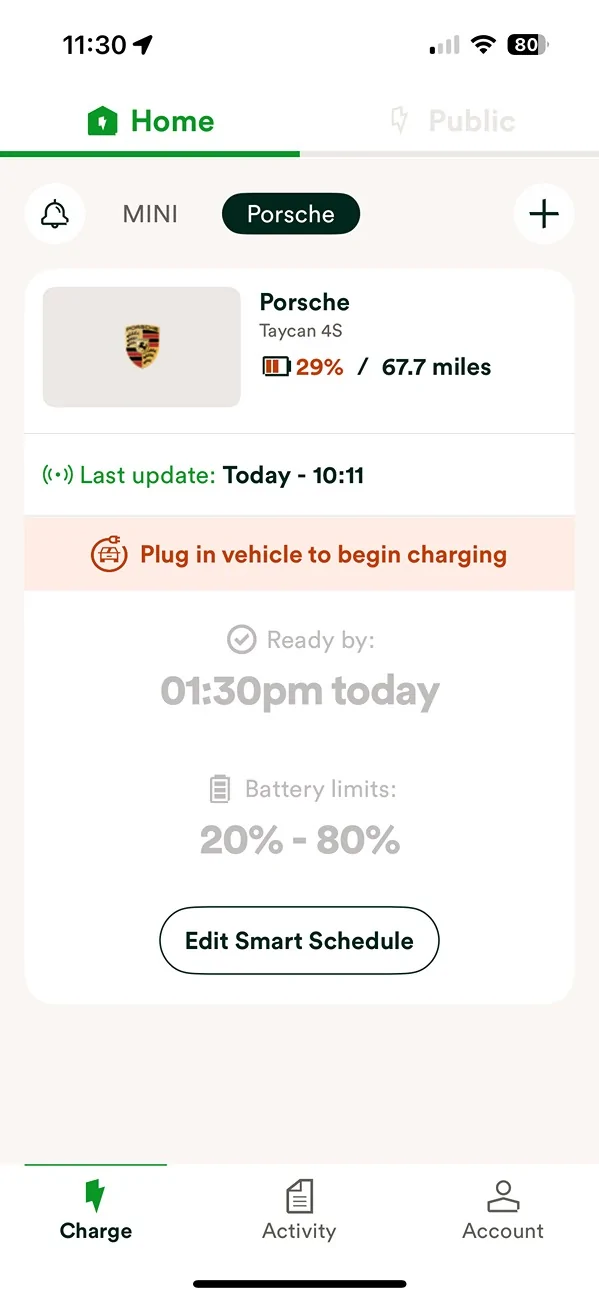
First off, open the app, make sure you're on the "Home" tab at the top and you should see your car with it's current State of Charge, etc:

Porsche Taycan New EV owner - Ovo Charge Anytime and wall charger help!!!??? IMG_5CEE8E51E0FB-1


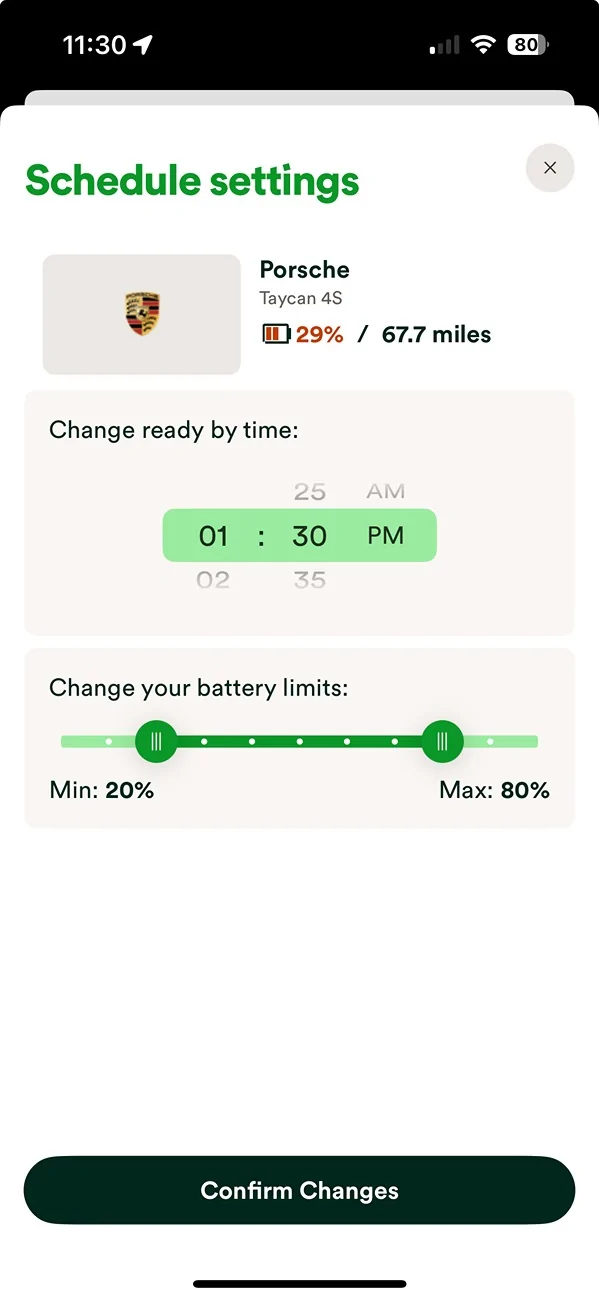
Click on "Edit Smart Schedule"

Porsche Taycan New EV owner - Ovo Charge Anytime and wall charger help!!!??? IMG_5CEE8E51E0FB-2


On that page you can set the maximum charge (mine set to 80% here) and the time you want it ready by.

Note that the minimum figure is also important - if your car is below that minimum it will charge immediately but at your full electricity rate, not at the Charge Anytime discounted rate.

As the engineer said, the best way to start it asap is to bring the "Charge ready by time" to sooner - so you can see mine is set to 1.30pm. The car can't possibly go from 29% to 80% between now and then, so it'll start the charge straight away at the CA discounted rate.

I can't actually find a "Charge Now" button in the new app so it's not just you!

One final word of warning - I find that the car "goes to sleep" if I schedule the Charge ready by time too far in the future, and CA does't wake it up to charge. So when I do an overnight charge now I plug the car in as late as poss before I go to bed, and I always sit in the car, switch it on and wait for the dahs to show LTE is connected, just so I know it has communicated with the internet. This isn't the case every time, but I've had numerous occasions where I've woken up and Charge Anytime hasn't woken the car to charge so nothing happened overnight.

Hope that helps - this is my first day with the new app after I noticed it wanted me to download the new one this morning
 
OP
OP
Tango22

Tango22

Well-Known Member
Joined
Jul 29, 2025
Threads
7
Messages
94
Reaction score
42
Location
Scotland UK
Vehicles
2024 Taycan GTS ST, 2019 McLaren 570S
Country flag
Thanks, that makes it a bit more clearer! I'm guessing that you can only set the battery levels if the car is plugged in and connected to the Zappi? My car isn't plugged into the Zappi at the moment and if I look in my appon that page in your screenshot above, there isn't a battery level setting.

I assume if I plug in, then the battery levels appear in the app?
 

Dabz

Well-Known Member
First Name
James
Joined
Jun 21, 2022
Threads
34
Messages
878
Reaction score
918
Location
UK
Vehicles
J1.1 4S
Country flag
Hmm that's odd, my car isn't connected either and I can set battery levels. I wonder if it's worth removing the car and re-adding it to the app? That's what OVO have always suggested to me as a first step any time I've reported an issue.
 
OP
OP
Tango22

Tango22

Well-Known Member
Joined
Jul 29, 2025
Threads
7
Messages
94
Reaction score
42
Location
Scotland UK
Vehicles
2024 Taycan GTS ST, 2019 McLaren 570S
Country flag
Hmm that's odd, my car isn't connected either and I can set battery levels. I wonder if it's worth removing the car and re-adding it to the app? That's what OVO have always suggested to me as a first step any time I've reported an issue.
I'll try that, cheers.

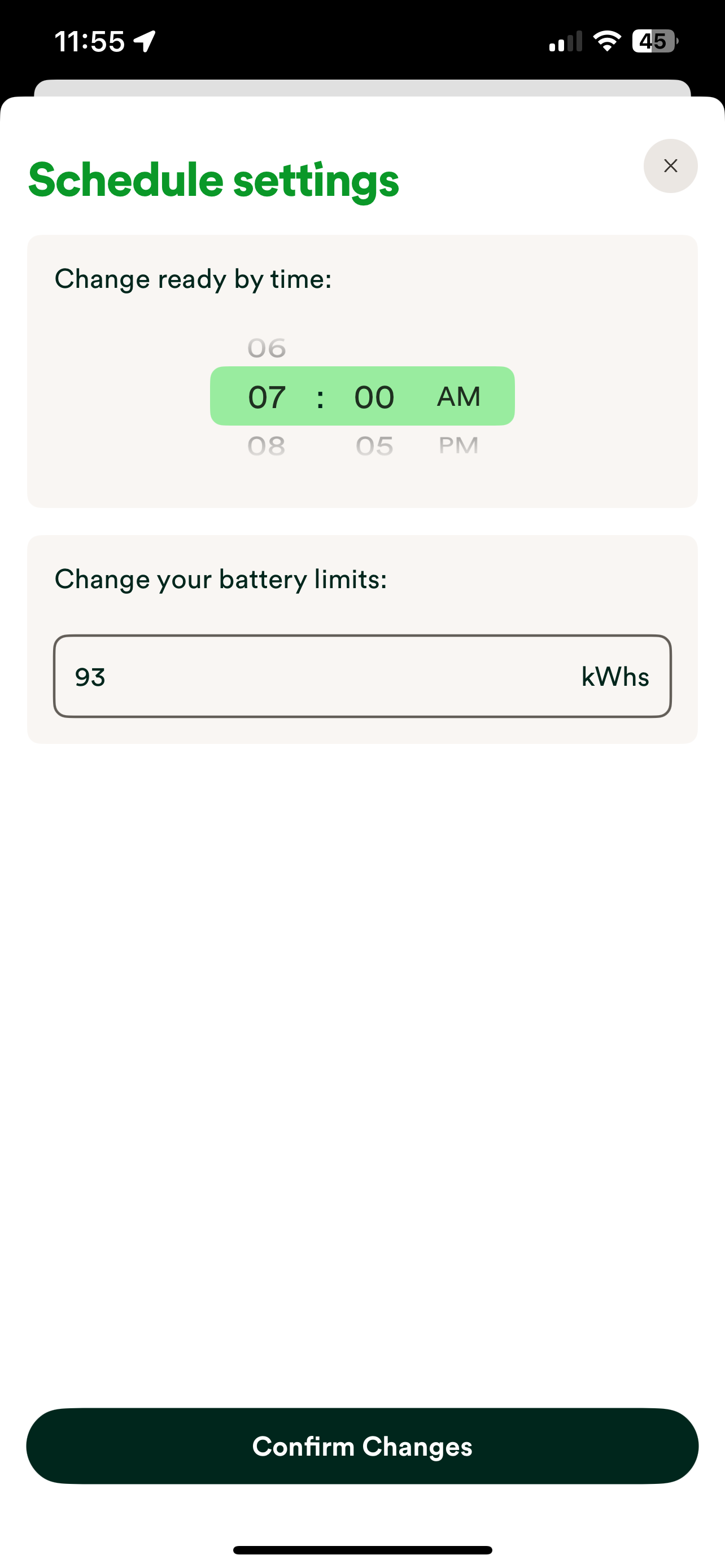
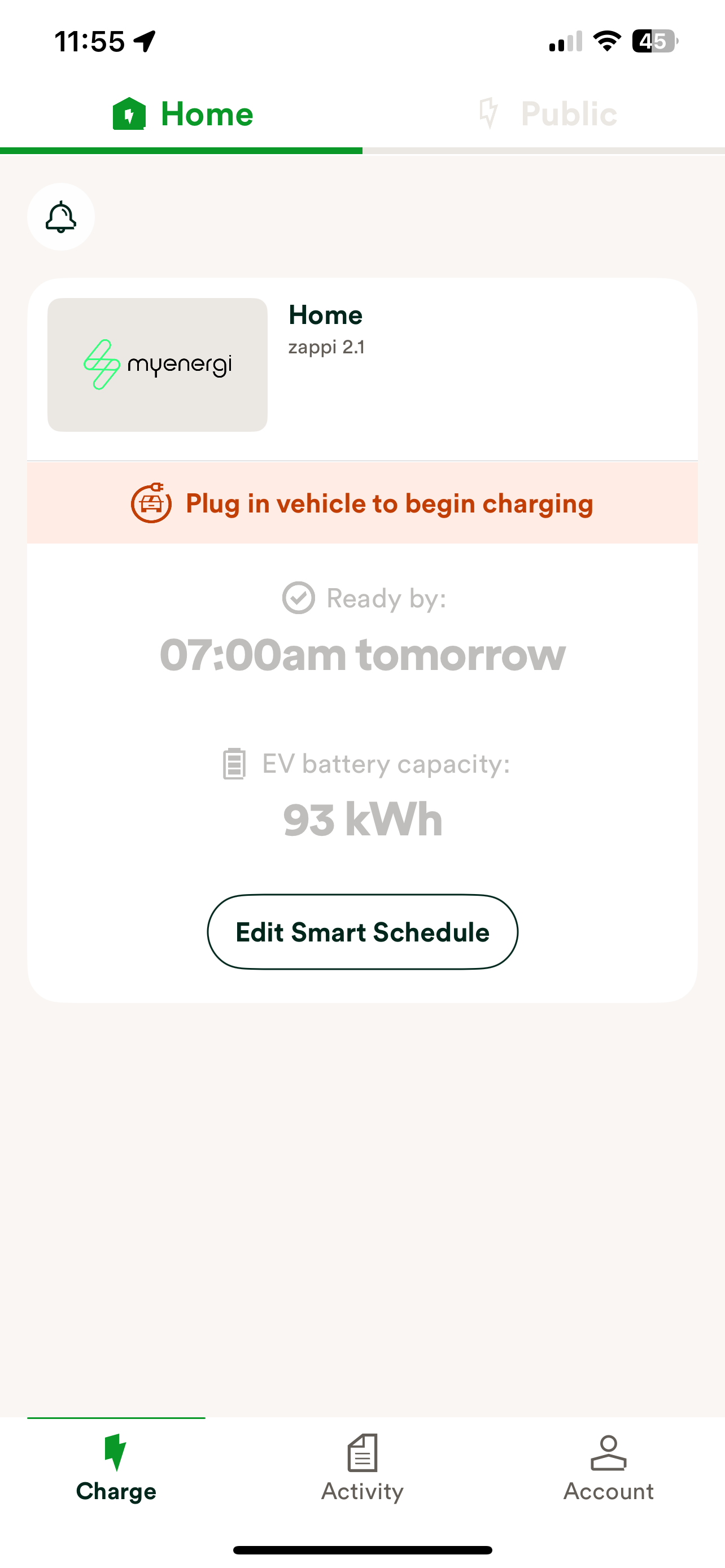
This is what my app shows with the car not connected/plugged in:-

Porsche Taycan New EV owner - Ovo Charge Anytime and wall charger help!!!??? OWzRVeH


Porsche Taycan New EV owner - Ovo Charge Anytime and wall charger help!!!??? eZXNJzt


Dabz

Well-Known Member
First Name
James
Joined
Jun 21, 2022
Threads
34
Messages
878
Reaction score
918
Location
UK
Vehicles
J1.1 4S
Country flag
That's very different to my screenshots - though perhaps that's how the Zappi works? My charger (a GivEnergy one) isn't specifically supported by OVO so I know Charge Anytime does everything via the car not via the charger itself
 
OP
OP
Tango22

Tango22

Well-Known Member
Joined
Jul 29, 2025
Threads
7
Messages
94
Reaction score
42
Location
Scotland UK
Vehicles
2024 Taycan GTS ST, 2019 McLaren 570S
Country flag
@Dabz

Is that the newer Ovo Charge app those screenshots are taken from? Mine doesn't show my car (like yours does) it only shows my charger. I add a car under the 'Devices' tab and it appears to have added it, but then when I go back to 'Charge' it only shows my charger?

If I remove the car and try adding again, sometimes it appears to add the vehicle but if you go back to the 'Charge' screen an error message pops up saying 'We couldn't load your car details'

So confusing!!! I was ecstatic to get the wall charger installed yesterday, but at the moment I feel like just going back to the Porsche mobile charger!!! :headbang:
 

Dabz

Well-Known Member
First Name
James
Joined
Jun 21, 2022
Threads
34
Messages
878
Reaction score
918
Location
UK
Vehicles
J1.1 4S
Country flag
Yeh those screenshots were taken as I was posting up earlier using the new app that I downloaded this morning. It sounds to me like the system is focusing on controlling your charger rather than the car itself.

Hang in there - when I had my charger I felt exactly the same and wished I'd stuck with the Porsche mobile charger. After some teething issues it all got sorted!


OP
OP
Tango22

Tango22

Well-Known Member
Joined
Jul 29, 2025
Threads
7
Messages
94
Reaction score
42
Location
Scotland UK
Vehicles
2024 Taycan GTS ST, 2019 McLaren 570S
Country flag
Some progress - Not sure why there aren't any options within anywhere in the OVO Charge app to allow you to set min/max battery levels (for me at least) but I set up a new charging profile in the My Porsche app and called it '80', setting the max battery charge at 80%. Activated that by sending it to the car, then charged it using the Zappi with the OVO Charge app.

It got to 80% and both the OVO and Porsche apps informed me that charging was complete.

Now just need to find out why the OVO Charge Anytime system started charging immediately earlier this afternoon despite me telling it I didn't need the car to be ready until 1100AM tomorrow.
 

Dabz

Well-Known Member
First Name
James
Joined
Jun 21, 2022
Threads
34
Messages
878
Reaction score
918
Location
UK
Vehicles
J1.1 4S
Country flag
Some progress - Not sure why there aren't any options within anywhere in the OVO Charge app to allow you to set min/max battery levels (for me at least) but I set up a new charging profile in the My Porsche app and called it '80', setting the max battery charge at 80%. Activated that by sending it to the car, then charged it using the Zappi with the OVO Charge app.

It got to 80% and both the OVO and Porsche apps informed me that charging was complete.

Now just need to find out why the OVO Charge Anytime system started charging immediately earlier this afternoon despite me telling it I didn't need the car to be ready until 1100AM tomorrow.
Sometimes it starts earlier because the whole point is that it'll choose when the grid is greenest or under less load. So it won't always charge in the run up to your departure time, it'll pick and choose when to start and stop the entire time it's plugged in.
 

BigBob

Well-Known Member
First Name
Rob
Joined
Nov 27, 2021
Threads
46
Messages
1,959
Reaction score
1,533
Location
London
Vehicles
Taycan CT 4S, Range Rover Sport
Country flag
This is a bit of a guess. But i think most (well me anyway) have charge anytime set up direct to the car. It kind of integrates direct with the car through some software called Kazula. Hence we can see the car in our home page rather than the EVSE (charger).

Again it's a guess but perhaps as your charge anytime is only to the charger, you can't set min/max charge levels for the car - or perhaps you have to use the car's own charging profiles to get it to do what you want. If so that's a bit of a kerfuffle.

My suggestion is to ditch the link to your zappi and reset it up to face the car direct. If you've a couple of EVs maybe that's an imperfect solution for you though.

@Dabz - re your missing 'charge now button'. I think it's called 'emergency charge' now and the button appears near the bottom of the screen you screenshotted - but perhaps car needs to be plugged in for it to appear. I don't see it right now, my car is unplugged.
 
OP
OP
Tango22

Tango22

Well-Known Member
Joined
Jul 29, 2025
Threads
7
Messages
94
Reaction score
42
Location
Scotland UK
Vehicles
2024 Taycan GTS ST, 2019 McLaren 570S
Country flag
This is a bit of a guess. But i think most (well me anyway) have charge anytime set up direct to the car. It kind of integrates direct with the car through some software called Kazula. Hence we can see the car in our home page rather than the EVSE (charger).

Again it's a guess but perhaps as your charge anytime is only to the charger, you can't set min/max charge levels for the car - or perhaps you have to use the car's own charging profiles to get it to do what you want. If so that's a bit of a kerfuffle.

My suggestion is to ditch the link to your zappi and reset it up to face the car direct. If you've a couple of EVs maybe that's an imperfect solution for you though.

@Dabz - re your missing 'charge now button'. I think it's called 'emergency charge' now and the button appears near the bottom of the screen you screenshotted - but perhaps car needs to be plugged in for it to appear. I don't see it right now, my car is unplugged.
You are absolutely spot on - it appears the OVO engineer has set up my charger to be integrated with OVO and not my car to be integrated with it. That explains why I can only see the charger listed in the app, under devices my car is listed but not on the main screen, as you said.

To be honest, as long as it all works as it should I'll see how I get on with it set up this way over the next couple of months. It does mean that the charging process and indeed the charger functionality is entirely managed by Ovo (hence the MNGD function showing on the Zappa's screen) so I can't switch modes between Eco, Boost etc but again, as long as it works as it should then I'm okay with that.

I had no idea that there were two ways to integrate everything, just assumed it would be the car that was integrated. Zappi chargers as far as I understand, have only fairly recently been officially compatible with Ovo CA so maybe that's just the default way that engineers install them now.
 

f1eng

Well-Known Member
First Name
Frank
Joined
Aug 19, 2021
Threads
48
Messages
4,765
Reaction score
8,335
Location
Oxfordshire, UK
Vehicles
Taycan CT4S, Ferrari 355, Merc 500E, Prius PHV
Country flag
However, I had a Zappi 2.1 wall charger fitted yesterday by Ovo. The engineer set up my Charge Anytime app and the MyEnergi app. Then we noticed that within the CA app, it said it was being discontinued and recommended using the new Ovo Charge app. So we I downloaded that and set it up.
I use charge anytime but don't have a smart charger so it is entirely using the App and direct link to Porsche, presumably via its communication, and my smart meter.

I am a bit concerned over the new app since I downloaded it but it failed to log on using my normal log-on so I didn't bother to use it and have continued with the old app.
I hate software changes often what is advertised as an "upgrade" is a functional downgrade or something which works differently so is just inconvenient compared to no change...
 

BigBob

Well-Known Member
First Name
Rob
Joined
Nov 27, 2021
Threads
46
Messages
1,959
Reaction score
1,533
Location
London
Vehicles
Taycan CT 4S, Range Rover Sport
Country flag
I use charge anytime but don't have a smart charger so it is entirely using the App and direct link to Porsche, presumably via its communication, and my smart meter.

I am a bit concerned over the new app since I downloaded it but it failed to log on using my normal log-on so I didn't bother to use it and have continued with the old app.
I hate software changes often what is advertised as an "upgrade" is a functional downgrade or something which works differently so is just inconvenient compared to no change...
I think you have to set it up as a new app, with a new password etc. but you do need to know the username and password for your main Ovo electricity account which it asks for during the set up process.
 

Rossmeldr

Well-Known Member
First Name
Ross
Joined
Nov 29, 2023
Threads
0
Messages
47
Reaction score
43
Location
Uk
Vehicles
Taycan 4s sport tourismo
Country flag
There are two ways to control charge anytime, via your car, or via the charger if compatible. If both are, then the preferred method is to control the charger. In this case, set your max charge level via the porsche app (or in your car directly) using a simple profile. The charger can't interrogate your car to ascertain the charge level, so it tends to assume it needs to fully charge and starts the process earlier. Simply set your ready by time in the app, and plug in.
You may initially get a charge error message from your car if the charger doesn't want to supply electricity when you first plug in, but I've never had it fail to charge once the app decides it's time to start charging.
The benefit of connecting the app to your charger is that the connection to my charger at least is a lot more reliable than porsche connect!
Sponsored


Top