Sponsored

Driving Assistance - Where is Traffic Jam assist?

SergeyIndy

Well-Known Member
First Name
Sergey
Joined
Dec 19, 2021
Threads
41
Messages
2,439
Reaction score
1,822
Location
Indianapolis
Vehicles
24 Macan GTS, 23 Taycan Turbo, 20 Cayenne Turbo
Country flag
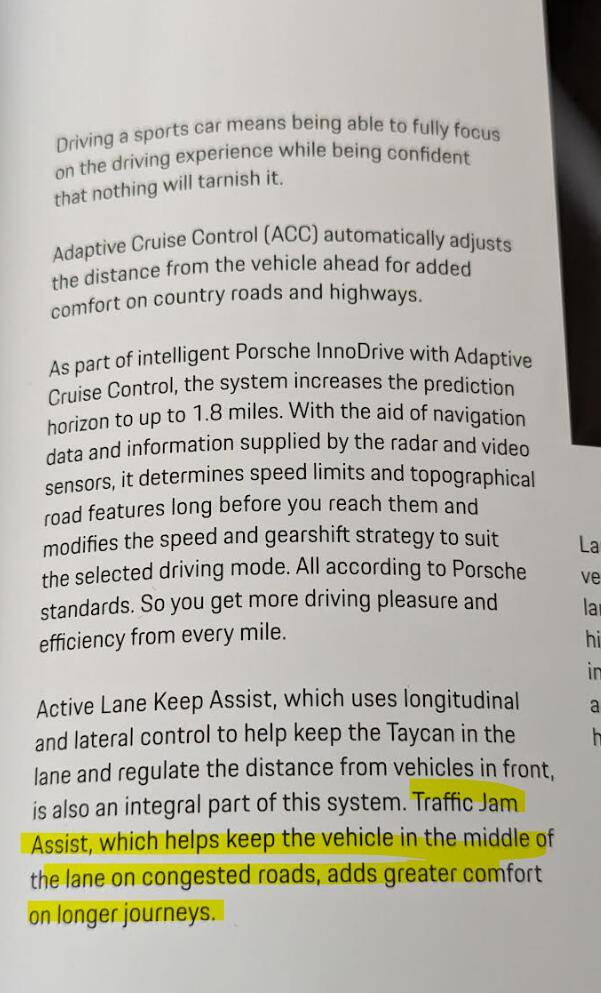
I am new and I have optioned all Assistance systems, so I have Active LKA, ACC, and PID, however, I am having a hard time figuring out if I have and how to detect presence and operation of the Traffic Jam assist or equivalent since it is mentioned on the Brochure (in the same paragraph as Active LKA) but not mentioned in the Manual and no evidence of it in the PCM screens. ACC and PID both state in the Operating Principle that they only work at 19mph+ speeds. For example, new Macans now have ACC as standard in the US but Traffic Jam is called out as such and a standalone extra cost option with clear description how it works at low speeds with ACC.

Taycan Printed Brochure: Page 31
Porsche Taycan Driving Assistance - Where is Traffic Jam assist? 1693323324487


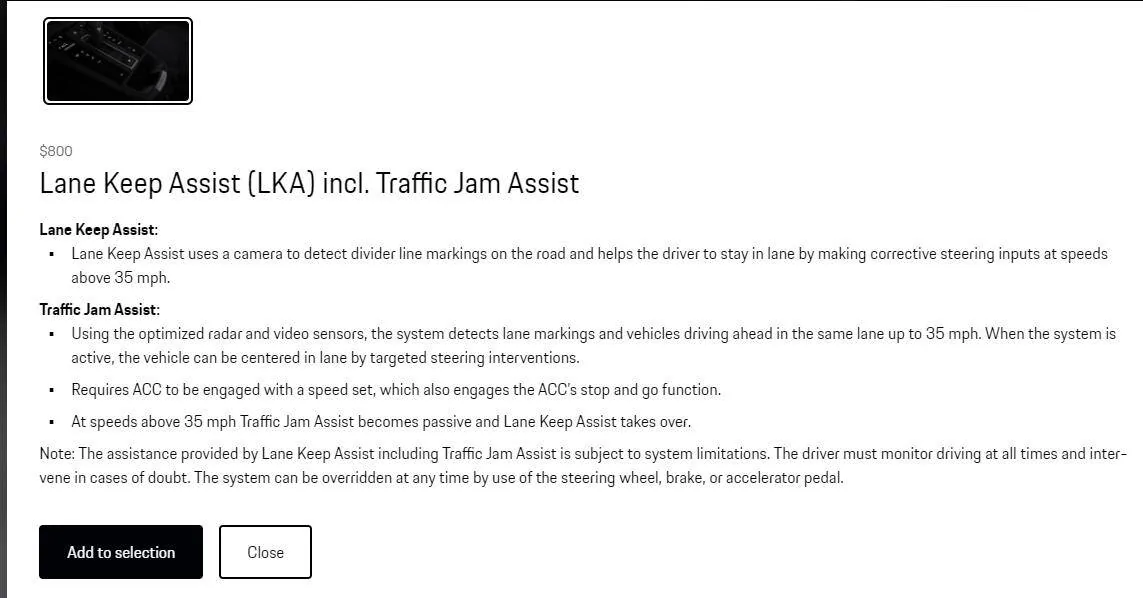
Macan Option that clearly states how Traffic Jam assists works with LKA and ACC:

Porsche Taycan Driving Assistance - Where is Traffic Jam assist? 1693324778235
Sponsored

 
Last edited:
OP
OP
SergeyIndy

SergeyIndy

Well-Known Member
First Name
Sergey
Joined
Dec 19, 2021
Threads
41
Messages
2,439
Reaction score
1,822
Location
Indianapolis
Vehicles
24 Macan GTS, 23 Taycan Turbo, 20 Cayenne Turbo
Country flag
I was hoping for real world use inputs from someone who is using ALK in traffic jam scenario (speeds below operating limits of ACC/PID) to confirm that the car is basically driving itself (keeps itself in the lane) with no inputs from the driver (gas/brake). I am avoiding those conditions for now, so my intent was to learn from someone else how it works before I try it myself.

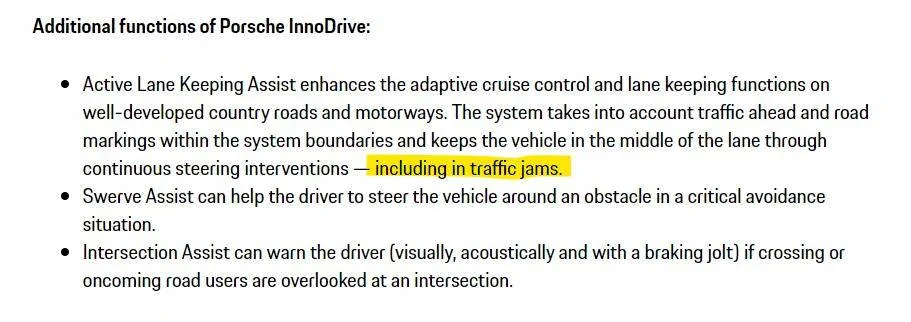
I found this info that indicates that Traffic Jam is not a standalone feature like in Macan but just part of the ALK when ACC is On.

https://media.porsche.com/mediakit/taycan/en/porsche-taycan/die-assistenzsysteme

Porsche Taycan Driving Assistance - Where is Traffic Jam assist? 1693498542686
 

schad

Well-Known Member
Joined
May 18, 2021
Threads
3
Messages
240
Reaction score
233
Location
Northeast
Vehicles
Taycan 4S, e-tron
Country flag
ACC definitely works all the way down to a complete stop, and if you are only stopped for a few seconds, it will also start you right back up again. If you are stopped more than a few seconds, you have to touch the throttle briefly to resume ACC.

ALK normally requires some steering input every few seconds or it will eventually disengage. I stopped paying for ALK when I stopped having a daily commute, so my memory here is a little foggy. But I seem to remember that in very low speed stop-and-go traffic, you don't have to do anything but occasionally touch the throttle.

The biggest hazard of ALK is that there is no clear indication when it loses the lane markers. It just stops steering. I don't know if it happens more often in traffic or if it's just less noticeable, but I had a couple occasions of suddenly realizing that the car was going but not steering any more.
 

JustWatching

Well-Known Member
Joined
Jan 31, 2022
Threads
10
Messages
199
Reaction score
286
Location
USA
Vehicles
Taycan 4S (April '22)
Country flag
I have PID. I used it on the Mass Turnpike in stop and go traffic for a few months. Not doing that commute anymore. It worked well. Definitely stays in the lane, stops and starts. If you come to a full stop for less than 15 seconds I will restart on its own, if it is more you will need to tap the accelerator.

I can't remember if at low speeds it nudges you to hold the steering wheel or not.

I used to have a Mercedes when I was doing that MA Turnpike commute and the the driving assistance made a huge difference which is why went with Innodrive. It is definitely very helpful in stop and go traffic.


BRZtoTaycan

Well-Known Member
Joined
Mar 22, 2023
Threads
2
Messages
45
Reaction score
34
Location
California
Vehicles
BRZ =>Taycan (RWD)
Country flag
I only purchased ALK after getting my car. It works really well on highways and in the city. The only thing I need to worry is if the car cannot read the lines, it will disengage auto steering without telling you.

ACC alone does not support traffic jam assist.
 

Caraholic

Well-Known Member
First Name
Don
Joined
Apr 12, 2021
Threads
10
Messages
844
Reaction score
555
Location
South Carolina
Vehicles
Taycan Turbo S, FL5 Type R, 392XR JL, F430, Cayman S
Country flag
I have PID. I used it on the Mass Turnpike in stop and go traffic for a few months. Not doing that commute anymore. It worked well. Definitely stays in the lane, stops and starts. If you come to a full stop for less than 15 seconds I will restart on its own, if it is more you will need to tap the accelerator.

I can't remember if at low speeds it nudges you to hold the steering wheel or not.

I used to have a Mercedes when I was doing that MA Turnpike commute and the the driving assistance made a huge difference which is why went with Innodrive. It is definitely very helpful in stop and go traffic.
correct it works very well in stop and go traffic your set speed just has to be greater then 19mph. So if you have it set an 55 for the highway it will still automatically operate in the 1-2 mph range in traffic. One thing to add is you don’t have to hit the accelerator if the car has been sitting if the car is stuck on hold. I found it much easier and more convenient just to tap the cruise control stalk up (resume) for it to go again.
 
OP
OP
SergeyIndy

SergeyIndy

Well-Known Member
First Name
Sergey
Joined
Dec 19, 2021
Threads
41
Messages
2,439
Reaction score
1,822
Location
Indianapolis
Vehicles
24 Macan GTS, 23 Taycan Turbo, 20 Cayenne Turbo
Country flag
correct it works very well in stop and go traffic your set speed just has to be greater then 19mph. So if you have it set an 55 for the highway it will still automatically operate in the 1-2 mph range in traffic. One thing to add is you don’t have to hit the accelerator if the car has been sitting if the car is stuck on hold. I found it much easier and more convenient just to tap the cruise control stalk up (resume) for it to go again.
Very helpful answers from everyone. Apologies for additional clarification since Taycan is my first car with any Assistance systems so not comfortable using them until understood from the setup and expected behavior.

I understand to simulate this Traffic Jam Assist at speeds below operating speed of ACC, I need to:

1. Assistance Systems are On (left tube showing proximity lines with car icon when it sees one ahead)
2. ACC set speed to 20mph (as an example so it is >19mph operating lower limit of ACC)
3. ALK set to On, since Traffic Jam function is part of this feature and not ACC standalone. The challenge is to see if it is still steering or not from notes, will reference manual one more time for indications of it being active or passive.
4. Then car will drive in stop/go at say 1mph to 5mph and will stop completely when needed and then move forward with traffic, unless more than 15 sec at stop, tap accelerator pedal or tap cruise stalk to Resume direction to get going again.


OP
OP
SergeyIndy

SergeyIndy

Well-Known Member
First Name
Sergey
Joined
Dec 19, 2021
Threads
41
Messages
2,439
Reaction score
1,822
Location
Indianapolis
Vehicles
24 Macan GTS, 23 Taycan Turbo, 20 Cayenne Turbo
Country flag
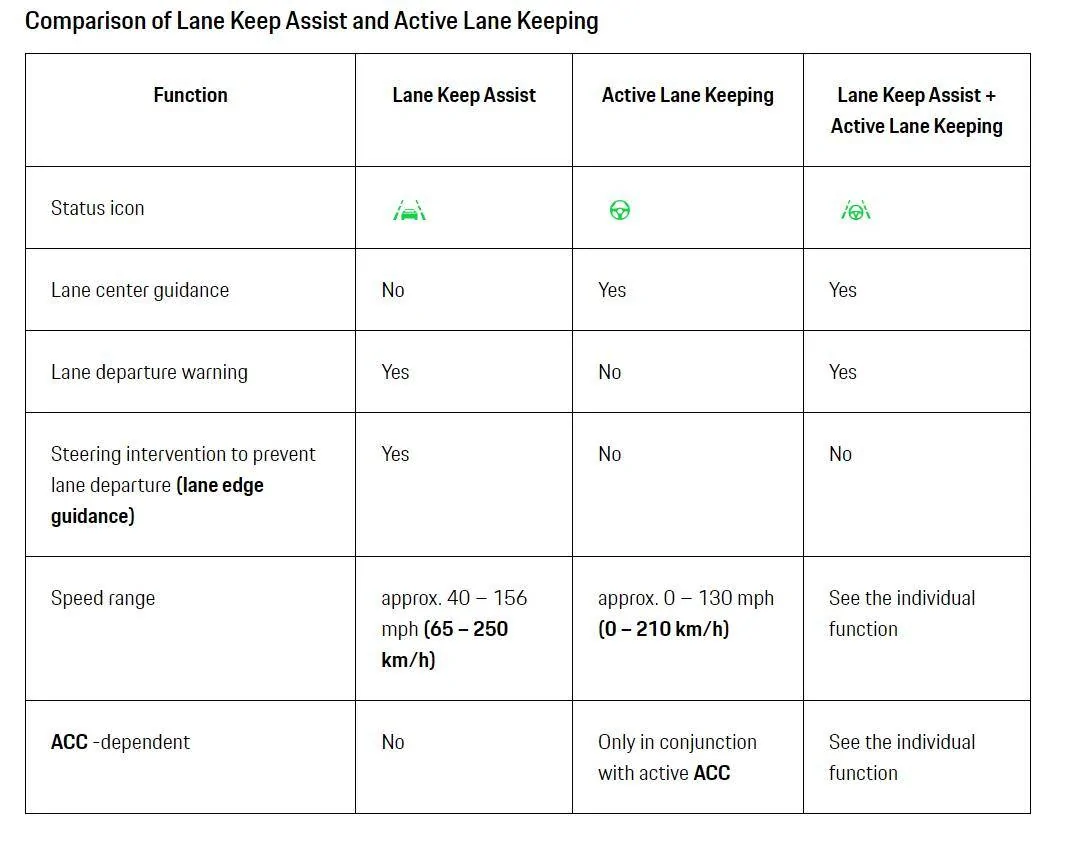
This table explains everything I was looking for in terms of Traffic Jam type function.
ALK is active when the wheel icon is green and passive when grey and ACC must be active.
ALK operates as Traffic Jam given its stated operating speed of 0mph+

Porsche Taycan Driving Assistance - Where is Traffic Jam assist? 1693581884350
 

violuma

Well-Known Member
Joined
Jul 21, 2023
Threads
3
Messages
451
Reaction score
676
Location
San Carlos, CA
Vehicles
2024 RWD
Country flag
This table explains everything I was looking for
Then I'm happy that you have found it, and maybe this is just me, but that table sums up pretty well why I declined all of the "quasi-autonomous" features.

I think they treat the driver like another of their CANbus modules, and I don't think I'd be a very good code module. So I chose several "inform driver" technology features, and zero "assist driver" ones.
 

JustWatching

Well-Known Member
Joined
Jan 31, 2022
Threads
10
Messages
199
Reaction score
286
Location
USA
Vehicles
Taycan 4S (April '22)
Country flag
Very helpful answers from everyone. Apologies for additional clarification since Taycan is my first car with any Assistance systems so not comfortable using them until understood from the setup and expected behavior.

I understand to simulate this Traffic Jam Assist at speeds below operating speed of ACC, I need to:

1. Assistance Systems are On (left tube showing proximity lines with car icon when it sees one ahead)
2. ACC set speed to 20mph (as an example so it is >19mph operating lower limit of ACC)
3. ALK set to On, since Traffic Jam function is part of this feature and not ACC standalone. The challenge is to see if it is still steering or not from notes, will reference manual one more time for indications of it being active or passive.
4. Then car will drive in stop/go at say 1mph to 5mph and will stop completely when needed and then move forward with traffic, unless more than 15 sec at stop, tap accelerator pedal or tap cruise stalk to Resume direction to get going again.

This looks all correct.

Auto Steering definitely happens during Traffic Jam. What I can't remember is how often it tells you to keep your hands on the steering wheel. It definitely does it at high speeds but maybe less often or not at all at lower speeds.

I would set speed to something like 50mph. It helps when traffic does pick up speed a bit more and it will go as slow as it needs to.

As @Caraholic said definitely better to tap the stalk than the accelerator. Stalk disengages the break, the accelerator actually accelerates so it is a jolt (a very small one).

And yes, it takes a a bit of time to trust the system, eventually you will. Even when I switched from the Mercedes where I had been using it for years to the Taycan, it took me a little bit to trust it.

The table you posted is correct but honestly that table makes things look more complicated than they really are.
 

Jonathan S.

Well-Known Member
First Name
Jonathan
Joined
Jan 19, 2023
Threads
43
Messages
2,089
Reaction score
1,908
Location
Amherst MA & Twin Mtn NH
Website
tinyurl.com
Vehicles
'22 4CT, '22 Audi A6 Allroad, '23 BMW i4 M50
Country flag
[...] The table you posted is correct but honestly that table makes things look more complicated than they really are.
I had been studying that page in my user manual so glad my reaction to it was not just me!
Specifically, I'm baffled as to why adding ALK to LKA loses the steering intervention -- seems like adding more ADAS features should increase the level of driving automation, not decrease it?
Or is that idea that ALK should prevent you from needing steering innovation?

So my new-to-me 4CT came with the Technology Package but not PID, which also means no ALK.
I purchased the three-month trial subscription to both PID and ALK -- went smoothly.
The combination of LCA + LKA + ALK = seems good enough, especially since it's not hands-off, so the any drifting and ping-pong'ing does matter that much since you need to have your hands (or at least, a hand) on the steering wheel anyway.

ACC is excellent, and even the auto regen/recup is kind of ADAS too (although not as active as in my wife's i4 M50).

PID though, hmm, probably will not keep it after the three-month trial.
I used it only briefly on a recent road trip b/c it was dropping down to each speed limit.
I'll have to try it again now that I've disabled that aspect.
Sponsored


Top