Sponsored

Can't update Mobile Porsche Charger Connect beyond version 2925

W1NGE

Well-Known Member
First Name
Adrian
Joined
Jan 11, 2021
Threads
53
Messages
11,015
Reaction score
6,805
Location
Aberdeen, Scotland
Vehicles
992.2, ex GTS ST owner, Macan T
Country flag
@Jamesfawcett - I think I'm in the same position as you were at the start of this thread - on v2925, unable to get the PMCC to connect to the internet, and so unable to see charging history in the app..

Were you able to obtain a file with v2934 to apply the update yourself manually?
If so, and if you still have the file, would you mind making it available to me?
I could DM you with either a Onedrive folder to upload to, or give you my email address.

When I try to dowload updates manually. using https://contact.porsche.com/middle-east/_uae_/accessoriesandservice/porscheservice/software-update/
- it cannot find my device serial number. That could be my next problem.

Or another later version
Manual upgrading won't solve your problem as you still have to get your PMCC on line in order to upload charging history otherwise the app won't be able to retrieve it.

No version of the software has impaired connectivity.

If you have a serial number issue then it could be that your PMCC isn't registered and associated with your Porsche ID.

Have you ever had your PMCC connected to the Porsche service?
Sponsored

 

D00notD00d

Well-Known Member
First Name
D00notD00d
Joined
May 17, 2023
Threads
4
Messages
979
Reaction score
605
Location
Newcastle
Vehicles
L461 Range Rover Sport. Gone: Taycan 4s, Cayenne, 911 C4S.
Country flag
@W1NGE See #9 above. I could be wrong but this sounds like my problem.
When I browse the PMCC device it says it has no internet access. That was also discussed on another thread.
There is a feature on the browser app that allows you to do a manual install. I believe that’s what James did above. Afterwards he had ‘cloud’ connectivity and could see charging history in the Porsche app.
That Porsche do not recognise the device serial number could be my next problem, or the update service may be separate. I won’t know if Porsche systems are incoherent until I try. It would not surprise me.
The device was unused when I got the car. One Porsche dealer claimed to have installed an update and had it working late last year but when returned to me the same problem existed (not the first such occurrence). It would be interesting to know when v2925 was released.
A second dealer told me the charging history feature had been withdrawn.

Seeing your thread about the latest version update last week and this one here from James indicates they were wrong.

The network information in the device settings shows its IP address. I can use this to see old charging history via the device browser app, quoting the password supplied with the device papers.

I’ve tried it connected directly to my router with a 192 address and via my Linksys WiFi mesh which uses a 10 address. Neither should make a difference. I’m unable to affect the DNS that the Sky router uses.
I tried to connect it to iPhone and IPad personal hotspots instead but it couldn’t see those.

When using its settings to conduct a sw update the device mislead me by appearing to connect to the internet then saying v2925 is the current version. That’s contradicted by threads here and the information in the device browser app. Its error handling does not work.

I’m not bothered about seeing the charging history in the My Porsche App but I would like to stop the errors that appear on the charger screen whenever I wake it up. They’re a daily reminder of bad design and bad service. If a manual offline update doesn’t achieve that, I’ll just turn off the charger WiFi.
 

W1NGE

Well-Known Member
First Name
Adrian
Joined
Jan 11, 2021
Threads
53
Messages
11,015
Reaction score
6,805
Location
Aberdeen, Scotland
Vehicles
992.2, ex GTS ST owner, Macan T
Country flag
@W1NGE See #9 above. I could be wrong but this sounds like my problem.
When I browse the PMCC device it says it has no internet access. That was also discussed on another thread.
There is a feature on the browser app that allows you to do a manual install. I believe that’s what James did above. Afterwards he had ‘cloud’ connectivity and could see charging history in the Porsche app.
That Porsche do not recognise the device serial number could be my next problem, or the update service may be separate. I won’t know if Porsche systems are incoherent until I try. It would not surprise me.
The device was unused when I got the car. One Porsche dealer claimed to have installed an update and had it working late last year but when returned to me the same problem existed (not the first such occurrence). It would be interesting to know when v2925 was released.
A second dealer told me the charging history feature had been withdrawn.

Seeing your thread about the latest version update last week and this one here from James indicates they were wrong.

The network information in the device settings shows its IP address. I can use this to see old charging history via the device browser app, quoting the password supplied with the device papers.

I’ve tried it connected directly to my router with a 192 address and via my Linksys WiFi mesh which uses a 10 address. Neither should make a difference. I’m unable to affect the DNS that the Sky router uses.
I tried to connect it to iPhone and IPad personal hotspots instead but it couldn’t see those.

When using its settings to conduct a sw update the device mislead me by appearing to connect to the internet then saying v2925 is the current version. That’s contradicted by threads here and the information in the device browser app. Its error handling does not work.

I’m not bothered about seeing the charging history in the My Porsche App but I would like to stop the errors that appear on the charger screen whenever I wake it up. They’re a daily reminder of bad design and bad service. If a manual offline update doesn’t achieve that, I’ll just turn off the charger WiFi.
Most dealers (and Gold Techs) rarely have the knowledge contained on this forum and I'm reasonably certain that there is a reliance on us to 'educate'. Only owners live with their Taycan's daily and have invested time to understand and resolve issues.

I've had my PMCC on line since Nov'20 with auto update set and will have received all updates as and when and so for this reason I don't think v2925 is the root cause of connectivity issues otherwise mine (and many others) would have gone offline when it was released.

I'm pretty sure all PMCC EVSEs get the same software patches and for certain they will within UK / EU. Some questions below and apologies if these have already been answered earlier:
  1. What is the current IP address listed on your PMCC?
  2. When using the PMCC panel and browse for SSIDs - which ones are listed (one should be your Linksys)?
  3. Is this IP address already reserved / in use by another device on your router (Linksys)?
  4. Can use the PMCC web app from a laptop / PC / mobile device when connected to your home network?
  5. Is your primary Porsche ID and password correctly entered in the PMCC (these should match what you have on My Porsche app?
  6. Has your PMCC been paired and registered with the credentials set in 2) above?
  7. Has PLC (networking) been disabled on your PMCC - not needed for connectivity if using WiFi and should be disabled for car to EVSE comms?
  8. The URL mentioned above is for UAE region and not UK - suspect this is the issue with not matching your serial number.
  9. Can you clarify the communication error you are seeing?
  10. Hotspot is only for point to point access and doe not provide a 'bridge' to the internet so not a lot of use other than you can't connect to your wifi router due to range issues etc.
If you have connectivity from your home network to the PMCC then you are halfway there. The connection to the cloud is the final step and this relies on registering your PMCC's serial number with your Porsche ID. It might be worth unpairing and then removing your Porsche ID from the PMCC entirely, reset the PMCC and then go through the process again. I might also be tempted to also try a secondary Porsche ID if the first attempt at reset fails.

I don't think any of the UK / EU updates have been safety related (there was one for NA) but I can't substantiate that but basic bug updates and corrections to prior faux pas (charging history - one minute its there and the next its gone. One of the updates also throttled the PMCC output from a max of 32A to 16A which seemed to impact NA users only.

Also worth reaching out to the OEM of the device (not Porsche) - eSystems MTG GmbH - https://esystems.de/oem-charging-solutions/
 

chun

Well-Known Member
Joined
Feb 4, 2024
Threads
27
Messages
2,339
Reaction score
2,101
Location
Switzerland
Vehicles
Taycan Turbo 2020, Cayman GT4
Country flag
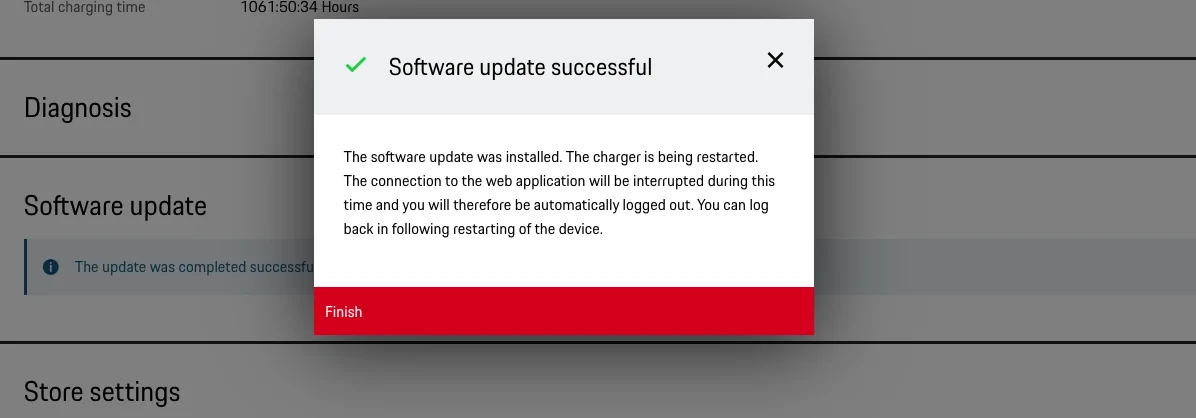
If anyone's interested or comes across this on Google, I had a read through the compiled Javascript errors on my Porsche Charger Connect when trying to update and found the issue. Previous versions of the upgrades must have been in a .bz2 zip compression, the latest one from the Porsche website is a .zip or .tar file.

To resolve, rename your downloaded file from:

update-VR_J1_15.1_2934-009.00062.004-08.09.2021_plasystemd.tar (or .zip)
to
update.bz2

Then It will update :)

Hope I don't regret the upgrade! I'll report back if I spot any differences.

1700861300029.webp
Classic porsche Quality control for software :) They didn't even bother doing it.


daveo4EV

Well-Known Member
First Name
David
Joined
Jan 28, 2019
Threads
192
Messages
7,003
Reaction score
10,473
Location
Santa Cruz
Vehicles
Cayenne Hybrid, 911(s) GT3/Convertable
Country flag
does anyone have the release notes to share for latest version?
 

W1NGE

Well-Known Member
First Name
Adrian
Joined
Jan 11, 2021
Threads
53
Messages
11,015
Reaction score
6,805
Location
Aberdeen, Scotland
Vehicles
992.2, ex GTS ST owner, Macan T
Country flag
does anyone have the release notes to share for latest version?
Nope.

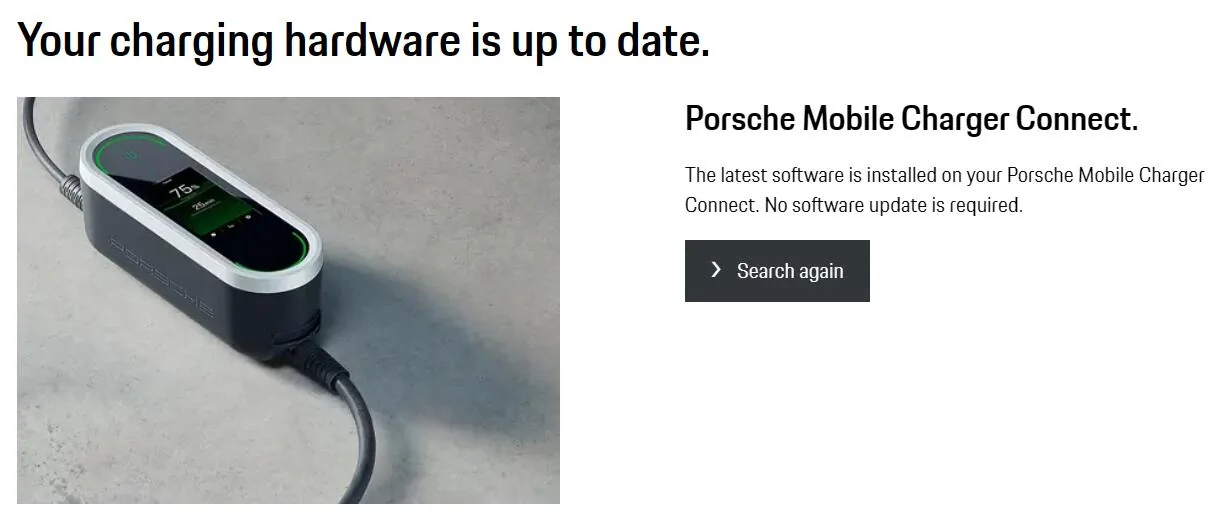
Tried https://contact.porsche.com/international/accessoriesandservice/porscheservice/software-update/ with my serial number which it recognised and confirmed mine is up to date which it is.


Porsche Taycan Can't update Mobile Porsche Charger Connect beyond version 2925 1725203455775-9m


OPs PMCC is a PMCC Model 5 - mine is Model 3. Notice that the URL confirms when I submit my serial number - https://contact.porsche.com/international/accessoriesandservice/porscheservice/software-update/downloads-mobile-charger-connect-3/

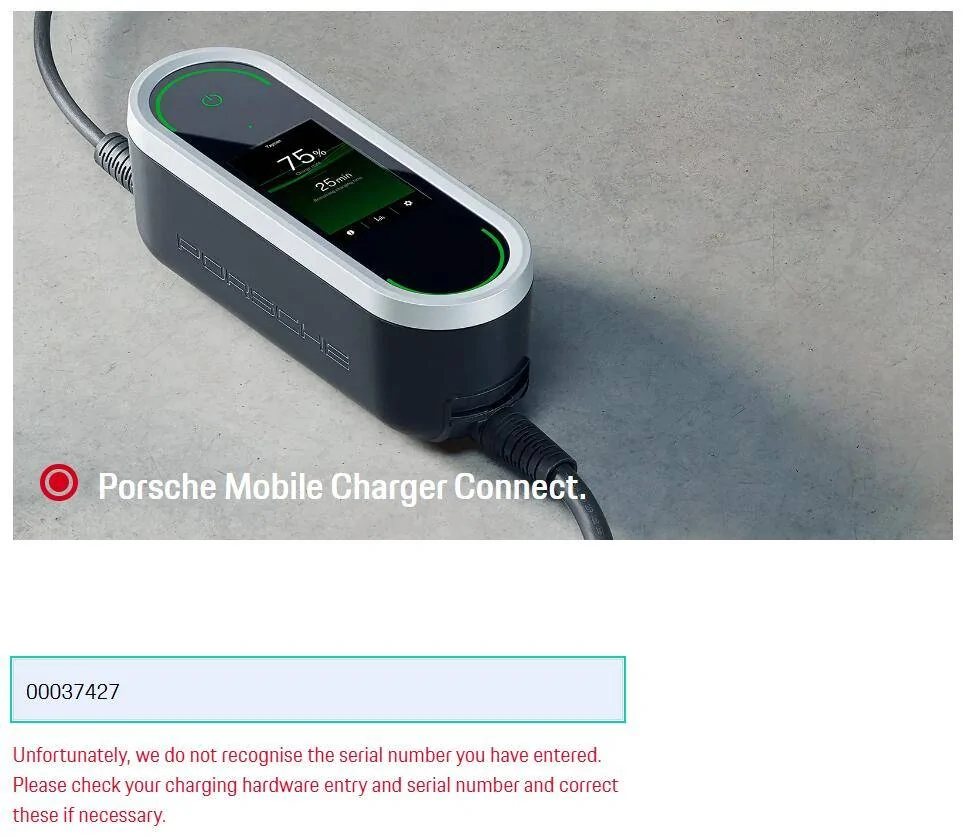
Tried with the OPs serial number - failed but then I noticed it had an extra leading zero. Applying that returned a success but no software update needed.

Feels like this tool isn't reliable or is reliable and the updates are serial number dependent.

No changelog that I can see available.


AndiL

Well-Known Member
First Name
Andreas
Joined
Apr 14, 2021
Threads
0
Messages
262
Reaction score
217
Location
Germany
Vehicles
Taycan 4S, ID. 3
Country flag
I hope the Porsche servers will be updated over the next week. My device now also shows an update, but the website doesn't show it yet. I'll wait with my update until the website provides it. Then the changelog will also be available.

Also, the update files are maintained by Porsche as they also provide it over their (or shared with Audi) servers for download.

But I guess as long someone can be blamed for anything, let's blame someone.

Note: The version 2934 file is named "update-VR_J1_15.1_2934-009.00062.004-08.09.2021_plasystemd.tar.xz". when I downloaded it. So the build was done Sept. 8th 2021. And the file can be used as is for a software update.So I guess the browser renamed the filename and removed the .xz extension. So this wasn't even a problem of the backend!
 
Last edited:

D00notD00d

Well-Known Member
First Name
D00notD00d
Joined
May 17, 2023
Threads
4
Messages
979
Reaction score
605
Location
Newcastle
Vehicles
L461 Range Rover Sport. Gone: Taycan 4s, Cayenne, 911 C4S.
Country flag
@W1NGE Thanks for your terrier like help. I’m very familiar with those characteristics.
Replies to your questions are below. Ideas welcome.

  1. What is the current IP address listed on your PMCC?
  2. When using the PMCC panel and browse for SSIDs - which ones are listed (one should be your Linksys)?
  3. Is this IP address already reserved / in use by another device on your router (Linksys)?
~ Depends on whether I choose to connect to my Sky router SSID or via the Linksys mesh SSID that sits behind it. Addresses 192.168.0.64 or 10.33.1.200 respectively. I can browse to the device using either address. I can see the device on both Linksys and Sky management interfaces. There’s no evidence of any address conflict/duplication.

4. Can use the PMCC web app from a laptop / PC / mobile device when connected to your home network?
~ Yes

5. Is your primary Porsche ID and password correctly entered in the PMCC (these should match what you have on My Porsche app?
6. Has your PMCC been paired and registered with the credentials set in 2) above?

- The design is that PMCC will present a QR code which you can use to associate it with your Porsche credentials - you can’t use the device settings to input those. You can associate the PMCC with your Porsche ID using the local PMCC browser interface. The reported absence of internet access from PMCC prevents both.

7. Has PLC (networking) been disabled on your PMCC - not needed for connectivity if using WiFi and should be disabled for car to EVSE comms?

- Yes. There was once a contradiction whereby the device settings showed PLC off but the browser interface showed it on. I’ve turned it off using the browser but that made no difference. Charging history is being stored on the device,

8. The URL mentioned above is for UAE region and not UK - suspect this is the issue with not matching your serial number.

- Good spot. I hadn’t noticed that. I just found the download page via Google, the full URL wasn’t shown. I found and tried an international equivalent today. https://contact.porsche.com/international/accessoriesandservice/porscheservice/software-update/

This did find my my device serial number 00037427.
It reported an update v2934 was available but also said it had already been downloaded on 13/10/23. The car was with the dealer on that day, the one that told me they had applied the update. When I tried to download it again today the result was an error ‘download link is invalid or has expired’. Hopes dashed.

9. Can you clarify the communication error you are seeing?

- The device reports a restricted operation - server authentication error rather than a communication error. It is unclear if the error handling is accurate. The PMCC says ‘no internet access available’. That could be because authentication hasn’t completed successfully, or it could be a comms error prevented the server being reached.

10. Hotspot is only for point to point access and doe not provide a 'bridge' to the internet so not a lot of use other than you can't connect to your wifi router due to range issues etc.

- I found that out the long way. When mentioning hotspot earlier I was referring to using my phone & Ipad personal hotspot to get internet access via 4/5g, but PMCC couldn’t see either.


if anyone can make the v2934 download available to me I’d be vgrateful.
 
Last edited:

W1NGE

Well-Known Member
First Name
Adrian
Joined
Jan 11, 2021
Threads
53
Messages
11,015
Reaction score
6,805
Location
Aberdeen, Scotland
Vehicles
992.2, ex GTS ST owner, Macan T
Country flag
@W1NGE Thanks for your terrier like help. I’m very familiar with those characteristics.
Replies to your questions are below. Ideas welcome.

  1. What is the current IP address listed on your PMCC?
  2. When using the PMCC panel and browse for SSIDs - which ones are listed (one should be your Linksys)?
  3. Is this IP address already reserved / in use by another device on your router (Linksys)?
~ Depends on whether I choose to connect to my Sky router SSID or via the Linksys mesh SSID that sits behind it. Addresses 192.168.0.64 or 10.33.1.200 respectively. I can browse to the device using either address. I can see the device on both Linksys and Sky management interfaces. There’s no evidence of any address conflict/duplication.

4. Can use the PMCC web app from a laptop / PC / mobile device when connected to your home network?
~ Yes

5. Is your primary Porsche ID and password correctly entered in the PMCC (these should match what you have on My Porsche app?
6. Has your PMCC been paired and registered with the credentials set in 2) above?

- The design is that PMCC will present a QR code which you can use to associate it with your Porsche credentials - you can’t use the device settings to input those. You can associate the PMCC with your Porsche ID using the local PMCC browser interface. The reported absence of internet access from PMCC prevents both.

7. Has PLC (networking) been disabled on your PMCC - not needed for connectivity if using WiFi and should be disabled for car to EVSE comms?

- Yes. There was once a contradiction whereby the device settings showed PLC off but the browser interface showed it on. I’ve turned it off using the browser but that made no difference. Charging history is being stored on the device,

8. The URL mentioned above is for UAE region and not UK - suspect this is the issue with not matching your serial number.

- Good spot. I hadn’t noticed that. I just found the download page via Google, the full URL wasn’t shown. I found and tried an international equivalent today. https://contact.porsche.com/international/accessoriesandservice/porscheservice/software-update/

This did find my my device serial number 00037427.
It reported an update v2934 was available but also said it had already been downloaded on 13/10/23. The car was with the dealer on that day, the one that told me they had applied the update. When I tried to download it again today the result was an error ‘download link is invalid or has expired’. Hopes dashed.

9. Can you clarify the communication error you are seeing?

- The device reports a restricted operation - server authentication error rather than a communication error. It is unclear if the error handling is accurate. The PMCC says ‘no internet access available’. That could be because authentication hasn’t completed successfully, or it could be a comms error prevented the server being reached.

10. Hotspot is only for point to point access and doe not provide a 'bridge' to the internet so not a lot of use other than you can't connect to your wifi router due to range issues etc.

- I found that out the long way. When mentioning hotspot earlier I was referring to using my phone & Ipad personal hotspot to get internet access via 4/5g, but PMCC couldn’t see either.


if anyone can make the v2934 download available to me I’d be vgrateful.
You actually want 3030 as this is the latest and available as of last week.

I'll ponder some more
 

D00notD00d

Well-Known Member
First Name
D00notD00d
Joined
May 17, 2023
Threads
4
Messages
979
Reaction score
605
Location
Newcastle
Vehicles
L461 Range Rover Sport. Gone: Taycan 4s, Cayenne, 911 C4S.
Country flag
You actually want 3030 as this is the latest and available as of last week.
I may need to get to v3030 via incremental instalments?
 

W1NGE

Well-Known Member
First Name
Adrian
Joined
Jan 11, 2021
Threads
53
Messages
11,015
Reaction score
6,805
Location
Aberdeen, Scotland
Vehicles
992.2, ex GTS ST owner, Macan T
Country flag
@W1NGE Thanks for your terrier like help. I’m very familiar with those characteristics.
Replies to your questions are below. Ideas welcome.

  1. What is the current IP address listed on your PMCC?
  2. When using the PMCC panel and browse for SSIDs - which ones are listed (one should be your Linksys)?
  3. Is this IP address already reserved / in use by another device on your router (Linksys)?
~ Depends on whether I choose to connect to my Sky router SSID or via the Linksys mesh SSID that sits behind it. Addresses 192.168.0.64 or 10.33.1.200 respectively. I can browse to the device using either address. I can see the device on both Linksys and Sky management interfaces. There’s no evidence of any address conflict/duplication.

4. Can use the PMCC web app from a laptop / PC / mobile device when connected to your home network?
~ Yes

5. Is your primary Porsche ID and password correctly entered in the PMCC (these should match what you have on My Porsche app?
6. Has your PMCC been paired and registered with the credentials set in 2) above?

- The design is that PMCC will present a QR code which you can use to associate it with your Porsche credentials - you can’t use the device settings to input those. You can associate the PMCC with your Porsche ID using the local PMCC browser interface. The reported absence of internet access from PMCC prevents both.

7. Has PLC (networking) been disabled on your PMCC - not needed for connectivity if using WiFi and should be disabled for car to EVSE comms?

- Yes. There was once a contradiction whereby the device settings showed PLC off but the browser interface showed it on. I’ve turned it off using the browser but that made no difference. Charging history is being stored on the device,

8. The URL mentioned above is for UAE region and not UK - suspect this is the issue with not matching your serial number.

- Good spot. I hadn’t noticed that. I just found the download page via Google, the full URL wasn’t shown. I found and tried an international equivalent today. https://contact.porsche.com/international/accessoriesandservice/porscheservice/software-update/

This did find my my device serial number 00037427.
It reported an update v2934 was available but also said it had already been downloaded on 13/10/23. The car was with the dealer on that day, the one that told me they had applied the update. When I tried to download it again today the result was an error ‘download link is invalid or has expired’. Hopes dashed.

9. Can you clarify the communication error you are seeing?

- The device reports a restricted operation - server authentication error rather than a communication error. It is unclear if the error handling is accurate. The PMCC says ‘no internet access available’. That could be because authentication hasn’t completed successfully, or it could be a comms error prevented the server being reached.

10. Hotspot is only for point to point access and doe not provide a 'bridge' to the internet so not a lot of use other than you can't connect to your wifi router due to range issues etc.

- I found that out the long way. When mentioning hotspot earlier I was referring to using my phone & Ipad personal hotspot to get internet access via 4/5g, but PMCC couldn’t see either.


if anyone can make the v2934 download available to me I’d be vgrateful.
I tried your SN on the website and I got the following error

Porsche Taycan Can't update Mobile Porsche Charger Connect beyond version 2925 1725265909619-7


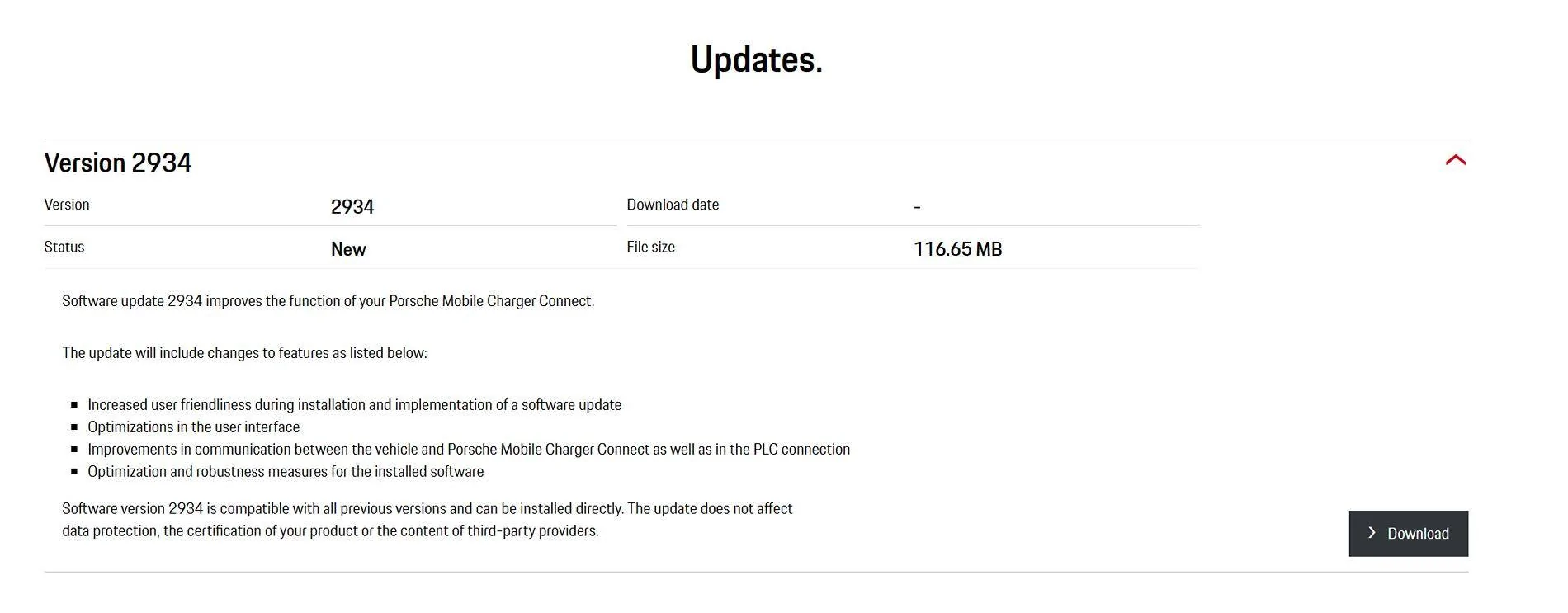
I then dropped the first leading zero and got:

Porsche Taycan Can't update Mobile Porsche Charger Connect beyond version 2925 1725266077443-l6


I have placed a copy of the software here:

PMCC 2934

Porsche Taycan Can't update Mobile Porsche Charger Connect beyond version 2925 1725266420502-ri
Sponsored


Top