Sponsored

My PCM got wiped at service center- can't set maximum charge% any more?

bluegrassvroom

Well-Known Member
First Name
Neil
Joined
Jan 18, 2022
Threads
24
Messages
151
Reaction score
108
Location
Kentucky, USA
Vehicles
2021 taycan 4s
Country flag
I had everything wiped in the PCM (bitches didn't warn me) when I had service done

Lost everything from garage door codes, gps locations of car auto raising, radio presets (so what I'm old)

It lost my charging profiles too.

Anyway- I am not finding the MAX% CHARGE any more when I set up a charging profile. I used to set it at 85% - but that setting simply isn't there

Any ideas? I've done this before- it was like there used to be an extra setting that's simply unavailable now

Porsche Taycan My PCM got wiped at service center- can't set maximum charge% any more? imag


Porsche Taycan My PCM got wiped at service center- can't set maximum charge% any more? imag
Sponsored


chun

Well-Known Member
Joined
Feb 4, 2024
Threads
27
Messages
2,339
Reaction score
2,101
Location
Switzerland
Vehicles
Taycan Turbo 2020, Cayman GT4
Country flag
Minimum charge is set by profile. Aka, when you plug in a charger, if you are below x% minimum charge, it will start charging right away until you reach that x%.

Maximum charging is set from the timer tab. You set a timer and a charging y%. So the battery will start charging just at the right time to reach y%. It needs to be set for all days of the week, otherwise, for days in which it is not set, it will just charge to the minimum set under profile.

My setup:
Profile - 35% with charging betwenn 00:00-7:00AM
Timer - every day ready for departure at 7:30 AM, Repeat turned on, charging turned on with a limit of 80%

That way, if i plug my battery at 6PM and it's below 35%, it will charge straight away to 35% and then it will stop until 00:00. At 00:00 it will start again to charge until 80% so the car is ready by 7:30 AM - usually it starts charging at like 3AM, because it only needs like 4hours for 35% to 80%.
 

SergeyIndy

Well-Known Member
First Name
Sergey
Joined
Dec 19, 2021
Threads
41
Messages
2,439
Reaction score
1,822
Location
Indianapolis
Vehicles
24 Macan GTS, 23 Taycan Turbo, 20 Cayenne Turbo
Country flag
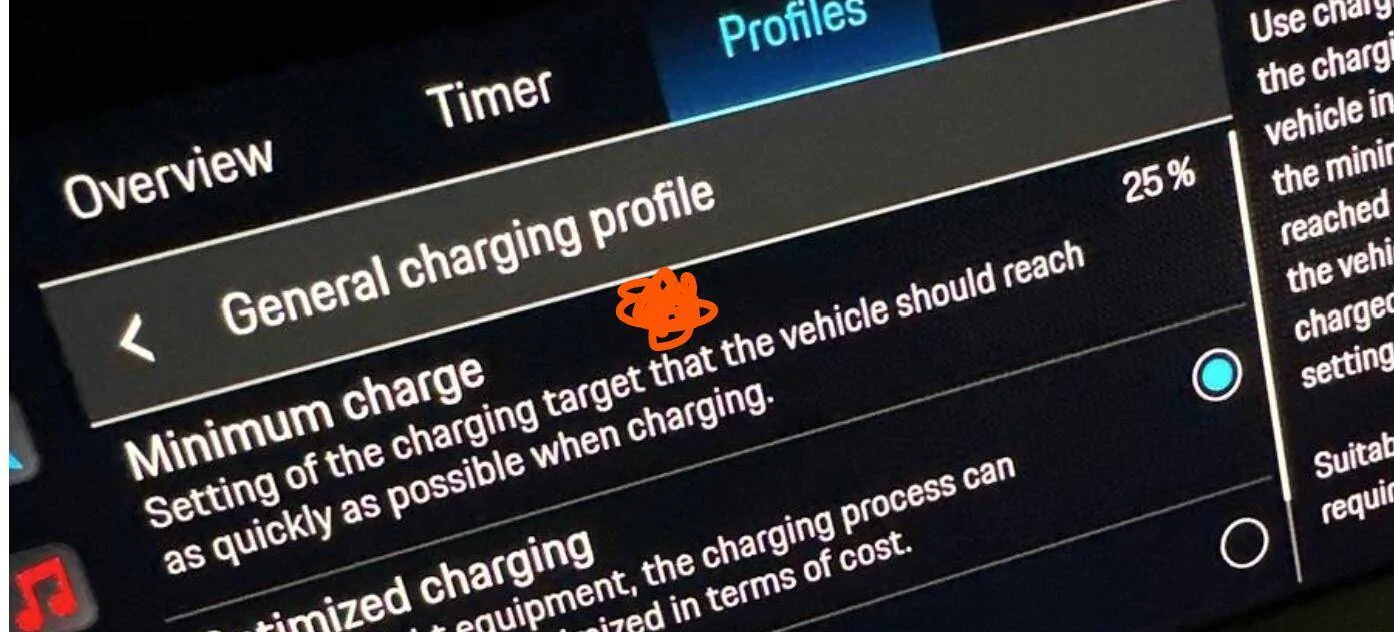
Press here (orange scribble) to get to the screen where you can setup 85% using Profile which would be value at which it will stop charging.

Porsche Taycan My PCM got wiped at service center- can't set maximum charge% any more? 1738715453026-7j


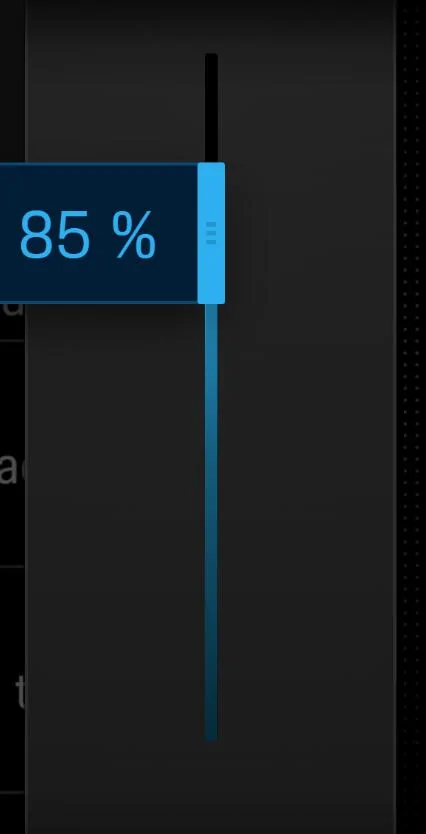
After you press, you should see a slider like this:

Porsche Taycan My PCM got wiped at service center- can't set maximum charge% any more? 1738715516293-3t
 

W1NGE

Well-Known Member
First Name
Adrian
Joined
Jan 11, 2021
Threads
53
Messages
11,015
Reaction score
6,805
Location
Aberdeen, Scotland
Vehicles
992.2, ex GTS ST owner, Macan T
Country flag
I had everything wiped in the PCM (bitches didn't warn me) when I had service done

Lost everything from garage door codes, gps locations of car auto raising, radio presets (so what I'm old)

It lost my charging profiles too.

Anyway- I am not finding the MAX% CHARGE any more when I set up a charging profile. I used to set it at 85% - but that setting simply isn't there

Any ideas? I've done this before- it was like there used to be an extra setting that's simply unavailable now
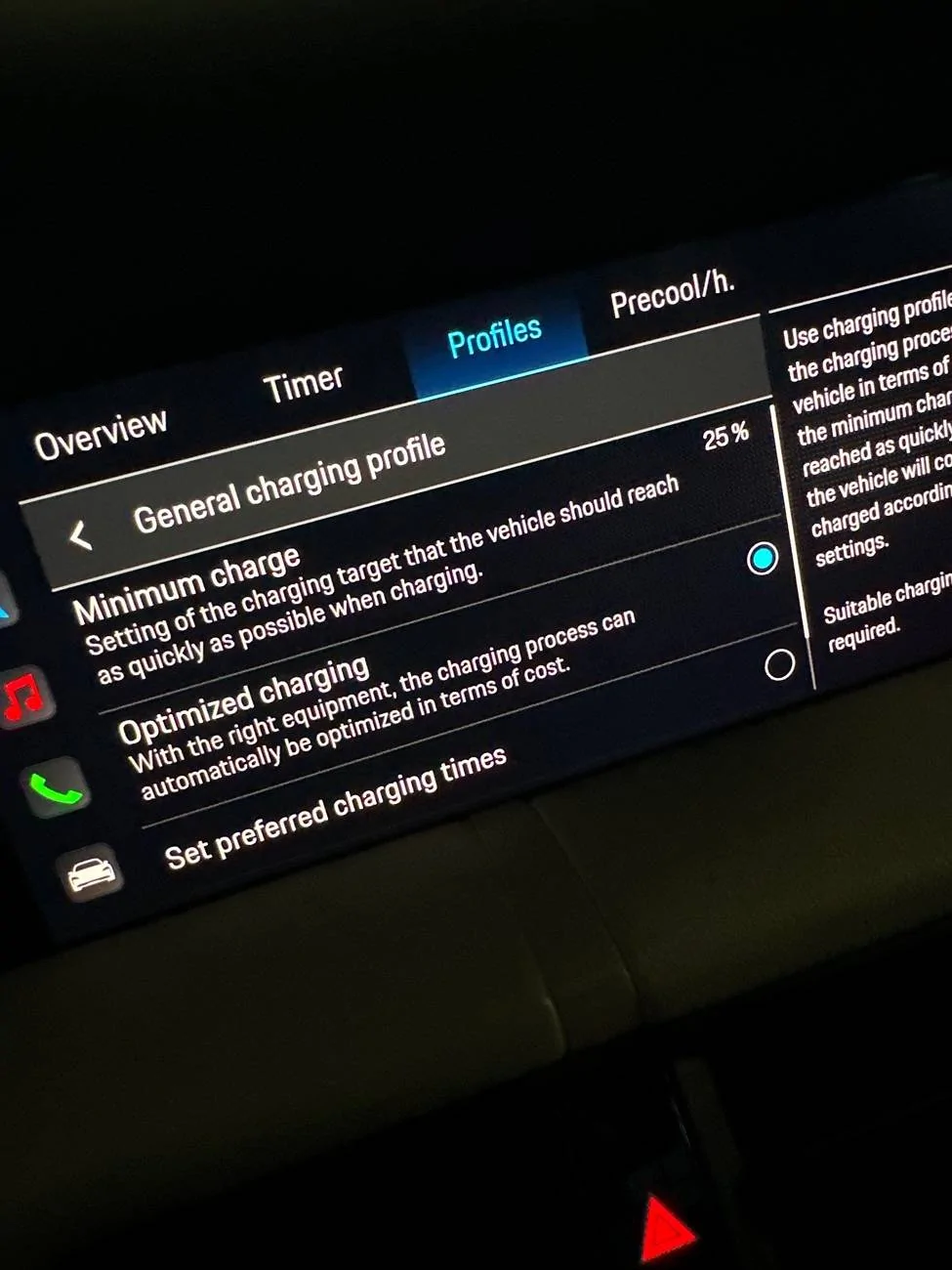
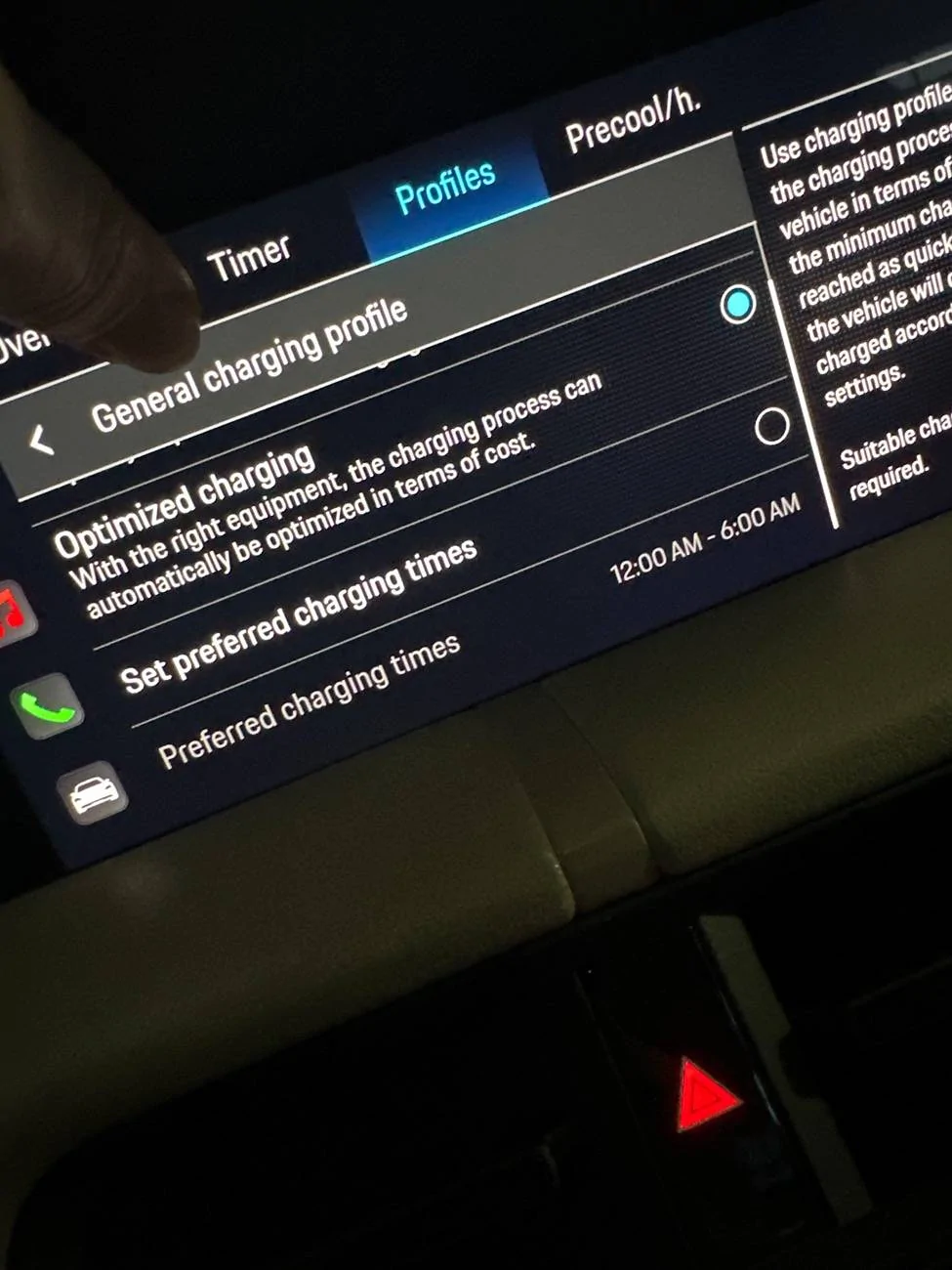
image.jpg


image.jpg
There is no max charge setting (never had been) - i think you mean minimum which you then set to be what you want, 80% in your case.
 
OP
OP
bluegrassvroom

bluegrassvroom

Well-Known Member
First Name
Neil
Joined
Jan 18, 2022
Threads
24
Messages
151
Reaction score
108
Location
Kentucky, USA
Vehicles
2021 taycan 4s
Country flag
Ok - thanks. I do remember setting this up originally years ago there being a disconnect between "maximum" and "minimum".
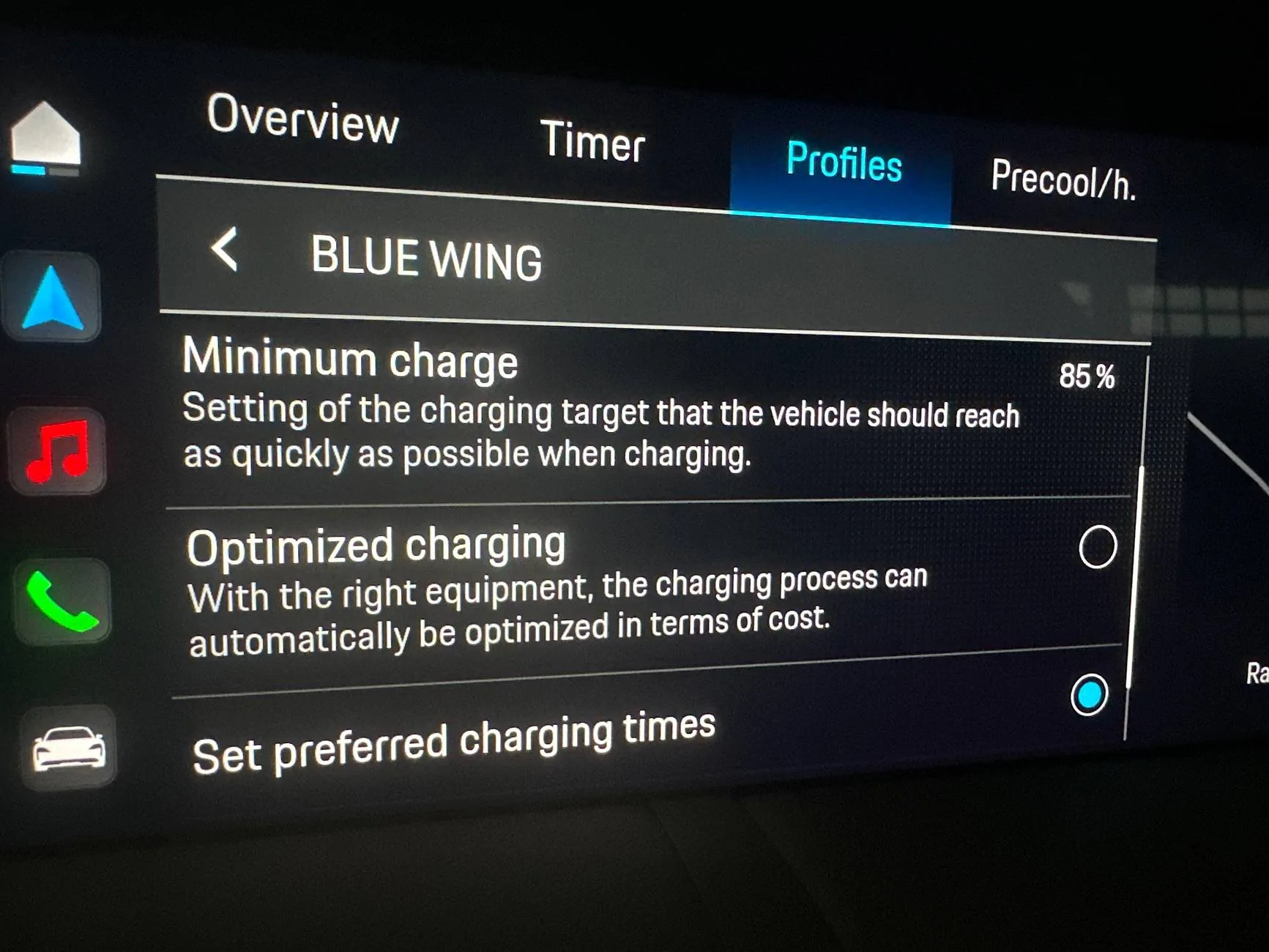
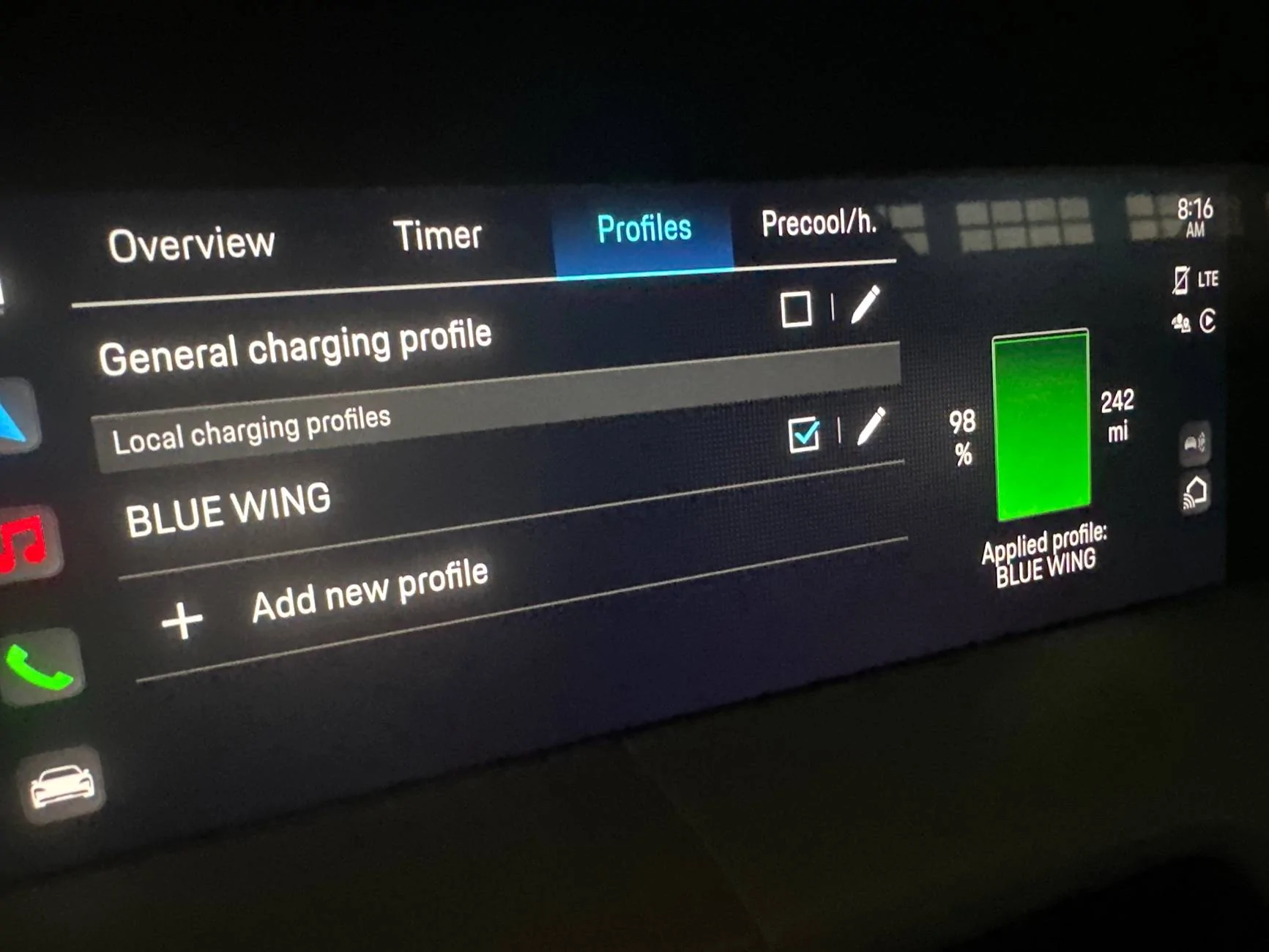
I changed the slider- still got 99% charge...


Porsche Taycan My PCM got wiped at service center- can't set maximum charge% any more? imag


Add that's the active profile

Porsche Taycan My PCM got wiped at service center- can't set maximum charge% any more? imag


Press here (orange scribble) to get to the screen where you can setup 85% using Profile which would be value at which it will stop charging.


After you press, you should see a slider like this:


W1NGE

Well-Known Member
First Name
Adrian
Joined
Jan 11, 2021
Threads
53
Messages
11,015
Reaction score
6,805
Location
Aberdeen, Scotland
Vehicles
992.2, ex GTS ST owner, Macan T
Country flag
Ok - thanks. I do remember setting this up originally years ago there being a disconnect between "maximum" and "minimum".
I changed the slider- still got 99% charge...


image.jpg


Add that's the active profile

image.jpg
You must use a profile and timer (timer that is recurring) to control the stop / start of a charging session.
 

SergeyIndy

Well-Known Member
First Name
Sergey
Joined
Dec 19, 2021
Threads
41
Messages
2,439
Reaction score
1,822
Location
Indianapolis
Vehicles
24 Macan GTS, 23 Taycan Turbo, 20 Cayenne Turbo
Country flag
I would like to ask if there is a reason you need a Local based Profile and Preferred Charging Times, so we start with the basics.

The simplest way is to set:

General Profile at 85%
Location independent
Optimized charging

Then it will stop at 85% by design in the US.

However, if you have reasons to be any different than that, then we can go into complications of limiting your charge using a recurring Timer as @W1NGE is suggesting in the above post.
 
OP
OP
bluegrassvroom

bluegrassvroom

Well-Known Member
First Name
Neil
Joined
Jan 18, 2022
Threads
24
Messages
151
Reaction score
108
Location
Kentucky, USA
Vehicles
2021 taycan 4s
Country flag
i had a reason once upon a time why i wanted a home one and then a general one -but 3.5 years later i just don't care any more (and i don't think i've charged anywhere but honme...). ok, i'll delete the location one and edit the general one - i also don't get the discounts overnight like i first thought so i can delete all that and have a simple single setting of 85%. i'll let ya'll know later


Watchesandburgers

Well-Known Member
First Name
Mark
Joined
Feb 11, 2024
Threads
40
Messages
429
Reaction score
519
Location
Houston, TX
Website
www.instagram.com
Vehicles
Porsche Taycan GTS
Country flag
The above picture is not the right way to set charge preferences. The Profile selection is Minimum Charge, which means the car will immediately charge to 85% when plugged in. This should be set to 25% or 35% or something on the low end as a minimum charge amount.

Touch the Timer tab - that's where you set the Maximum Charge value of 85%.

Regarding location based charging, this only applies for Level II chargers, 240 volt / 40 amp or similar. If you charge at this type of charger at work or locations other than home, this could be useful. For example, if you have a time-of-use plan with lower electricity rates at home and only want to charge between 10pm and 6am, use a location-based "Home" timer. Then set the General timer to charge any time of day.

Hope that helps. There are dozens of other threads on charging setup, so search away!
 

W1NGE

Well-Known Member
First Name
Adrian
Joined
Jan 11, 2021
Threads
53
Messages
11,015
Reaction score
6,805
Location
Aberdeen, Scotland
Vehicles
992.2, ex GTS ST owner, Macan T
Country flag
I would like to ask if there is a reason you need a Local based Profile and Preferred Charging Times, so we start with the basics.

The simplest way is to set:

General Profile at 85%
Location independent
Optimized charging

Then it will stop at 85% by design in the US.

However, if you have reasons to be any different than that, then we can go into complications of limiting your charge using a recurring Timer as @W1NGE is suggesting in the above post.
To be clear, timers are not a complication and are necessary for controlled charging sessions as I've exhaustively waxed lyrically on for years on this forum. Two Taycans since 2020 and profile only charging regardless of the various permutations of charging settings does not work for me (any many others outside of US).

Note also that providers such as Ovo Charge Anytime (which I use) also use a combination of timers and profiles which their app automatically creates (direct online integration to PCM) to control off peak charging. I wonder why that would be.

I have a long held suspicion that there are quite possibly regional variations and at least some undocumented software tweaks over the years which will have altered things too.

At the end of the day whatever works....
 
OP
OP
bluegrassvroom

bluegrassvroom

Well-Known Member
First Name
Neil
Joined
Jan 18, 2022
Threads
24
Messages
151
Reaction score
108
Location
Kentucky, USA
Vehicles
2021 taycan 4s
Country flag
The above picture is not the right way to set charge preferences. The Profile selection is Minimum Charge, which means the car will immediately charge to 85% when plugged in. This should be set to 25% or 35% or something on the low end as a minimum charge amount.

Touch the Timer tab - that's where you set the Maximum Charge value of 85%.

Regarding location based charging, this only applies for Level II chargers, 240 volt / 40 amp or similar. If you charge at this type of charger at work or locations other than home, this could be useful. For example, if you have a time-of-use plan with lower electricity rates at home and only want to charge between 10pm and 6am, use a location-based "Home" timer. Then set the General timer to charge any time of day.

Hope that helps. There are dozens of other threads on charging setup, so search away!
ok thanks - i remember it being a headache when i first set it up 3 years ago - but i just didn't see the same options - i was wondering if they finally changed it with one of the OTA updates in the last 3 years

i remember the min and max being switched - and everyone thought it was asinine - like maybe a bad translation or understanding in English. it SHOULD be the MIN is the charge it'll hit when you first plug it in regardless of level or time or charger type. And Max is where it'll stop. but it ABSOLUTELY wasn't this when i first got my '21 and set up the charging profiles.
I couldn't find the Max setting when i was messing around with it this week but i don't think i clicked the timer button in the middle - i'll try when i get in later
Sponsored


Top