Sponsored

CarPlay navigation and PCM navigation at the same time

Hirschaj

Well-Known Member
First Name
Jim
Joined
Sep 5, 2021
Threads
68
Messages
2,223
Reaction score
2,617
Location
Austin TX
Vehicles
2022 Taycan CT4 - Mamba Green, 2022 Challenger
Country flag
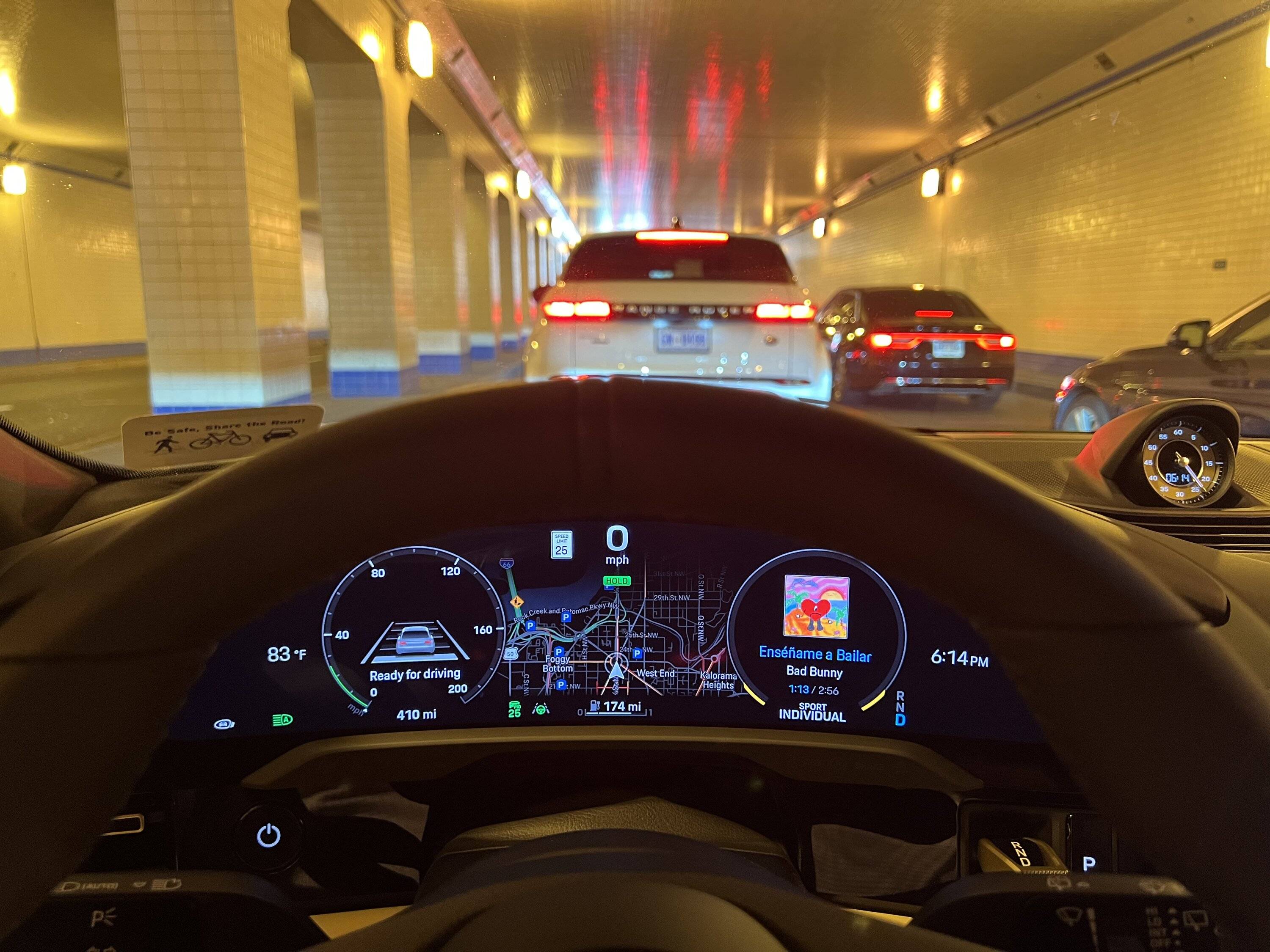
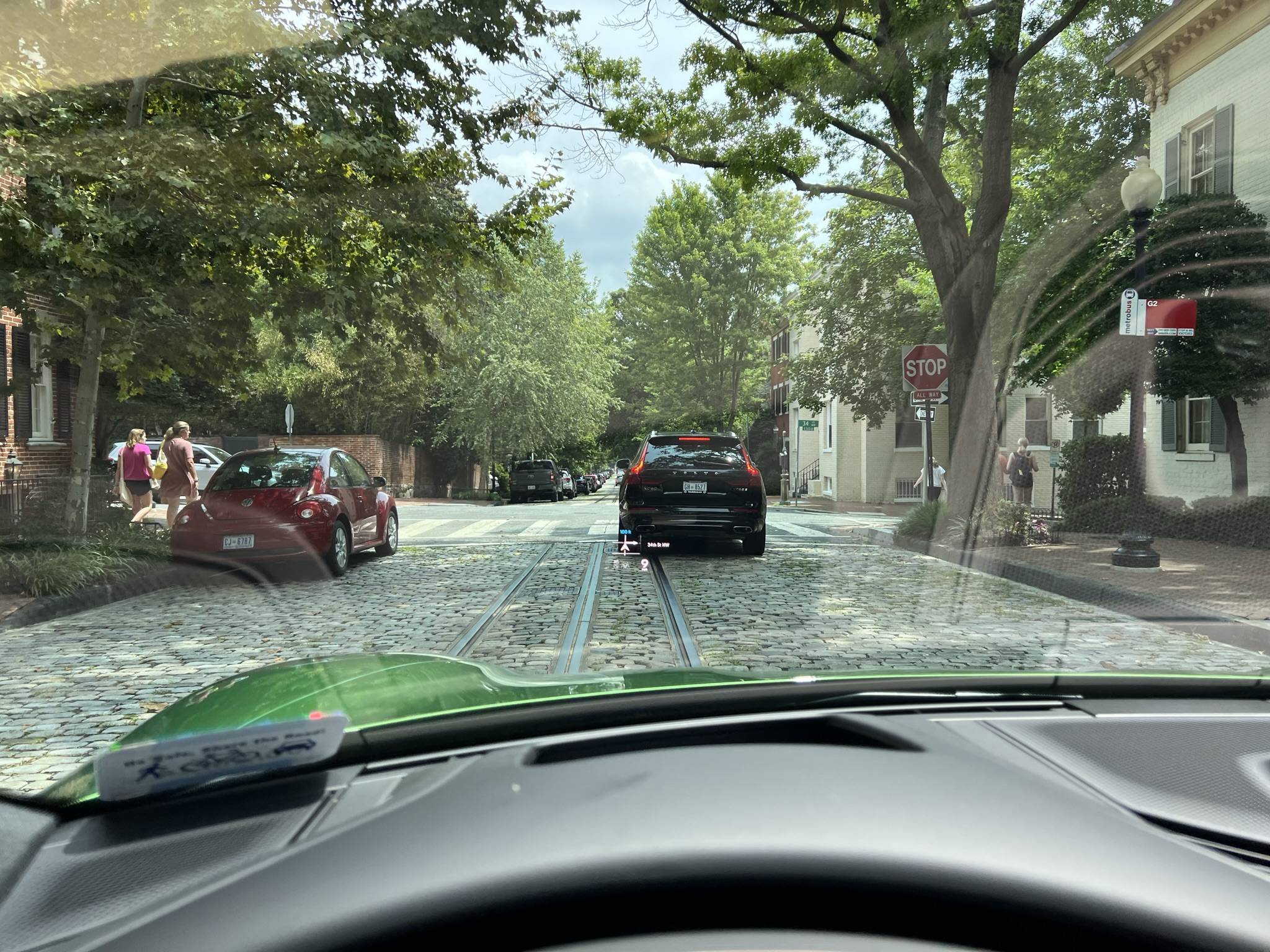
I want police/speed alerts and better live traffic routing of Waze, but I want the charging info/touting from the Porsche system, as well as I like having the map and routing displayed on HUD and over steering wheel.

if the integration were better such that Waze included rich routing based on current charter status and it could be shown on HUD and over steering wheel, I would stick solely with Waze.
4A1FF634-E763-41C6-8790-C7AE307C494F.jpeg


90067A44-B2B0-42EC-BFBE-032681DCEE39.jpeg
Thanks for the explanation. I’m sure you’re already aware of this but just in case, you will get police and road hazard alerts from Waze without actively routing. It just needs to be turned on. I see your point about the better routing capabilities of Waze combined with the charger planning of the Porsche nav. I might try that out on my next road trip. Thanks for the tip.
Sponsored


TDinDC

Well-Known Member
Joined
Jun 25, 2022
Threads
21
Messages
1,066
Reaction score
1,277
Location
Washington, DC, USA
Vehicles
'22 Taycan 4S Cross Turismo, '06 Club Coupe (#48)
Country flag
Thanks for the explanation. I’m sure you’re already aware of this but just in case, you will get police and road hazard alerts from Waze without actively routing. It just needs to be turned on. I see your point about the better routing capabilities of Waze combined with the charger planning of the Porsche nav. I might try that out on my next road trip. Thanks for the tip.
Yes, I think that the Porsche NAV occasionally makes utterly bizarre choices and it doesn’t update in real time based on traffic/obstacles. So, 95% of the time they give exactly the same guidance, but when they differ, unless I can see that it is due to going to a charger not listed in Waze, I ALWAYS ignore Porsche and follow Waze (and then Porsche updates to follow Waze).
 

Hirschaj

Well-Known Member
First Name
Jim
Joined
Sep 5, 2021
Threads
68
Messages
2,223
Reaction score
2,617
Location
Austin TX
Vehicles
2022 Taycan CT4 - Mamba Green, 2022 Challenger
Country flag
I promise you all that I use built in Navigation (showing on center display above steering wheel and in HUD) and Waze via car play (on main display above tunnel) simultaneously each and every day. It is definitely possible.

it is true that one can shut the other off at startup, but I find that this is less likely to happen if you start Waze on phone before entering car, wait until CarPlay is up in car, and then start in car NAV (then push CarPlay icon to display Waze again).
If it shuts off NAV, just restart it.
I just tried this in my car that has the ANA6 update applied. It would not let me run both at the same time for more than a few seconds. It kept killing the Porsche nav. You either have a “Unicarn“? or you figured out a process that tricks the car.
 

TDinDC

Well-Known Member
Joined
Jun 25, 2022
Threads
21
Messages
1,066
Reaction score
1,277
Location
Washington, DC, USA
Vehicles
'22 Taycan 4S Cross Turismo, '06 Club Coupe (#48)
Country flag
I just tried this in my car that has the ANA6 update applied. It would not let me run both at the same time for more than a few seconds. It kept killing the Porsche nav. You either have a “Unicarn“? or you figured out a process that tricks the car.
It is picky at first but I assure you it will work.
 

TDinDC

Well-Known Member
Joined
Jun 25, 2022
Threads
21
Messages
1,066
Reaction score
1,277
Location
Washington, DC, USA
Vehicles
'22 Taycan 4S Cross Turismo, '06 Club Coupe (#48)
Country flag
Visual Confirmation!
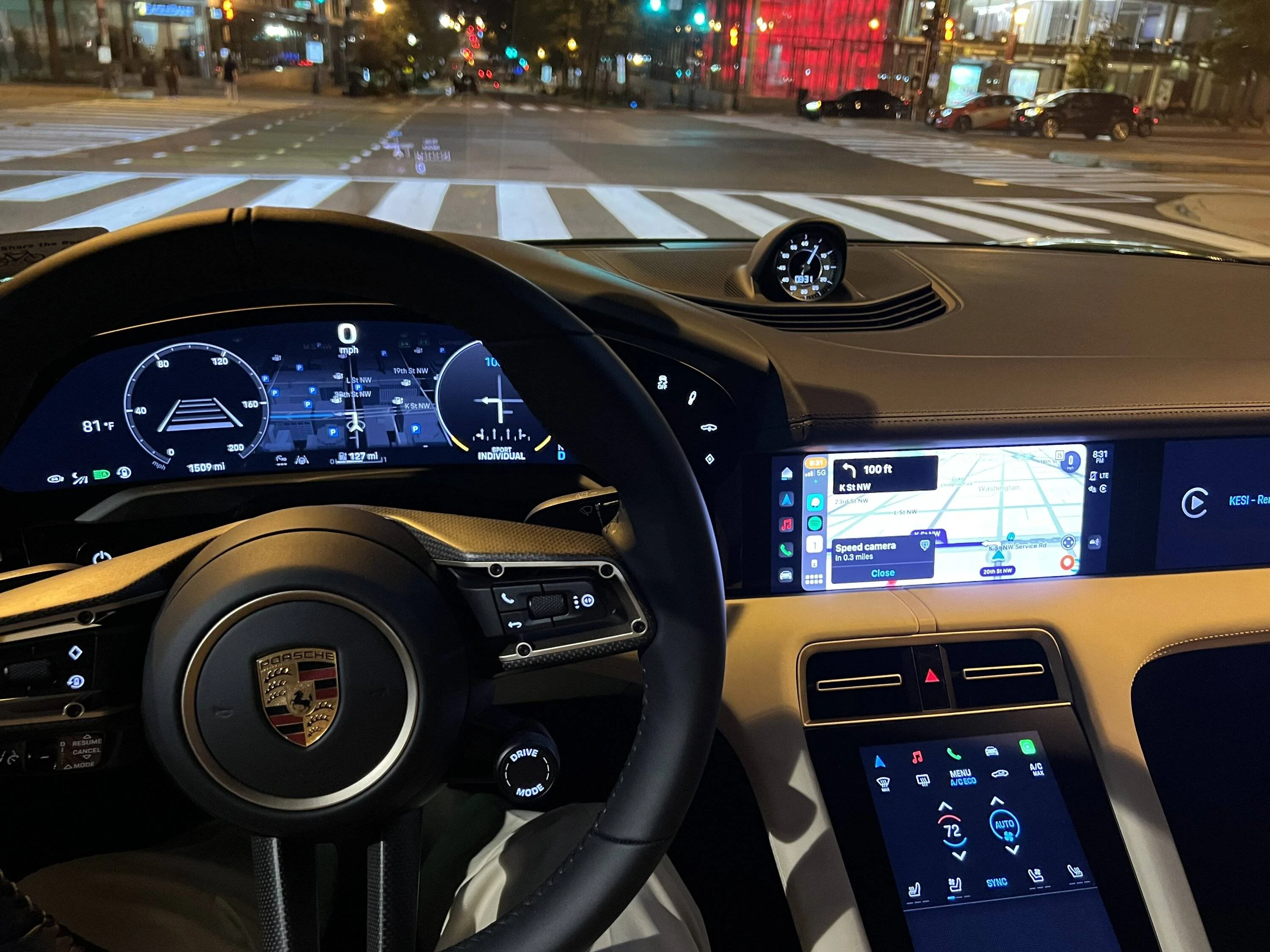
For what it’s worth, it works best if you put in destination in Waze on phone, get started with CarPlay, and then when you are on the way with good signal, hit the NAV button, put in destination, start, and then simply hit CarPlay button again once NAV has started.

Porsche Taycan CarPlay navigation and PCM navigation at the same time A70674C0-959C-4A23-8840-A5183F92E6DE


TDinDC

Well-Known Member
Joined
Jun 25, 2022
Threads
21
Messages
1,066
Reaction score
1,277
Location
Washington, DC, USA
Vehicles
'22 Taycan 4S Cross Turismo, '06 Club Coupe (#48)
Country flag
Ok, I paid attention to the steps I use and that work every time:

1. Open Waze on iPhone and get routing started before entering car.
2. Enter car and start CarPlay.
3. Start driving and get to point with good signal.
4. Hit Navigation icon on left of upper center screen.
5. Enter address (I usually have the address in the car already, so not sure whether manually entering address now would change anything).
6. Start Porsche Navigation
7. Hit CarPlay icon (and Waze should appear as before).

Porsche Taycan CarPlay navigation and PCM navigation at the same time 10944321-0FA3-4137-B973-B7AAAA852258
 
Last edited:

Hirschaj

Well-Known Member
First Name
Jim
Joined
Sep 5, 2021
Threads
68
Messages
2,223
Reaction score
2,617
Location
Austin TX
Vehicles
2022 Taycan CT4 - Mamba Green, 2022 Challenger
Country flag
Ok, I paid attention to the steps I use and that work every time:

1. Open Waze on iPhone and get routing started before entering car.
2. Enter car and start CarPlay.
3. Start driving and get to point with good signal.
4. Hit Navigation icon on left of upper center screen.
5. Enter address (I usually have the address in the car already, so not sure whether manually entering address now would change anything).
6. Start Porsche Navigation
7. Hit CarPlay icon (and Waze should appear as before).

10944321-0FA3-4137-B973-B7AAAA852258.jpeg
I tried your process this morning on my car. I could not get the Porsche nav to stay on. Glad it works for you but it did not work for me.
 

TDinDC

Well-Known Member
Joined
Jun 25, 2022
Threads
21
Messages
1,066
Reaction score
1,277
Location
Washington, DC, USA
Vehicles
'22 Taycan 4S Cross Turismo, '06 Club Coupe (#48)
Country flag
I tried your process this morning on my car. I could not get the Porsche nav to stay on. Glad it works for you but it did not work for me.
Sorry to hear that. Some days, it can be finicky, so hopefully you went back and forth a few times. I'm not sure why it would work on some but not others, but I guess it could be software/version related.


outie

Well-Known Member
First Name
Dennis
Joined
Nov 16, 2021
Threads
2
Messages
243
Reaction score
157
Location
SoCal
Vehicles
Tesla Model X, McLaren 750S Spider, Taycan GTS
Country flag
If someone really wants both PCM navigation and Carplay navigation to work at same time, I have found that it is possible if you have a Carplay AI box (not sure about wireless carplay adaptor as I only have the AI box). Carplay AI box allows you to run netflix/youtube/whatever app based on Android on the PCM screen. Instead of connecting the iPhone to PCM via carplay, you connect your iPhone to the Carplay AI Box via carplay. I know it sounds convoluted, but it works.

It goes like this: PCM -> Carplay AI Box (plug in usb-c port as wired carplay device) -> iPhone connects to Carplay AI Box via wireless carplay.

Basically the PCM only sees the Carplay AI box as a carplay device and doesn’t know what it is running. When your phone connects to the Carplay AI box via carplay you can run any navigation apps and the PCM doesn’t know. One issue is that album art won’t show in PCM music screen when you use a Carplay AI box, but only if you choose to run Apple music on your phone.
 

TaycanCook

Well-Known Member
Joined
Oct 1, 2021
Threads
26
Messages
600
Reaction score
416
Location
NYC
Vehicles
MG 4S CT
Country flag
+1. It did not work for me either.
Same but I use android auto. It did allow both to run simultaneously at one point, but then it stopped a couple of weeks ago. I had wondered if it has something to do with version of android auto, but perhaps it was the car.
 

X88

Well-Known Member
First Name
Zain
Joined
Mar 24, 2022
Threads
1
Messages
131
Reaction score
82
Location
Houston, TX
Vehicles
2022 Taycan GTS
Country flag
Ok, I paid attention to the steps I use and that work every time:

1. Open Waze on iPhone and get routing started before entering car.
2. Enter car and start CarPlay.
3. Start driving and get to point with good signal.
4. Hit Navigation icon on left of upper center screen.
5. Enter address (I usually have the address in the car already, so not sure whether manually entering address now would change anything).
6. Start Porsche Navigation
7. Hit CarPlay icon (and Waze should appear as before).

10944321-0FA3-4137-B973-B7AAAA852258.jpeg
Thanks for the tip! Unfortunately I too tried your process in my 22 GTS (just delivered last week and the software was updated by the dealer before I picked it up). Repeated it on two or three different short drives but it didn't work for me either. Once I get to step 6 to start Porsche navigation, Waze navigation stops, although Waze will continue to run and show the map, hazards, police etc.

I'll keep experimenting as I really would like to be able to run both simultaneously for the reasons you outlined ...
 

TDinDC

Well-Known Member
Joined
Jun 25, 2022
Threads
21
Messages
1,066
Reaction score
1,277
Location
Washington, DC, USA
Vehicles
'22 Taycan 4S Cross Turismo, '06 Club Coupe (#48)
Country flag
Thanks for the tip! Unfortunately I too tried your process in my 22 GTS (just delivered last week and the software was updated by the dealer before I picked it up). Repeated it on two or three different short drives but it didn't work for me either. Once I get to step 6 to start Porsche navigation, Waze navigation stops, although Waze will continue to run and show the map, hazards, police etc.

I'll keep experimenting as I really would like to be able to run both simultaneously for the reasons you outlined ...
I know it’s tricky, but here is the way I think I am getting it to work. Before I enter connect to the car, I start the routing with Waze on my phone. When I get to the car, I start routing with the car nav, and then start driving. While driving, I then press the CarPlay, and Waze will show up. Now, every now and again, it shuts off the nav in the car, and then go back to CarPlay again. If Waze has stopped, I then restart. But I can always get them both running.

The irony is that I no longer even try to do this most of the time. On short trips, I use Waze via CarPlay. On long trips, I use car nav, and just rely on audible warnings from waze on my wife’s phone. Haha
 

TDinDC

Well-Known Member
Joined
Jun 25, 2022
Threads
21
Messages
1,066
Reaction score
1,277
Location
Washington, DC, USA
Vehicles
'22 Taycan 4S Cross Turismo, '06 Club Coupe (#48)
Country flag
Same but I use android auto. It did allow both to run simultaneously at one point, but then it stopped a couple of weeks ago. I had wondered if it has something to do with version of android auto, but perhaps it was the car.
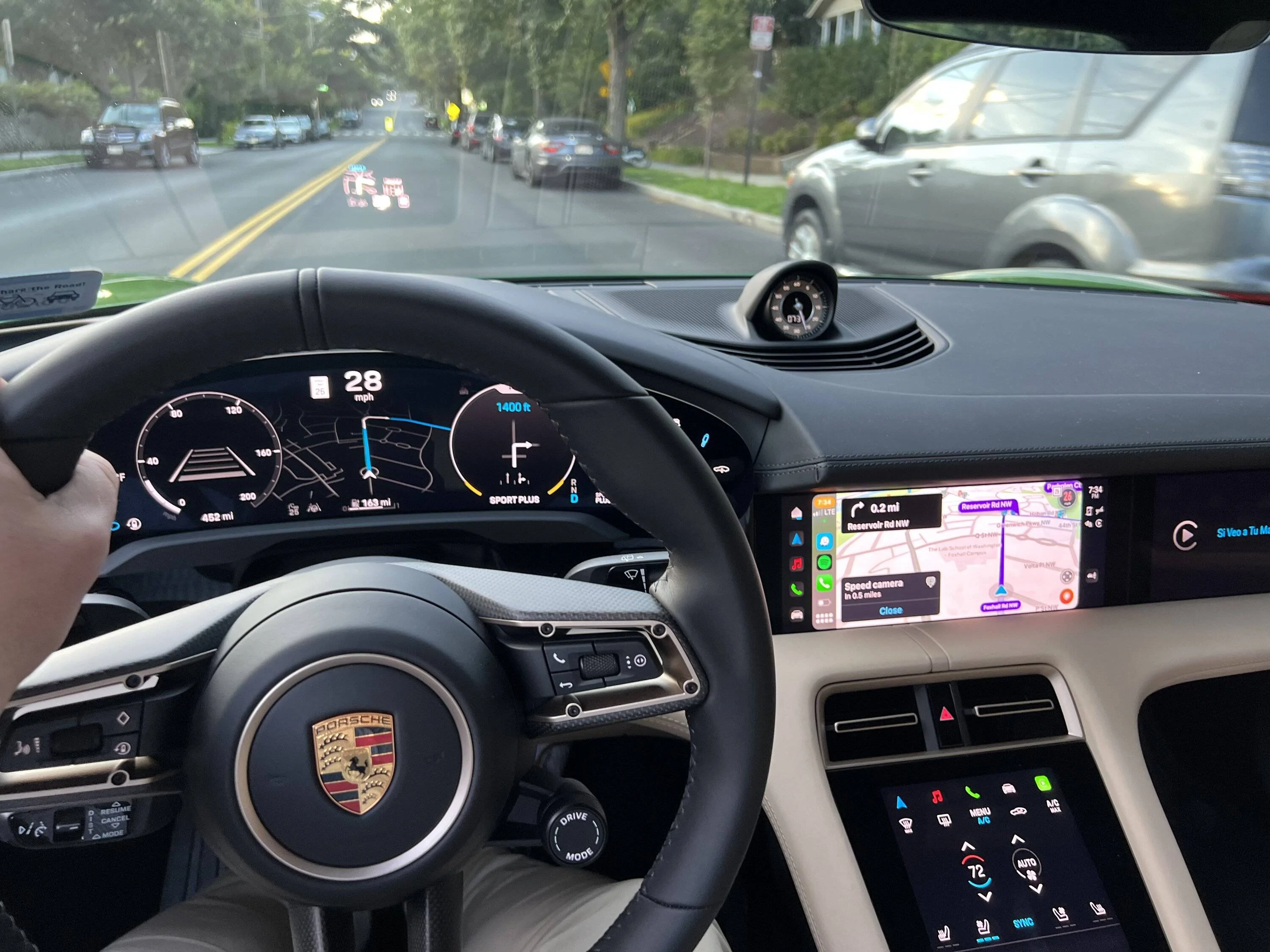
I have to admit that you all had me doubting myself, but no, it works every time. Here’s from tonight. Again, I think the key is to get on the road with one and then join the other rather than fussing with both right when you get in the car.

Porsche Taycan CarPlay navigation and PCM navigation at the same time 5374D993-73CB-45BC-BDB7-9DC1E8CE7916
Sponsored

 
Last edited:


Top