Sponsored

Hypervolt & Octopus IG question

thefunkygibbon

Well-Known Member
Joined
Mar 14, 2025
Threads
16
Messages
254
Reaction score
139
Location
Peterborough
Vehicles
Taycan Turbo
Country flag
ok so I'm a little confused about schedules and whatnot. only got it all setup today.

I have octopus control the charger.
it's created a bunch of schedules on the charger.

what do I need to setup on the taycan side of things?
In terms of profile and/or timer.
obviously I want to only charge it to 85%
but the profile only sets the minimum amount of charge.
timer seems to suggest a maximum charge but is reliant on setting a time. I don't really want the car choosing what times to charge at as I obviously want to charge it whenever octopus tells me the times are cheap.


any pointers?

cheers
Sponsored

 

tylerdurden

Well-Known Member
Joined
Sep 23, 2023
Threads
39
Messages
183
Reaction score
65
Location
London
Vehicles
2023 Taycan GTS
Country flag
ok, this is my understanding. You have 1 EV, a taycan. Once set up charging schedules are set by octopus. You don't need to set anything on the car. You set everything on the octopus app. THe % charge and time you want the car ready.

I have 2 EV's. Octopus only allows their app to control 1 EV. So I have set up my other EV as the primary. My Tacan is not controlled by the app. This is where setting up a timer schedule is needed to charge overnight on the cheap tariff
 

W1NGE

Well-Known Member
First Name
Adrian
Joined
Jan 11, 2021
Threads
53
Messages
11,017
Reaction score
6,805
Location
Aberdeen, Scotland
Vehicles
992.2, ex GTS ST & 4S owner, Macan T
Country flag
ok so I'm a little confused about schedules and whatnot. only got it all setup today.

I have octopus control the charger.
it's created a bunch of schedules on the charger.

what do I need to setup on the taycan side of things?
In terms of profile and/or timer.
obviously I want to only charge it to 85%
but the profile only sets the minimum amount of charge.
timer seems to suggest a maximum charge but is reliant on setting a time. I don't really want the car choosing what times to charge at as I obviously want to charge it whenever octopus tells me the times are cheap.


any pointers?

cheers
Do not use programming in your EVSE.

All programming should be performed via timers and profiles.

The car controls the charging session and not the other way around.

Programming via your EVSE will invariably lead to conflicts and issues during expected charging sessions.

Intelligent charging from OVO and others rely on direct communication with the car's PCM to create timers and profiles so you don't have to.

Profiles set the minimum required charge - 25% is the default and good for most. Once this level is reached the session will pause (flashing blue) waiting on the next timed event set by the timer.

Timers control when you want the car charged by and to what level of charge.

Used in tandem for stress free charging.

Research the forum as this topic has been exhaustively discussed for over 4 years.
 
OP
OP
thefunkygibbon

thefunkygibbon

Well-Known Member
Joined
Mar 14, 2025
Threads
16
Messages
254
Reaction score
139
Location
Peterborough
Vehicles
Taycan Turbo
Country flag
with octopus it controls the charger or the car ...one of the two. and it won't work with the car unless you subscribe to Porsche connect. which I do not, don't intend to and shouldn't expect to to be able to charge my EV.

so that doesn't work for using octopus intelligent go.

I did end up using a timer on the car as that seems to be the only possible way of stating a max charge. but this morning I have awoken with a notification from octopus that it couldnt charge my car. currently is a time where a schedule set to charge and my hypervolt app is telling me that it is "waiting for your car" when I know its likely needing another 20% charge.

yes I appreciate that charging has been talked about extensively but I haven't found much talk about this specifically with OIG. hence making this post.
 
OP
OP
thefunkygibbon

thefunkygibbon

Well-Known Member
Joined
Mar 14, 2025
Threads
16
Messages
254
Reaction score
139
Location
Peterborough
Vehicles
Taycan Turbo
Country flag
ok, this is my understanding. You have 1 EV, a taycan. Once set up charging schedules are set by octopus. You don't need to set anything on the car. You set everything on the octopus app. THe % charge and time you want the car ready.

I have 2 EV's. Octopus only allows their app to control 1 EV. So I have set up my other EV as the primary. My Tacan is not controlled by the app. This is where setting up a timer schedule is needed to charge overnight on the cheap tariff
doesn't octopus support your charger?
I can't/don't want to have to set a specific different charge % every time I get home and start to charge the car. that's just really inconvenient.

I'm getting a bit frustrated now. surely having my intelligent car be charged intelligently in 2025 shouldn't be such a faff! it was much simpler and convenient to simply use my 3 pin charger. it makes zero sense that it should be less flexible when using a much more expensive and intelligent charging solution!


csm7djs

Well-Known Member
First Name
Daniel
Joined
Apr 24, 2024
Threads
4
Messages
103
Reaction score
57
Location
UK
Vehicles
CT4S
Country flag
I also have 2 EV's and Octopus IG. I registered for it and set it up with my Taycan. Then turned off the smart side of it.

I have my charger on a schedule to come on at the cheap times and can plug in either car and control the amount of charge they get via the cars rather than anything else. Profile is just set to charge to 85%.

I'm sure there are a lot of reasons why the smart charging is better, but this just works perfectly everytime and for both cars
 
OP
OP
thefunkygibbon

thefunkygibbon

Well-Known Member
Joined
Mar 14, 2025
Threads
16
Messages
254
Reaction score
139
Location
Peterborough
Vehicles
Taycan Turbo
Country flag
I also have 2 EV's and Octopus IG. I registered for it and set it up with my Taycan. Then turned off the smart side of it.

I have my charger on a schedule to come on at the cheap times and can plug in either car and control the amount of charge they get via the cars rather than anything else. Profile is just set to charge to 85%.

I'm sure there are a lot of reasons why the smart charging is better, but this just works perfectly everytime and for both cars
thanks,
how do you "turn off the smart side of it"? doesnt octopus complain/threaten to change you to Octopus Go instead ?

that does make more sense tbh, we will be getting a 2nd EV at some point later this year so I was wondering how this is all going to work with that scenario
 

csm7djs

Well-Known Member
First Name
Daniel
Joined
Apr 24, 2024
Threads
4
Messages
103
Reaction score
57
Location
UK
Vehicles
CT4S
Country flag
There is an option in the Octopus app under devices - you should see your car and then turn off the Smart Control from there.

Whilst others will have different opinions on the Smart feature, having the set time from 11:30 - 05:30 on my charger, then using the settings in the both cars offers us the easiest and best solution.


tophamn

Well-Known Member
First Name
Neil
Joined
Jul 17, 2024
Threads
1
Messages
708
Reaction score
474
Location
Bristol UK
Vehicles
Taycan ST GTS
Country flag
I have a Zappi wall box and Octopus IG. This is what I've got set up:
  • Octopus device is configured as Myenergi Zappi (the wall box, not the car)
  • I've told Octopus what car I have (so they know the battery capacity)
  • I set Octopus, via the app, to provide a certain % charge - MORE than I need, and a ready-by time
  • in the car
    • I have a single profile: location independent, 75% charge, optimised charging
    • I don't have ANY timer set
    • [others may disagree but in this config the % set in the profile is the MAX - the car doesn't charge beyond this; if you set a charging timer the profile % becomes the minimum and the max is controlled by the timer]
When I get home if I need charge I plug in (and enter the wall box passcode!). Octopus then sees you're connected and schedules the amount of charge set in the Octopus app (which is more than the car needs, remember) - you get notification in the app of when the car will charge which could be split into several slots through the night.

Note also the car will complain that charging isn't possible - but that's fine as Octopus is not letting it charge right away.

Through the night Octopus controls the wall box to enable charging during the scheduled slots. At some point the car decides it's had enough (% in profile is reached) so stops - and you'll then likely get notification in the Octopus app that charging isn't working since it thinks you need more (neither Octopus nor the wall box can see your battery state-of-charge), but you don't and all is fine - ignore it.

In the early days I did try to get Octopus to control the car directly but it very often failed and either over-charged or didn't charge at all.
 

Fish Fingers

Well-Known Member
Joined
Feb 20, 2021
Threads
50
Messages
2,534
Reaction score
3,285
Location
UK
Vehicles
Sold
Country flag
There is an option in the Octopus app under devices - you should see your car and then turn off the Smart Control from there.

Whilst others will have different opinions on the Smart feature, having the set time from 11:30 - 05:30 on my charger, then using the settings in the both cars offers us the easiest and best solution.
We do the same on OIG, after we had problems registering my BMW i4 M50 as a device.

So we now have 2 BMW cars (EV and a PHEV) both set via the car to 'immediate charge' up to 80%/100% respectively (but varies depending on needs).

EVSE set to charge 11.30-05.30 from it's app (not via Octopus).

No devices selected in the Octopus app.

I told Octopus this is what I now do and they emailed back to say they are fine with it. Works fine.
A lot simpler than pi55ing about with all those 'enode' 30 minute slots when the Taycan struggled with connections and often missed them.

Now the EVSE just starts charging either car at 11.30 and stops when it hits the cars target.
 
Last edited:

tophamn

Well-Known Member
First Name
Neil
Joined
Jul 17, 2024
Threads
1
Messages
708
Reaction score
474
Location
Bristol UK
Vehicles
Taycan ST GTS
Country flag
...
A lot simpler than pi55ing about with all those 'enode' 30 minute slots when the Taycan struggled with connections and often missed them.
This is the problem with having Octopus integrate directly with the Taycan and not the wall-box: the communication with the car, via Porsche's servers, is just not reliable enough for how Octopus want to control it.

I've had no such issues since I switched to Octopus controlling the wall-box - Myenergi Zappi in my case.
 
OP
OP
thefunkygibbon

thefunkygibbon

Well-Known Member
Joined
Mar 14, 2025
Threads
16
Messages
254
Reaction score
139
Location
Peterborough
Vehicles
Taycan Turbo
Country flag
another quick one. then for all you OIG customers. ... I just checked my usage from wednesday (when I had my charger fitted) and looking at the times where octopus created schedules during the afternoon, it appears that I've been charged full whack for those hours. is that normal to see in the octopus app/usage section? It shows the overnight charging as 7p in there
 

tophamn

Well-Known Member
First Name
Neil
Joined
Jul 17, 2024
Threads
1
Messages
708
Reaction score
474
Location
Bristol UK
Vehicles
Taycan ST GTS
Country flag
another quick one. then for all you OIG customers. ... I just checked my usage from wednesday (when I had my charger fitted) and looking at the times where octopus created schedules during the afternoon, it appears that I've been charged full whack for those hours. is that normal to see in the octopus app/usage section? It shows the overnight charging as 7p in there
You sure Octopus created that schedule? - or did you "bump charge" it? It's also possible your wall-box was configured to charge immediately which also wouldn't be covered by the 7p/kWh rate.

That said: if it was the same day you had the wall-box fitted I suspect all the systems weren't in sync. I think I remember Octopus asking you to do a test charge straight-away, right? - it might be worth contacting them to ask about it.

BTW when you're up and running properly Octopus will occasionally schedule charging outside the normal overnight slots - you get these at 7p/kWh, plus (I think I'm right in saying) any other electricity you use at the same time!
 
OP
OP
thefunkygibbon

thefunkygibbon

Well-Known Member
Joined
Mar 14, 2025
Threads
16
Messages
254
Reaction score
139
Location
Peterborough
Vehicles
Taycan Turbo
Country flag
i can see that it's working ok now (in as much as I can see I'm currently at 7p as per schedule). but yes on weds afternoon these were 100% part of their schedules too...I haven't used boost before and don't really intend on doing so lol. sounds like something's gone wonky on that day then, I'll reach out to them and see if they can sort.


thanks for all your help (everyone) ... appreciated
 

Fish Fingers

Well-Known Member
Joined
Feb 20, 2021
Threads
50
Messages
2,534
Reaction score
3,285
Location
UK
Vehicles
Sold
Country flag
This is the problem with having Octopus integrate directly with the Taycan and not the wall-box: the communication with the car, via Porsche's servers, is just not reliable enough for how Octopus want to control it.

I've had no such issues since I switched to Octopus controlling the wall-box - Myenergi Zappi in my case.
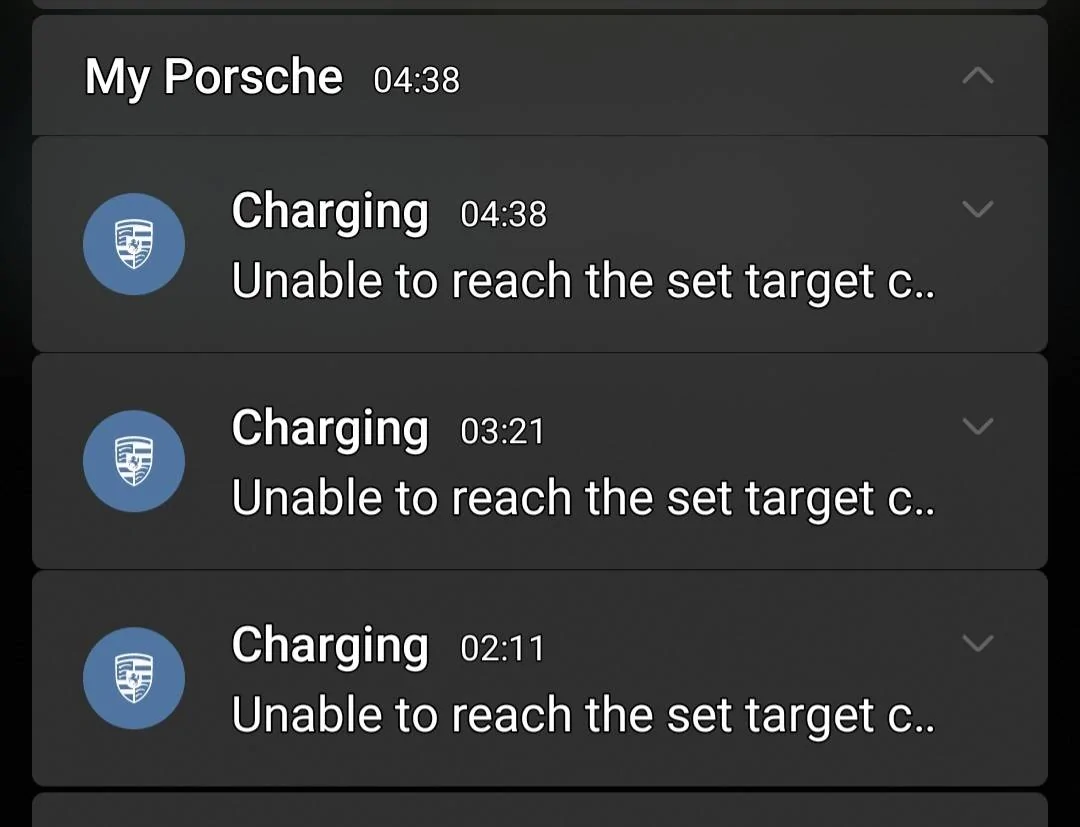
I used to wake up to the following list most mornings.....
Porsche Taycan Hypervolt & Octopus IG question Screenshot_20231125_073408_One UI Hom
Sponsored


Top