Sponsored

KenR

Well-Known Member
First Name
Ken
Joined
Jan 20, 2023
Threads
4
Messages
198
Reaction score
240
Location
Wales, UK
Vehicles
Taycan Turbo GT
Country flag
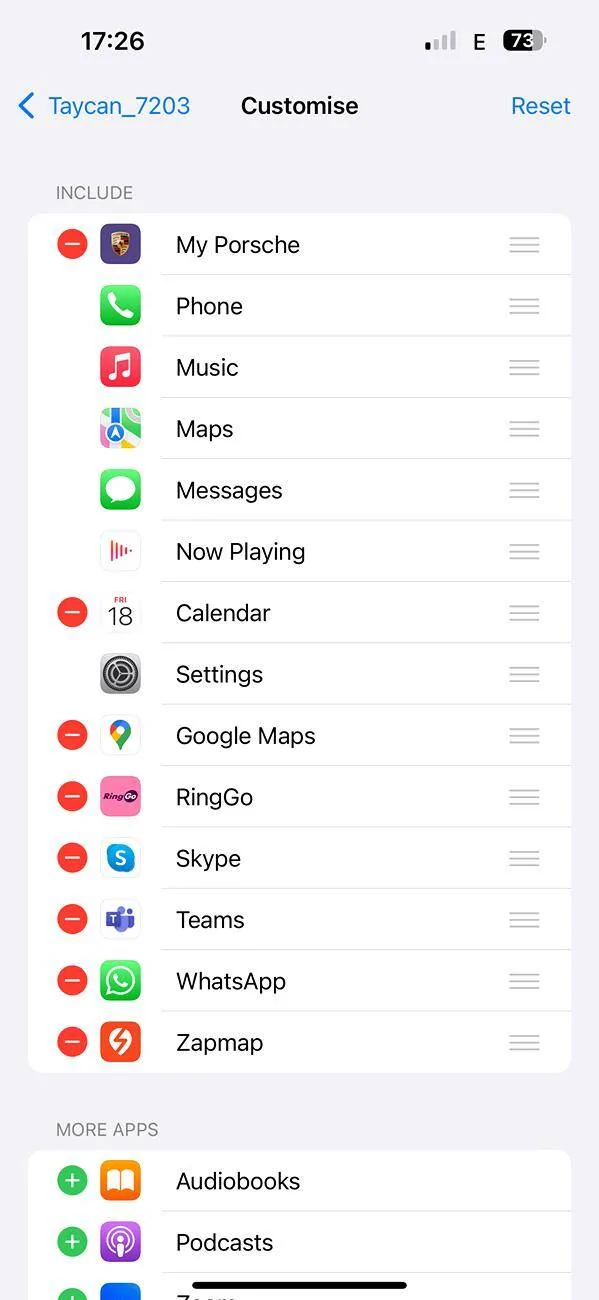
I don’t have the My Porsche icon on my Apple CarPlay screen in my new GT. I had it in my old Turbo S, and am puzzled. Any ideas?
 

tigerbalm

Well-Known Member
First Name
Damien
Joined
Oct 11, 2020
Threads
94
Messages
3,514
Reaction score
7,912
Location
Dublin, Ireland
Website
www.targatrips.com
Vehicles
911 Targa 4 GTS, Fiat 500 EV. Sold: Taycan Turbo S, Taycan 4S; Panamera Turbo S
Country flag
I don’t have the My Porsche icon on my Apple CarPlay screen in my new GT. I had it in my old Turbo S, and am puzzled. Any ideas?
On phone go into (I think) Settings -> General -> CarPlay -> Customise. And make sure MyPorsche is ticked on to show up in CarPlay.
 

KenR

Well-Known Member
First Name
Ken
Joined
Jan 20, 2023
Threads
4
Messages
198
Reaction score
240
Location
Wales, UK
Vehicles
Taycan Turbo GT
Country flag
On phone go into (I think) Settings -> General -> CarPlay -> Customise. And make sure MyPorsche is ticked on to show up in CarPlay.
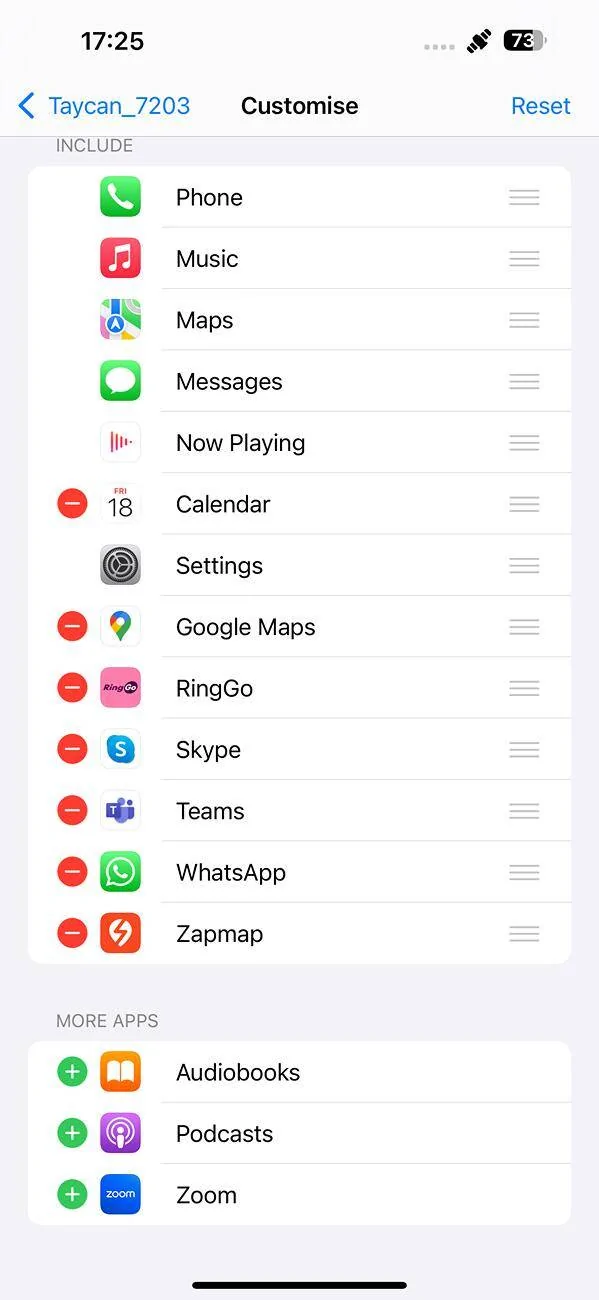
Thanks for your suggestion. Strange thing is that when my iPhone is not connected to the car I see:
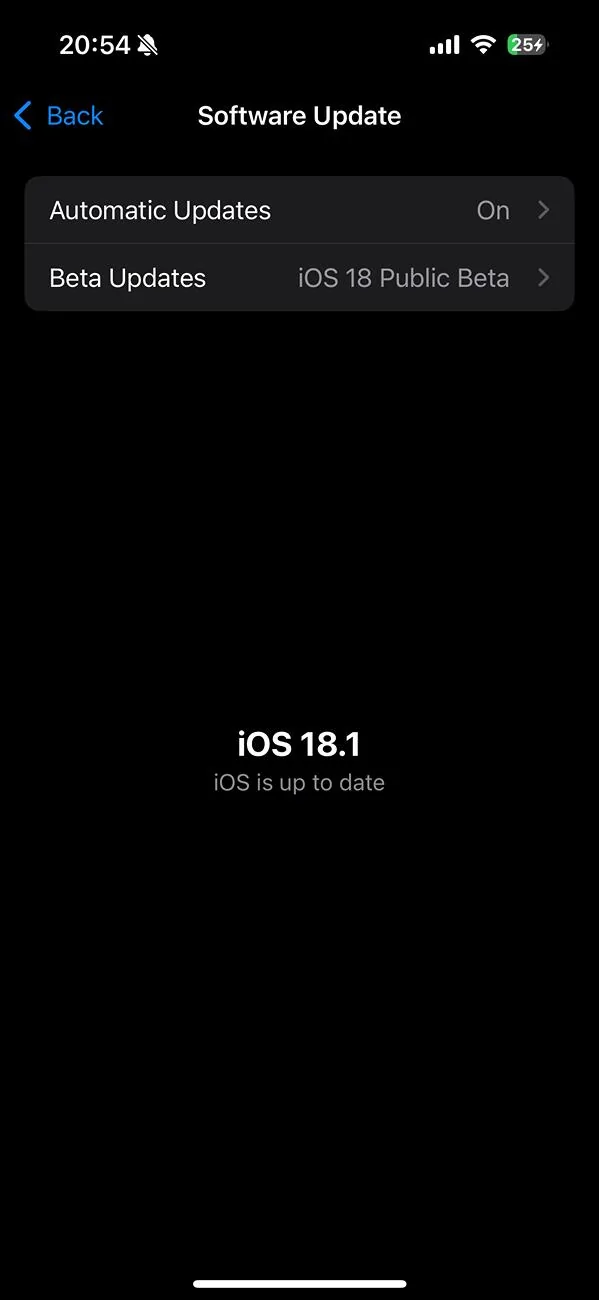
Porsche Taycan CarPlay Integrated Porsche Controls on my Taycan (w/ iOS 18.1) IMG_1740

but as soon as the phone connects to the car the My Porsche icon disappears.
Porsche Taycan CarPlay Integrated Porsche Controls on my Taycan (w/ iOS 18.1) IMG_1739
 

MichaelPNW

Active Member
First Name
Michael
Joined
Sep 25, 2024
Threads
5
Messages
31
Reaction score
23
Location
Seattle, WA
Vehicles
’23 Taycan GTS, '24 Defender 110 V8, ‘15 Wrangler Rubicon
Country flag
I'm a huge Apple fan boy and a self-claimed tech nerd. I honestly don't see the added value of having Carplay / Android Auto, the Carplay interface is also too cartoon'ish for me. What am I missing?

I always believed Carplay was for cheap vehicles so you had some sat-nav there and easy controls for radio etc. And a luxury feeling. PCM offers me a better phone intergration, sat-nav, Apple Music, Weather app, settings for ALL vehicle settings, not just a random selector etc.
I’m with you on this ?. Cartoonish UI is my biggest beef. The native UI is far more elegant. Same on my wife’s Defender.

BUT. Absolutely wish I could get Waze data. Google Maps in CarPlay or Waze directly is just better at real time nav adjustments for traffic, closures, etc. a highway interchange near me has changed several times under construction in the last few months and Google has it accurate every day, Porsche nav is still operating with what the exchange looked like 6+ months ago despite “updated maps.”


d00d

Well-Known Member
Joined
Mar 7, 2024
Threads
1
Messages
544
Reaction score
368
Location
4MB, HYA
Vehicles
yes
Country flag
To get the Porsche application in Carplay, first on the iPhone I had to select Vehicle Details:Functions:My Porsche in Apple CarPlay, do a setup while in the car, get out and restart the phone.
 

KenR

Well-Known Member
First Name
Ken
Joined
Jan 20, 2023
Threads
4
Messages
198
Reaction score
240
Location
Wales, UK
Vehicles
Taycan Turbo GT
Country flag
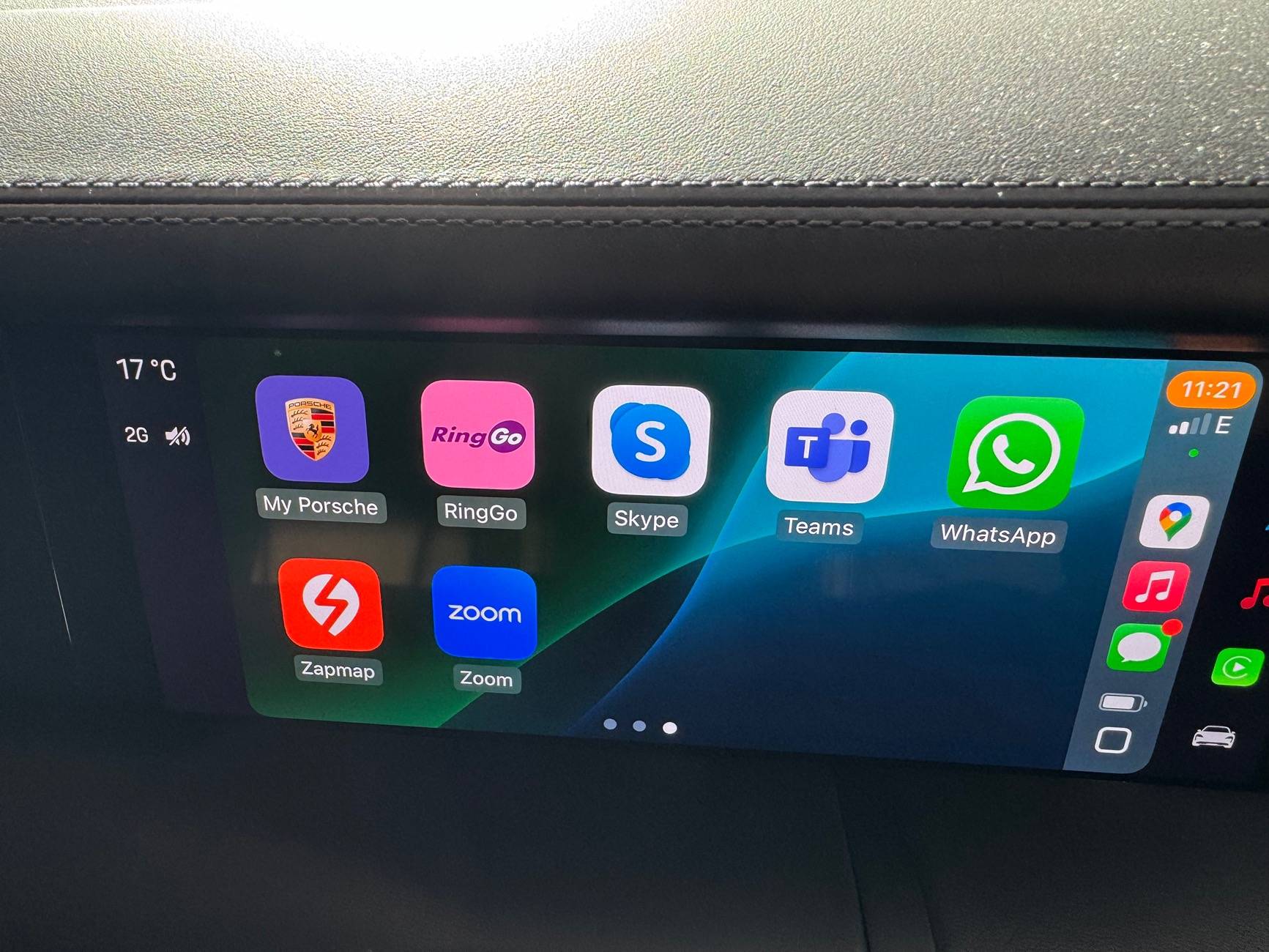
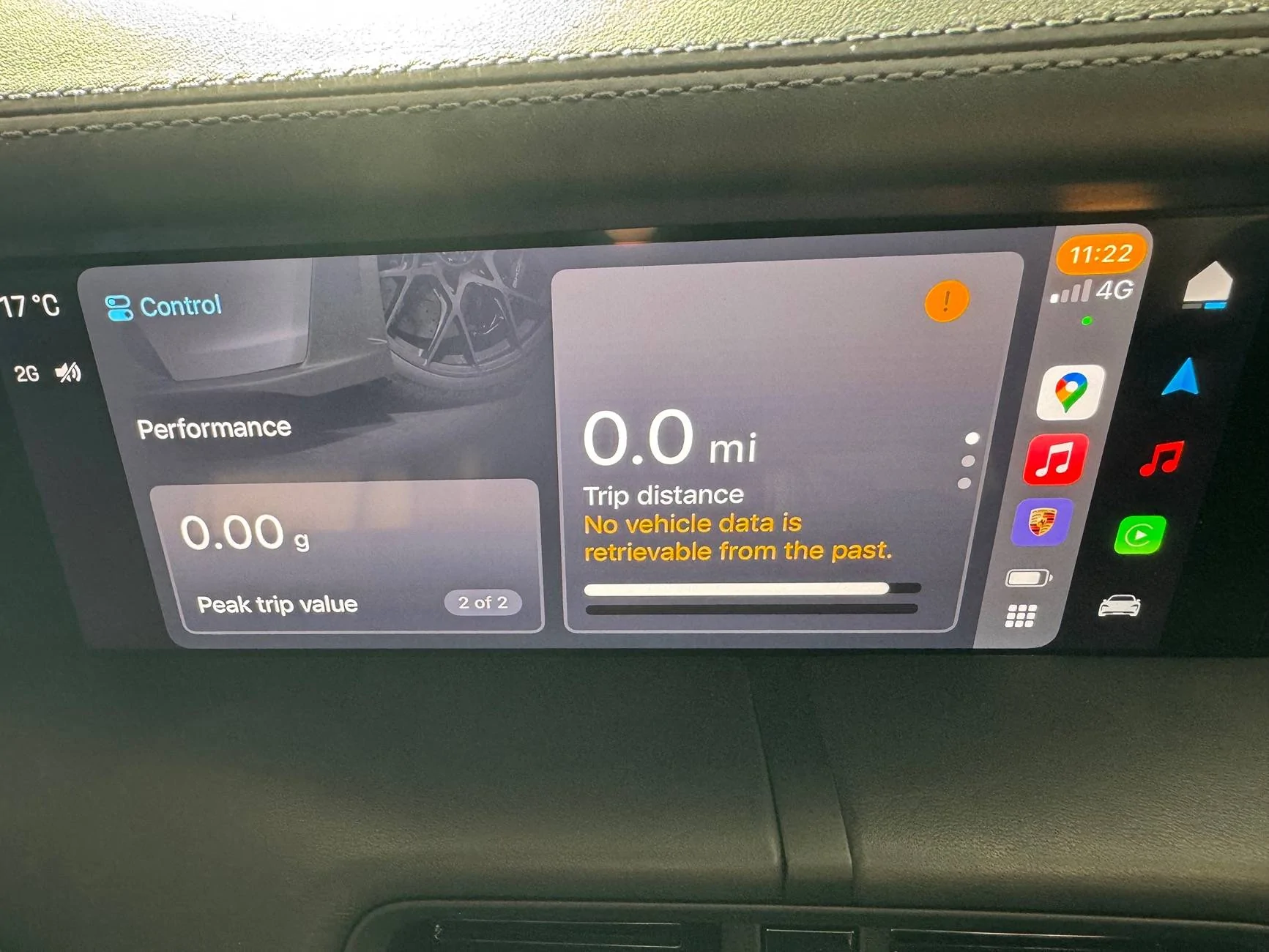
I did the iOS 18.1 Beta update and now I see the My Porsche icon in CarPlay - in Purple Sky no less! Can I say with certainty that the 18.1 update fixed it… no. Several other things happened during the update process - phone reboot, me fiddling with CarPlay, and so on. Anyway, it seems to work now ?

Porsche Taycan CarPlay Integrated Porsche Controls on my Taycan (w/ iOS 18.1) IMG_1741


Porsche Taycan CarPlay Integrated Porsche Controls on my Taycan (w/ iOS 18.1) IMG_1742
 

ptodorov0

Member
First Name
Plamen
Joined
Nov 21, 2023
Threads
0
Messages
9
Reaction score
16
Location
Sofia, Bulgaria
Vehicles
Taycan 4S
Country flag
+1 to Waze
If you're not using Waze all the time, you're doing driving wrong. At least in the USA, it's essential.
It is also essential in Europe, at least in Eastern Europe. There are a lot of Wazers here in Bulgaria so all hazards, hidden mobile radars and traffic jams are tagged immediately. That’s the main reason I am on Carplay all the time. Spotify via Carplay works smoother than the PCM Spotify integration too. The additional features on 18.2 seem nice, will try them ASAP.
 

VONRichie

Well-Known Member
Joined
Jul 9, 2024
Threads
14
Messages
60
Reaction score
48
Location
Uk
Vehicles
Taycan RWD
Country flag
Totally agree,

I'm a huge Apple fan boy and a self-claimed tech nerd. I honestly don't see the added value of having Carplay / Android Auto, the Carplay interface is also too cartoon'ish for me. What am I missing?

I always believed Carplay was for cheap vehicles so you had some sat-nav there and easy controls for radio etc. And a luxury feeling. PCM offers me a better phone intergration, sat-nav, Apple Music, Weather app, settings for ALL vehicle settings, not just a random selector etc.
 

C130

Active Member
First Name
Scott
Joined
Mar 7, 2024
Threads
3
Messages
26
Reaction score
15
Location
Texas
Vehicles
F-150 Hybrid, 24 Taycan
Country flag
I keep getting a message using CarPlay that states “battery information may not be accurate” then a few minutes later I get another message stating “battery information is now accurate”. i get these messages constantly every 5-10 minutes it seems. I’m running the beta updates. Anyone else getting these messages and anything to resolve it?
 

KenR

Well-Known Member
First Name
Ken
Joined
Jan 20, 2023
Threads
4
Messages
198
Reaction score
240
Location
Wales, UK
Vehicles
Taycan Turbo GT
Country flag
I keep getting a message using CarPlay that states “battery information may not be accurate” then a few minutes later I get another message stating “battery information is now accurate”. i get these messages constantly every 5-10 minutes it seems. I’m running the beta updates. Anyone else getting these messages and anything to resolve it?
I haven’t seen this.
 

Smithy37

Well-Known Member
First Name
Mark
Joined
Jun 21, 2020
Threads
17
Messages
186
Reaction score
181
Location
United Kingdom
Vehicles
Porsche 991.2 C4 GTS. Taycan Turbo S
Country flag
There was a bug in 18.0.1 where the Porsche app “fell” off the CarPlay screen. Just turn your phone off and back on again and it re-appears.
Sponsored


Top