Sponsored

Can't set up a Homelink

BillD

Well-Known Member
First Name
Bill
Joined
Aug 1, 2021
Threads
11
Messages
45
Reaction score
18
Location
Incline Village, NV, USA
Vehicles
2015 Tesla Model S, 1964 Porsche 356, 1973 Porsche
Country flag
Porsche Reno just reprogrammed my Taycan and I can no longer setup Homelink to open my garage door. When I attempt to set up Homelink, it wants me to set up Button I, II, or III. Part of the process involves pressing I, II, or III. They Taycan has no such buttons.

Does anyone know how to fix this?

I previously had the garage door bound to one of the diamond buttons. I'd like to get back there.
Sponsored
 

hifi239

Well-Known Member
First Name
Will
Joined
Mar 15, 2023
Threads
27
Messages
470
Reaction score
423
Location
Boston
Vehicles
Taycan
Country flag
What said I, II, or III? See this video. Then when you set this up, you can assign the diamond as it says in the end of the video. (Hold down diamind, choose Instrument cluster button, choose Homelink). I believe Porsche Taycan supports different garage doors via location, but I only have one garage door so I haven't tried that.
 
OP
OP

BillD

Well-Known Member
First Name
Bill
Joined
Aug 1, 2021
Threads
11
Messages
45
Reaction score
18
Location
Incline Village, NV, USA
Vehicles
2015 Tesla Model S, 1964 Porsche 356, 1973 Porsche
Country flag
That video shows how my PCM used to work - before Porsche reprogrammed it. The homelink button used to go to a screen that let you "Configure New Profile". Now the first homelink screen gives the option to configure button I, II, or III.


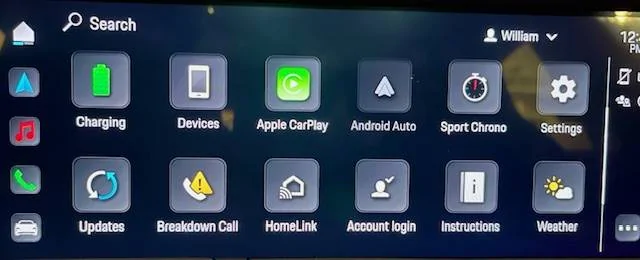
Starting from the new color home screen that makes it seem like the Taycan has arrived in Oz from Kansas:
Porsche Taycan Can't set up a Homelink IMG_4495


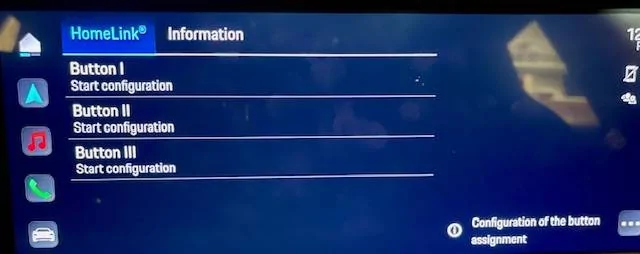
You press "HomeLink" and get this screen - requiring you to configure non-existent buttons.
Porsche Taycan Can't set up a Homelink IMG_4496


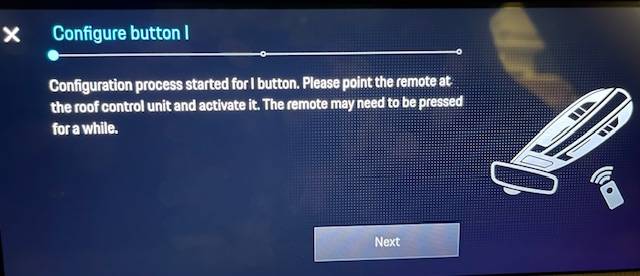
Pressing "Button I, Start configuration" leads to
Porsche Taycan Can't set up a Homelink IMG_4497


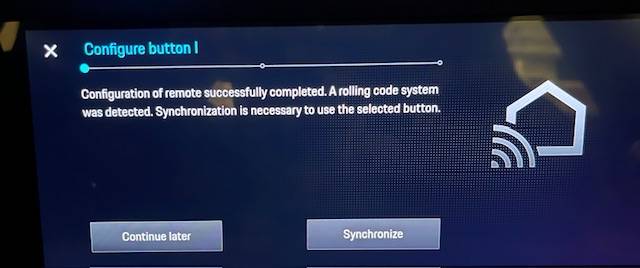
After holding down the remote for a few seconds you get:
Porsche Taycan Can't set up a Homelink IMG_4498


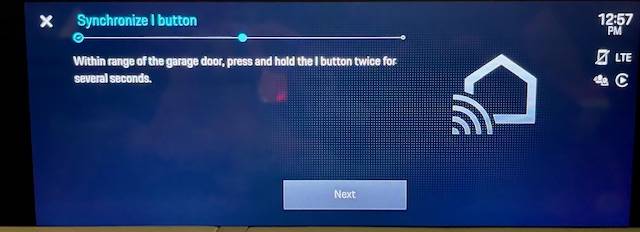
Pressing "Synchronize" brings you to the final screen - requiring you to press the non-existent button I to finish the configuration:

Porsche Taycan Can't set up a Homelink IMG_4500


I assume some other model Porsche has these buttons and they didn't create a version of the new software for cars without them.

If anyone knows a work-around, let me know.
 

W1NGE

Well-Known Member
First Name
Adrian
Joined
Jan 11, 2021
Threads
53
Messages
11,015
Reaction score
6,805
Location
Aberdeen, Scotland
Vehicles
992.2, ex GTS ST owner, Macan T
Country flag
That video shows how my PCM used to work - before Porsche reprogrammed it. The homelink button used to go to a screen that let you "Configure New Profile". Now the first homelink screen gives the option to configure button I, II, or III.


Starting from the new color home screen that makes it seem like the Taycan has arrived in Oz from Kansas:
IMG_4495.webp


You press "HomeLink" and get this screen - requiring you to configure non-existent buttons.
IMG_4496.webp


Pressing "Button I, Start configuration" leads to
IMG_4497.jpg


After holding down the remote for a few seconds you get:
IMG_4498.jpg


Pressing "Synchronize" brings you to the final screen - requiring you to press the non-existent button I to finish the configuration:

IMG_4500.jpg


I assume some other model Porsche has these buttons and they didn't create a version of the new software for cars without them.

If anyone knows a work-around, let me know.
This is not the correct option to start with. Homelink is generic to many manufacturers and so supports multiple implementations - cars with buttons in the rearview mirror and those that don't (Taycan).

There are 2 setup options to choose from when the Homelink screen is open click ... to see the options.

The default one presented should be the one to use so before selecting anything else try this first.

If there are pre-existing profiles and none work then delete all and start over.

Depending on the type of door opener you have - fixed code, rolling code etc then choose the profile type which matches that.

If none are suitable then you may need to select the UC option - Universal Controller and have the garage remote handy. Using UC you don't programme the PCM by pointing the remote at it when in learn mode but instead you train the UC receiver on the door opener (set to learn mode). The PCM sends the transmit code and when correctly paired to your opener will open the door.

If not using UC then the standard Homelink profile learning sequence should do the trick. Its a 5 step process and includes the geo location assignment. Assigning to the diamond key can be done later.

It cam be a faff so patience needed. It took me a while to figure it out and I had the added complication of having UC as my door openers (Hormanm) use a proprietary rolling code which is not compatible with anything Homelink offers. This entailed adding an additional receiver to the door opener.

Some openers have UC built in which saves on an additional piece of hardware but the Homelink steps will be the same - set Homelink to UC, the opener in learn mode and then create the new profile.

If no UC then it should be a matter of using your opener remote and training the PCM by following the on screen instructions.

The entire exercise may require 2 people particularly if using UC as you have around 30 secs to run between door opener and PCM to perform the learning sequence.
 

TDinDC

Well-Known Member
Joined
Jun 25, 2022
Threads
21
Messages
1,066
Reaction score
1,277
Location
Washington, DC, USA
Vehicles
'22 Taycan 4S Cross Turismo, '06 Club Coupe (#48)
Country flag
That video shows how my PCM used to work - before Porsche reprogrammed it. The homelink button used to go to a screen that let you "Configure New Profile". Now the first homelink screen gives the option to configure button I, II, or III.


Starting from the new color home screen that makes it seem like the Taycan has arrived in Oz from Kansas:
IMG_4495.jpg


You press "HomeLink" and get this screen - requiring you to configure non-existent buttons.
IMG_4496.jpg


Pressing "Button I, Start configuration" leads to
IMG_4497.jpg


After holding down the remote for a few seconds you get:
IMG_4498.jpg


Pressing "Synchronize" brings you to the final screen - requiring you to press the non-existent button I to finish the configuration:

IMG_4500.jpg


I assume some other model Porsche has these buttons and they didn't create a version of the new software for cars without them.

If anyone knows a work-around, let me know.
I just got my car back from recall work and two year service, and my home link programming is wiped out. I have exactly the same screen, which is different than before.


OP
OP

BillD

Well-Known Member
First Name
Bill
Joined
Aug 1, 2021
Threads
11
Messages
45
Reaction score
18
Location
Incline Village, NV, USA
Vehicles
2015 Tesla Model S, 1964 Porsche 356, 1973 Porsche
Country flag
@W1NGE There are no other options. You press the HomeLink button on the home screen and you get the screen offering to configure the three buttons. No other choices. I suspect this is a bug in the latest version of the PCM software.
 

TDinDC

Well-Known Member
Joined
Jun 25, 2022
Threads
21
Messages
1,066
Reaction score
1,277
Location
Washington, DC, USA
Vehicles
'22 Taycan 4S Cross Turismo, '06 Club Coupe (#48)
Country flag
@W1NGE There are no other options. You press the HomeLink button on the home screen and you get the screen offering to configure the three buttons. No other choices. I suspect this is a bug in the latest version of the PCM software.
precisely
 

Winterfell

Well-Known Member
First Name
Steve
Joined
Jun 6, 2023
Threads
0
Messages
71
Reaction score
42
Location
Bay Area
Vehicles
2023 CT 4S
Country flag
@W1NGE There are no other options. You press the HomeLink button on the home screen and you get the screen offering to configure the three buttons. No other choices. I suspect this is a bug in the latest version of the PCM software.
Same here, you need to bring your car back to service, your Taycan thinks it is a Macan ?

It is a software issue and service needs to re-program the PCM again. My Service reps where in disbelief at first, as the only Porsche you can buy with physical buttons is the current Macan, all other model use profiles.

One just wonders……


TDinDC

Well-Known Member
Joined
Jun 25, 2022
Threads
21
Messages
1,066
Reaction score
1,277
Location
Washington, DC, USA
Vehicles
'22 Taycan 4S Cross Turismo, '06 Club Coupe (#48)
Country flag
Same here, you need to bring your car back to service, your Taycan thinks it is a Macan ?

It is a software issue and service needs to re-program the PCM again. My Service reps where in disbelief at first, as the only Porsche you can buy with physical buttons is the current Macan, all other model use profiles.

One just wonders……
Really? I really have to take it back in?
 
OP
OP

BillD

Well-Known Member
First Name
Bill
Joined
Aug 1, 2021
Threads
11
Messages
45
Reaction score
18
Location
Incline Village, NV, USA
Vehicles
2015 Tesla Model S, 1964 Porsche 356, 1973 Porsche
Country flag
I'm resigned to taking it back it, but I first have to convince the service manager that there is something wrong.
 

Winterfell

Well-Known Member
First Name
Steve
Joined
Jun 6, 2023
Threads
0
Messages
71
Reaction score
42
Location
Bay Area
Vehicles
2023 CT 4S
Country flag
I'm resigned to taking it back it, but I first have to convince the service manager that there is something wrong.
Initially I had the same, my Service Advisor gave me the “are you stupid” look. First he said, follow the instructions on the screen. I simply asked “show me”. After 30+min when the Service Advisor was still fumbling around my Sales Rep came by and asked what was going on. So I told him the software was updated now when I try to setup homelink (as it was erased) the Taycan is asking fir a button to be pushed and that the Service Advisor is looking for it to prove me wrong. My Sales Rep immediately said, there are no buttons, only Macan have buttons nowadays. Tue Service A. was then a bit puzzled and now I have to take it in.

We all joked around about though. ?
 

W1NGE

Well-Known Member
First Name
Adrian
Joined
Jan 11, 2021
Threads
53
Messages
11,015
Reaction score
6,805
Location
Aberdeen, Scotland
Vehicles
992.2, ex GTS ST owner, Macan T
Country flag
@W1NGE There are no other options. You press the HomeLink button on the home screen and you get the screen offering to configure the three buttons. No other choices. I suspect this is a bug in the latest version of the PCM software.
So what software update was rolled out recently which led to the wrong software package for Homelink?

Which MYs are impacted?

I have the "latest" software and no recalls pending so curious as to what the root cause might be.
 

TDinDC

Well-Known Member
Joined
Jun 25, 2022
Threads
21
Messages
1,066
Reaction score
1,277
Location
Washington, DC, USA
Vehicles
'22 Taycan 4S Cross Turismo, '06 Club Coupe (#48)
Country flag
So what software update was rolled out recently which led to the wrong software package for Homelink?

Which MYs are impacted?

I have the "latest" software and no recalls pending so curious as to what the root cause might be.
Mine is a ‘22 CT that just came back from 2 year service. Homelink is wonked.
 

W1NGE

Well-Known Member
First Name
Adrian
Joined
Jan 11, 2021
Threads
53
Messages
11,015
Reaction score
6,805
Location
Aberdeen, Scotland
Vehicles
992.2, ex GTS ST owner, Macan T
Country flag
Mine is a ‘22 CT that just came back from 2 year service. Homelink is wonked.
Ok so not likely software update related that would impact others thankfully - dealer error perhaps. I have a MY23 and HL works just fine.
Sponsored


Top