Sponsored

Taycan Timer

WindsurfUS1111

Well-Known Member
First Name
Gary
Joined
Jan 28, 2023
Threads
10
Messages
98
Reaction score
34
Location
Chevy Chase MD
Vehicles
2024 Tesla Model S; 2023 Rivian R1S
Country flag
I've had my Taycan for 6 weeks and haven't figured out the timer charging. My dealer has played with it and made recommendations but nothing has worked.

I've set the timer for a 7AM departure with an 85% charge.
Under profiles, there's GENERAL, which I've set for a minimum 25% charge, and clicked "Optimized Charging"
I've also added a Profile that says 50% minimum charge. I've assumed if the car has a charge over 50% it won't charge.

What am I doing wrong?

The timer doesn't work for me, probably because I haven't set it up correctly - even with dealer/salesperson guidance.

Currently, my only way to charge is DIRECT CHARGING, which I uncheck when trying to use the TIMER.

Guidance would be greatly appreciated. My Porsche dealer, and the 800-PORSCHE support line haven't helped solve this issue.
Sponsored


 

JustWatching

Well-Known Member
Joined
Jan 31, 2022
Threads
10
Messages
199
Reaction score
286
Location
USA
Vehicles
Taycan 4S (April '22)
Country flag
What are you trying to accomplish with your setup?

Also, make sure you don’t have any active destinations in your navigation.
 

WasserGKuehlt

Well-Known Member
Joined
Sep 7, 2022
Threads
5
Messages
2,066
Reaction score
2,456
Location
WA
Vehicles
4CT, 996C2, MacanS
Country flag
What are you (not) seeing? Is the timer activated (checked box in the Timer list)?

The algorithm is roughly this (upon plugging in):
- if direct charging/DC - charge, exit
- find an active profile: that means enabled, and matching current geo location if specified
- if found: while SoC < profile min charge then charge, exit
- find an active timer: that means enabled/scheduled
- if timer found: calculate when timer fires (T0), calculate the delta SoC, query the charge rate from EVSE, calculate time needed to reach the target SoC (dt). Start charging at max(Now, T0 - dt).

If T0-dt < Now, you'll get a warning that charging won't complete in time.

Again, note that creating the timer doesn't enable it - that's a separate click (whether in the app or on the PCM screen).
 

W1NGE

Well-Known Member
First Name
Adrian
Joined
Jan 11, 2021
Threads
53
Messages
11,015
Reaction score
6,805
Location
Aberdeen, Scotland
Vehicles
992.2, ex GTS ST owner, Macan T
Country flag
I've had my Taycan for 6 weeks and haven't figured out the timer charging. My dealer has played with it and made recommendations but nothing has worked.

I've set the timer for a 7AM departure with an 85% charge.
Under profiles, there's GENERAL, which I've set for a minimum 25% charge, and clicked "Optimized Charging"
I've also added a Profile that says 50% minimum charge. I've assumed if the car has a charge over 50% it won't charge.

What am I doing wrong?

The timer doesn't work for me, probably because I haven't set it up correctly - even with dealer/salesperson guidance.

Currently, my only way to charge is DIRECT CHARGING, which I uncheck when trying to use the TIMER.

Guidance would be greatly appreciated. My Porsche dealer, and the 800-PORSCHE support line haven't helped solve this issue.
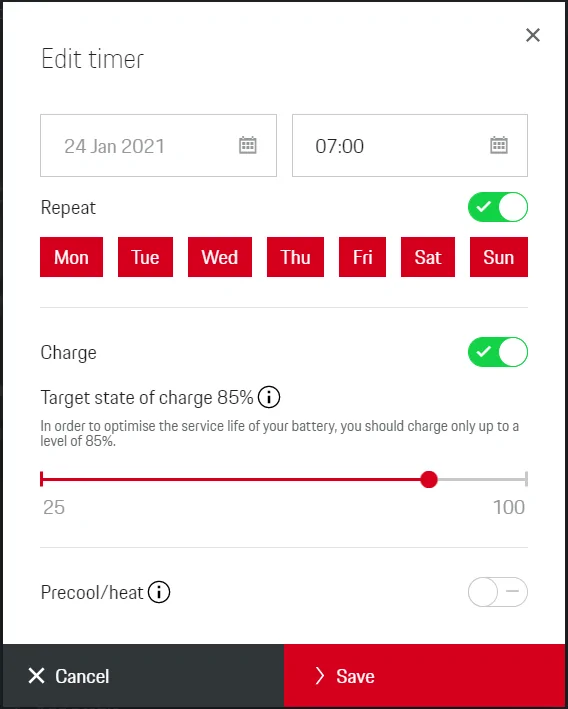
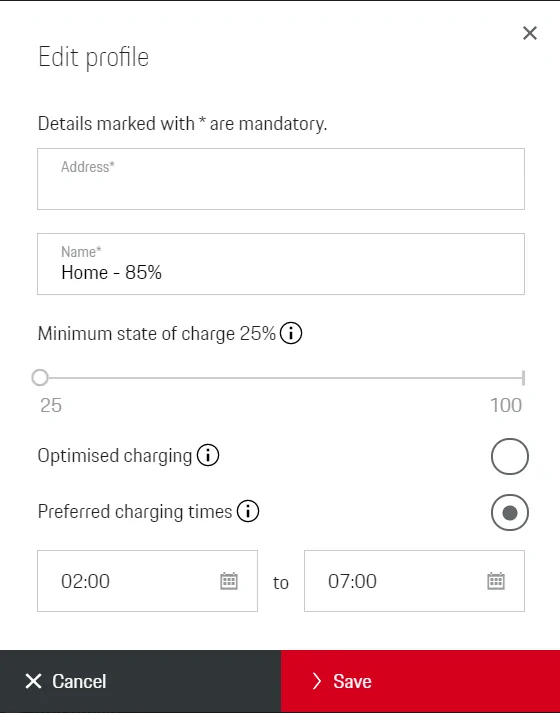
Use the following daily timer and location based profile. This will give you an 85% charge with a minimum of 25%. Plug in when you need to charge.

Delete all other profiles and timers.

Optimised charging only comes into play when using a Home Energy Manager (HEM) and can be disabled. If you are then any programming on that may be conflicting with your charging sessions.

Porsche Taycan Taycan Timer Daily Timer


Porsche Taycan Taycan Timer Profile - Preferred Charging Tim
 

WasserGKuehlt

Well-Known Member
Joined
Sep 7, 2022
Threads
5
Messages
2,066
Reaction score
2,456
Location
WA
Vehicles
4CT, 996C2, MacanS
Country flag
Also, what “charger”/EVSE are you using? Any config/settings on that one that may clash with the car’s timer?


Dee

Well-Known Member
First Name
Dee
Joined
Dec 14, 2018
Threads
78
Messages
3,499
Reaction score
4,039
Location
The Netherlands
Vehicles
A lot
Country flag
I've had my Taycan for 6 weeks and haven't figured out the timer charging. My dealer has played with it and made recommendations but nothing has worked.

I've set the timer for a 7AM departure with an 85% charge.
Under profiles, there's GENERAL, which I've set for a minimum 25% charge, and clicked "Optimized Charging"
I've also added a Profile that says 50% minimum charge. I've assumed if the car has a charge over 50% it won't charge.

What am I doing wrong?

The timer doesn't work for me, probably because I haven't set it up correctly - even with dealer/salesperson guidance.

Currently, my only way to charge is DIRECT CHARGING, which I uncheck when trying to use the TIMER.

Guidance would be greatly appreciated. My Porsche dealer, and the 800-PORSCHE support line haven't helped solve this issue.
Does it even start charging or doesn't it do anything at all?

First, delete your "Profile 50% minimum" (cuz "don't charge if SoC<50%" is exactly the same as "not plugging in"?).
After that: like @W1NGE posted.
 

WasserGKuehlt

Well-Known Member
Joined
Sep 7, 2022
Threads
5
Messages
2,066
Reaction score
2,456
Location
WA
Vehicles
4CT, 996C2, MacanS
Country flag
First, delete your "Profile 50% minimum" (cuz "don't charge if SoC<50%" is exactly the same as "not plugging in"
Not sure what you mean here; min 50% means "charge immediately until 50%". If one wanted to have at all times 50%+, that's exactly the profile they should create and enable.
 

Dee

Well-Known Member
First Name
Dee
Joined
Dec 14, 2018
Threads
78
Messages
3,499
Reaction score
4,039
Location
The Netherlands
Vehicles
A lot
Country flag
Not sure what you mean here; min 50% means "charge immediately until 50%". If one wanted to have at all times 50%+, that's exactly the profile they should create and enable.
No.
If it contradicts with an active timer it'll either stop or just go to 100%.
If he's only using a profile then yes, you are right but he's not.


WasserGKuehlt

Well-Known Member
Joined
Sep 7, 2022
Threads
5
Messages
2,066
Reaction score
2,456
Location
WA
Vehicles
4CT, 996C2, MacanS
Country flag
If it contradicts with an active timer it'll either stop or just go to 100%.
Not sure that's true, either; the profile is the min/lower boundary, and the timer is the target/upper. In the weird case where the timer's target is < profile's min, the car would still charge to the higher value of the two - and _then_ stop.
 

Dee

Well-Known Member
First Name
Dee
Joined
Dec 14, 2018
Threads
78
Messages
3,499
Reaction score
4,039
Location
The Netherlands
Vehicles
A lot
Country flag
Not sure that's true, either; the profile is the min/lower boundary, and the timer is the target/upper. In the weird case where the timer's target is < profile's min, the car would still charge to the higher value of the two - and _then_ stop.
If the timer starts within the profile it'll charge to 100% cuz the car sees this as a contradiction and choose the best option for the customer: charge to 100%.
Try it.
It highly depends on your charge rate, that'll determine if you are able to get to your set goal.
It all interacts with each other and once you combine the different factors it's pretty logical imho.

Note: there may be different charging software in different cars.
We've seen that in our Facebook group as well.
 

Perry

Well-Known Member
First Name
Daniel
Joined
Mar 26, 2021
Threads
14
Messages
382
Reaction score
672
Location
Sweden
Vehicles
Tesla SP85D, Model P3D, Taycan Turbo S CT
Country flag
First of all, make sure that the timer and profile are activated in the app. A common issue that people create a profile and/or timer, but then forget to activate it.

A profile is essentially the charge level that you want to keep the car at. When you plug in your car, it will immediately start charging up until it reaches the designated charge level. You have a base profile that is used as standard, or you can override it by adding new profiles that will be used in certain locations.

Compared to other brands like e.g. Tesla, a profile is more or less equivalent to charge limit.

A timer is a scheduled departure time when you want the car to be ready. The car will make sure that interior temperature is correct and/or that the car is charged to the level set in the timer (assuming it's higher than what is set in the profile). If you drive to work at 07:30, you can for example set a timer to make sure the car is warm and cozy at that time.

Combining both a profile and a timer, when you plug in the charger, the car will immediately charge to the limit set in the profile and then stop. Then, depending on the charge speed, it will resume charging again such that it will reach the charge limit set in the timer at the designated time.

So a typical use case is if you're going on a longer trip in the morning and need the car 100% charged. You can then set the profile to ~85% and a timer at 100%. When you plug in the car, it will charge to 85%, pause, and then later charge to 100% so that it is ready when you about to leave.

You also have an option to direct charge. If you activate direct charging, the car will ignore the profile and simply charge until it reaches 100% or until you deactivate it.

Note that when plugging in a fast charger (e.g. Ionity or Electrify America), the car will always charge to 100%.
 

WasserGKuehlt

Well-Known Member
Joined
Sep 7, 2022
Threads
5
Messages
2,066
Reaction score
2,456
Location
WA
Vehicles
4CT, 996C2, MacanS
Country flag
If the timer starts within the profile it'll charge to 100% cuz the car sees this as a contradiction and choose the best option for the customer: charge to 100%.
Try it.
Alright. I explained the algorithm above, and I’m not sure why you thought that didn’t count, or why ignoring user input and charging to 100% somehow makes sense.

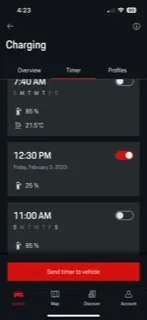
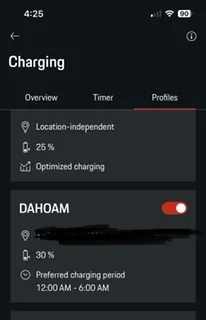
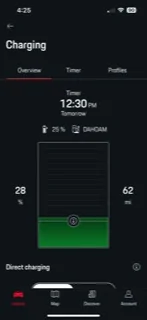
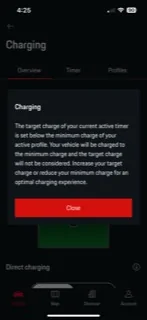
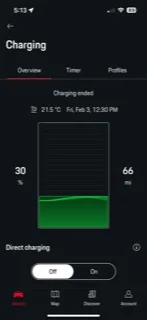
So I went and tried it - assuming I understood what you meant by “timer starts within the profile”. The pics should be self-explanatory, but anyway:
- starting SoC: 28
- timer set for ~20hrs from now, target SoC: 25. This is the only active timer.
- profile set to min SoC of 30. This is the only applicable profile, by location. The profile has preferred charging hours (12am to 6am)

According to my theory, starting charging now would have gone past the timer, go to 30% and stop. Your point was that it’d keep going - or did I misunderstand?

Porsche Taycan Taycan Timer D6786828-F84C-44BC-964A-B0EE88C2D556
Porsche Taycan Taycan Timer 41B12513-590A-4F48-B4B8-32ECF1CA2CDA
Porsche Taycan Taycan Timer 3C4C5EA9-FADA-459B-8333-F19FBE233D97
Porsche Taycan Taycan Timer 5E2552D2-0716-4F9F-962D-60D8E4A663E0
Porsche Taycan Taycan Timer F497B4AA-DEC6-4B1E-8EB1-ADC23E23683E
 

Finbo

Well-Known Member
First Name
Finlay
Joined
Sep 14, 2022
Threads
2
Messages
76
Reaction score
74
Location
Northern Ireland
Vehicles
Porsche Taycan Cross Turismo
Country flag
My Drivers charger decided it wasn’t going to work so had to change it over. Not first time but I’ve always had problems with charging

I leave the wall unit Easse open and use profile in the Porsche app. 25% min and timer set for 2 to 9 am winter which will change to 1-8 in the summer months

My charge jumped from 190 in near freezing to 215 at 10°c so hoping for 230-240 in always cold Northern Ireland summer
 

Tesla2Taycan

Well-Known Member
Joined
Jan 5, 2022
Threads
4
Messages
123
Reaction score
54
Location
Silicon Valley, CA
Vehicles
Tesla Model S P85 + Taycan GTS
Country flag
Not sure that's true, either; the profile is the min/lower boundary, and the timer is the target/upper. In the weird case where the timer's target is < profile's min, the car would still charge to the higher value of the two - and _then_ stop.
Based on your statement I want to understand what I should do in my case.
I connect my car at work every morning and I don’t want it to charge to 100% (I want to set to 85% and stop by 5pm) for battery health reasons.
What timer and profile settings should I use?
 
Last edited:

WasserGKuehlt

Well-Known Member
Joined
Sep 7, 2022
Threads
5
Messages
2,066
Reaction score
2,456
Location
WA
Vehicles
4CT, 996C2, MacanS
Country flag
You’d create a profile that is location based (and set to the workplace’s address) with a min SoC of 85% - that’s it, no timers.

Re 5pm stop time - depends on what you want to achieve: if it’s for the car to be ready and preheated, then use a timer set for 5pm, the same 85% SoC and heating/precooling etc.
If it’s that you want charging to stop at 5pm irrespective of SoC, then don’t use a timer. Instead, the same work profile should add a preferred charging interval of 12am-5pm.
Sponsored


Top