Sponsored

Charging to 80% but car went to 100#

PSUEric

Well-Known Member
First Name
Eric
Joined
Jul 25, 2023
Threads
15
Messages
114
Reaction score
233
Location
St Marys, Ga
Vehicles
2008 Infiniti G37S Coupe, 2015 Toyota Highlander
Country flag
This happened once before and I thought it was my mistake. I set the timer to 80% and the car in the garage reached it and stopped charging. Normally I would disconnect before going to bed, but last night I forgot and when I woke up, the car was fully charged. This happened a couple months ago and I thought I had accidentally moved the slider on the app from on to off.
So the question is if the timer is set to a number (less than 100%) and you fail to disconnect, why does it later continue charging to 100%?
On other news went over 12,000 trouble free miles today! Still smiling every time I drive it!
Sponsored

 

Jhenson29

Well-Known Member
First Name
Jeremy
Joined
Feb 9, 2021
Threads
37
Messages
3,014
Reaction score
4,650
Location
St. Louis, MO
Vehicles
2022 Macan S; 2021 Taycan 4S
Country flag
Please post pics of your timer and profile settings.
 

Fish Fingers

Well-Known Member
Joined
Feb 20, 2021
Threads
50
Messages
2,528
Reaction score
3,279
Location
UK
Vehicles
Sold
Country flag
This happened once before and I thought it was my mistake. I set the timer to 80% and the car in the garage reached it and stopped charging. Normally I would disconnect before going to bed, but last night I forgot and when I woke up, the car was fully charged. This happened a couple months ago and I thought I had accidentally moved the slider on the app from on to off.
So the question is if the timer is set to a number (less than 100%) and you fail to disconnect, why does it later continue charging to 100%?
On other news went over 12,000 trouble free miles today! Still smiling every time I drive it!
That happens here in the UK for people using intelligent utility providers (eg Octopus Intelligent Go).
These put their own custom charging schedules onto the car each time it's plugged in.

First night it hits the stated charge. But if you don't unplug it, the next night it charges to 100%.

No idea why, but it happened to me a few times when I forgot to unplug it and was confirmed by other members on here.
 

JIP1080

Well-Known Member
First Name
JP
Joined
Aug 16, 2023
Threads
1
Messages
166
Reaction score
211
Location
Atlanta, GA
Vehicles
Taycan GTS ST
Country flag
For the first time yesterday mine charged above target. I usually only have a profile set for 80%, but a week+ ago I bumped that up and set a timer as well in preparation for a trip. One time timer, deleted when I got home (and "sent to vehicle") and set my profile back to 80%. First charge back hit my target. Going on a trip again without the car, so set the new profile to 50%. Hit the target, alerted me, paused, then continued. If the timer had still been in place I would not have expected the pause just based on timing and charge speed. Verified direct charge was off, no timers, and confirmed the profile setting. Something I'll watch going forward, but guessing it was just a fluke. Unrelated I'm sure, but this same week the range dropped almost 20% without a change in the outside temps (if anything they went up). These cars are weird sometimes ?‍♂
 

SergeyIndy

Well-Known Member
First Name
Sergey
Joined
Dec 19, 2021
Threads
41
Messages
2,439
Reaction score
1,822
Location
Indianapolis
Vehicles
24 Macan GTS, 23 Taycan Turbo, 20 Cayenne Turbo
Country flag
This happened once before and I thought it was my mistake. I set the timer to 80% and the car in the garage reached it and stopped charging. Normally I would disconnect before going to bed, but last night I forgot and when I woke up, the car was fully charged. This happened a couple months ago and I thought I had accidentally moved the slider on the app from on to off.
So the question is if the timer is set to a number (less than 100%) and you fail to disconnect, why does it later continue charging to 100%?
On other news went over 12,000 trouble free miles today! Still smiling every time I drive it!
As @Jhenson29 stated we need pictures of all your charge setting screens.
One, the car will not go above the target of the Timer if everything else is set correctly.
Two, why are you setting a Timer to evening time and then unplugging the car. The intent of the Timer convenience is to set it to the morning time and keep the car plugged in overnight.


SergeyIndy

Well-Known Member
First Name
Sergey
Joined
Dec 19, 2021
Threads
41
Messages
2,439
Reaction score
1,822
Location
Indianapolis
Vehicles
24 Macan GTS, 23 Taycan Turbo, 20 Cayenne Turbo
Country flag
For the first time yesterday mine charged above target. I usually only have a profile set for 80%, but a week+ ago I bumped that up and set a timer as well in preparation for a trip. One time timer, deleted when I got home (and "sent to vehicle") and set my profile back to 80%. First charge back hit my target. Going on a trip again without the car, so set the new profile to 50%. Hit the target, alerted me, paused, then continued. If the timer had still been in place I would not have expected the pause just based on timing and charge speed. Verified direct charge was off, no timers, and confirmed the profile setting. Something I'll watch going forward, but guessing it was just a fluke. Unrelated I'm sure, but this same week the range dropped almost 20% without a change in the outside temps (if anything they went up). These cars are weird sometimes ?‍♂
I am not really following what you are trying to accomplish and yes the car charging controls with Timers/Profiles is the worst, but we have it all figured out here on the forum and know all the ways to set things up correctly to achieve the intended goals, so there is nothing that is "weird" or unexpected when things setup correctly and all the limitations understood by the owner.

If you could tell us what you want to accomplish as far as timing and state of charge, then we can tell exactly what needs to be setup and how, and I assure you there will be nothing weird about it after, unless there something wrong with the bits and pieces of the setup.
 

JIP1080

Well-Known Member
First Name
JP
Joined
Aug 16, 2023
Threads
1
Messages
166
Reaction score
211
Location
Atlanta, GA
Vehicles
Taycan GTS ST
Country flag
I am not really following what you are trying to accomplish and yes the car charging controls with Timers/Profiles is the worst, but we have it all figured out here on the forum and know all the ways to set things up correctly to achieve the intended goals, so there is nothing that is "weird" or unexpected when things setup correctly and all the limitations understood by the owner.

If you could tell us what you want to accomplish as far as timing and state of charge, then we can tell exactly what needs to be setup and how, and I assure you there will be nothing weird about it after, unless there something wrong with the bits and pieces of the setup.
I'm saying I've been working with the charging settings for over a year now, have the profiles and timers figured out (very much thanks to this forum) and use them without issue frequently, but this most recent charge I experienced something similar to what OP noted. My suspicion is that there is a state the car can get into where the charging continues beyond the target despite theoretically properly configured charging settings.

To review my setup:
Normally
Timer: None
Location: Home address
Profile: 80%, optimized
Direct Charge: Off
Result: x% -> 80% charge. Hold.

Most recent setup
Timer: None
Location: Home address
Profile: Set to 50%, optimized
Direct Charge: Off
Result: 17% -> 50%, alerted charge complete, multi-hour pause, 50% -> 55% and actively charging when I noticed.

@PSUEric - by chance do you have profiles by location? Wondering out loud if perhaps the car lost the GPS (or GPS was incorrect) and the car ignored the profile for the location it should have used.

Concrete example of what I'm asking
Setup:

Timers: None

Profile 1:
Location: Home address
Charge: 50%, optimized

Profile 2:
Location: Not set
Charge: 80%, optimized

Scenario: Car is parked at the "Home address" location. Car stars charging, hits Profile 1 target, is left plugged in. GPS drops / is weak and indicates car is 100m away. (Mine thought I was across the river on time when I got in).

In this case, could the car decide it is on Profile 2 and resume charging?
 

SergeyIndy

Well-Known Member
First Name
Sergey
Joined
Dec 19, 2021
Threads
41
Messages
2,439
Reaction score
1,822
Location
Indianapolis
Vehicles
24 Macan GTS, 23 Taycan Turbo, 20 Cayenne Turbo
Country flag
^ Very helpful context @JIP1080. This is my take on what should happen.

Both setups below should Hold not for long after the Profile level is reached and then go to 100%.
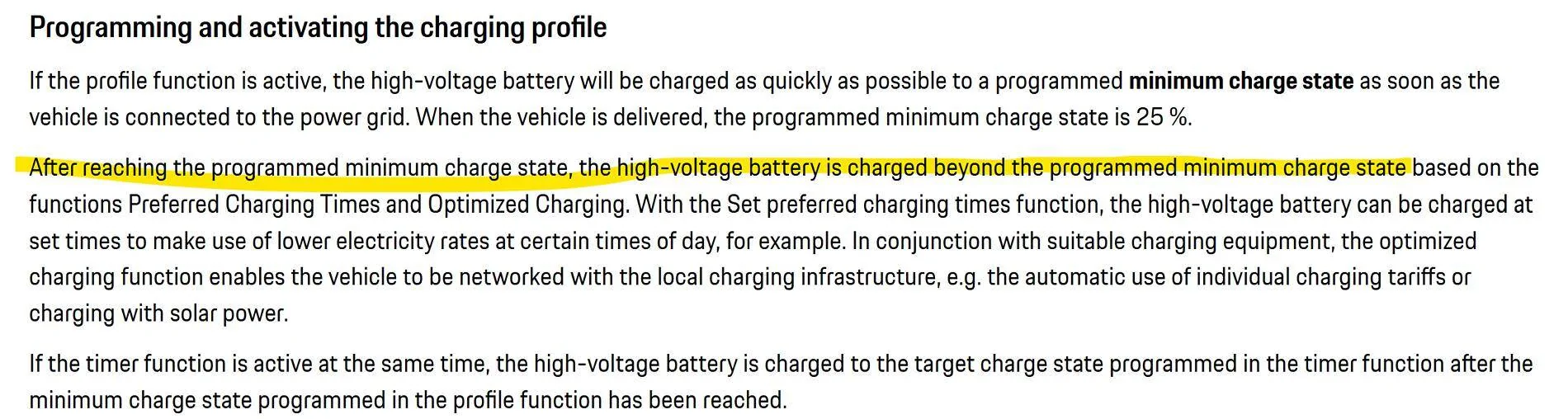
The reason is because Profile is a minimum instruction to the car to reach as soon as it is plugged in, then it looks for the next instruction, and if there is no Timer then it restarts charging to 100%.

Normally
Timer: None
Location: Home address
Profile: 80%, optimized
Direct Charge: Off
Result: x% -> 80% charge

Most recent setup
Timer: None
Location: Home address
Profile: Set to 50%, optimized
Direct Charge: Off
Result: 17% -> 50%.

Therefore, if you want to cap any percent charge, you must set a Timer (recurring not a one time), which is the instruction to the car to what charge state to reach BY THE TIME set in the Timer. Regardless of any other settings (Direct must be off) the car will ALWAYS charge to 25% as soon as it is plugged in, then it looks for the next instruction, and if you have a Timer set then it will draw charge on and off over the period of time to reach the Timer target charge state by the time set in the Timer which is intended to be a Departure time.


For example, If your use case is to depart every day in the morning at 8am and have the car be at 80% SoC, then this is the setup:

Plug-in Time: Evening, if below 25% charge starts asap to 25% then goes into Pause
Timer: Recurring Every Day 8am with 80% target
Location: Home address
Profile: None
Direct Charge: Off
 
Last edited:


Jhenson29

Well-Known Member
First Name
Jeremy
Joined
Feb 9, 2021
Threads
37
Messages
3,014
Reaction score
4,650
Location
St. Louis, MO
Vehicles
2022 Macan S; 2021 Taycan 4S
Country flag
Both setups below should Hold not for long after the Profile level is reached and then go to 100%.
The reason is because Profile is a minimum instruction to the car to reach as soon as it is plugged in, then it looks for the next instruction, and if there is no Timer then it restarts charging to 100%.
A profile set to optimized (and no HEM) with no timer will not charge past the min.
Wondering out loud if perhaps the car lost the GPS (or GPS was incorrect) and the car ignored the profile for the location it should have used.
Sounds reasonable to me. I’ve only ever used the general profile and have never had an issue.
 

SergeyIndy

Well-Known Member
First Name
Sergey
Joined
Dec 19, 2021
Threads
41
Messages
2,439
Reaction score
1,822
Location
Indianapolis
Vehicles
24 Macan GTS, 23 Taycan Turbo, 20 Cayenne Turbo
Country flag
A profile set to optimized (and no HEM) with no timer will not charge past the min.
This may work for you but clearly for @JIP1080 in the second use case, the car went past it, which to me is expected behavior as by definition Profile is a minimum and Optimized is a meaningless setting in the US as it is just a Default with no support for anything intelligent. I am happy to test this out and report back.
 

Jhenson29

Well-Known Member
First Name
Jeremy
Joined
Feb 9, 2021
Threads
37
Messages
3,014
Reaction score
4,650
Location
St. Louis, MO
Vehicles
2022 Macan S; 2021 Taycan 4S
Country flag
This may work for you but clearly for @JIP1080 in the second use case, the car went past it, which to me is expected behavior as by definition Profile is a minimum and Optimized is a meaningless setting in the US as it is just a Default with no support for anything intelligent. I am happy to test this out and report back.
Ok. Test. Lots of people use profiles exactly as I describe. I’ve been doing it for 3.5 years.

@JIP1080 describes something different where there are two profiles, one location based and one not, and suggests a possibility of the car switching from the location one to the general one on some type of GPS error. So it’s not that it’s charging past the profile min. It’s using a different profile and charging to that min. Or, another example, if one doesn’t have a general profile enabled, it may just change to 100% in this case. Honestly, that’s what I would expect. This may be the cause of some of the reported “charge past min” issues. I don’t know. Again, I’ve always only ever used a general profile and never had it charge past min, unless I set a timer to do so.
 

JIP1080

Well-Known Member
First Name
JP
Joined
Aug 16, 2023
Threads
1
Messages
166
Reaction score
211
Location
Atlanta, GA
Vehicles
Taycan GTS ST
Country flag
^ Very helpful context @JIP1080. This is my take on what should happen.

Both setups below should Hold not for long after the Profile level is reached and then go to 100%.
The reason is because Profile is a minimum instruction to the car to reach as soon as it is plugged in, then it looks for the next instruction, and if there is no Timer then it restarts charging to 100%.

Normally
Timer: None
Location: Home address
Profile: 80%, optimized
Direct Charge: Off
Result: x% -> 80% charge

Most recent setup
Timer: None
Location: Home address
Profile: Set to 50%, optimized
Direct Charge: Off
Result: 17% -> 50%.

Therefore, if you want to cap any percent charge, you must set a Timer (recurring not a one time), which is the instruction to the car to what charge state to reach BY THE TIME set in the Timer. Regardless of any other settings (Direct must be off) the car will ALWAYS charge to 25% as soon as it is plugged in, then it looks for the next instruction, and if you have a Timer set then it will draw charge on and off over the period of time to reach the Timer target charge state by the time set in the Timer which is intended to be a Departure time.


For example, If your use case is to depart every day in the morning at 8am and have the car be at 80% SoC, then this is the setup:

Plug-in Time: Evening
Timer: Recurring Every Day 8am with 80% target
Location: Home address
Profile: None
Direct Charge: Off
Been away reading back through the various charging related posts for a bit and going through my app settings.

I'm going to put my hand up here and say I was wrong about my setup ?‍♂. I have a location independent General profile as well. It's on and set to 80%. It's sitting alongside my 50% home location profile right now. That's on me for missing and I apologize!! So in reality my setup is the scenario I was asking about apparently. Feeling like a moron at the moment messing that up in the threads here.

The goal for me was the faux maximum (hit the minimum with no more instructions so it holds). I've run for a year with the home profile set to 80% (and the general profile at 80% as well). No timers except when I was going on a known trip. For the last year it had reliably stopped at my minimum and held, per @Jhenson29 's posts in thread https://www.taycanforum.com/forum/threads/taycan-charging-quick-reference-profiles-and-timers.6799/

It did this same charge to the profile minimum 80% and stop this past Sunday. But then Thursday evening I set a 50% profile minimum target on my home location profile and sent it to the car. It did the behavior I described charging to 50%, telling me it had hit the target, holding for hours, then continuing.
I'm out of town for as bit, but I'm curious to test when I get back to leave the two profiles as-is and observe the behavior over a longer period.
 

W1NGE

Well-Known Member
First Name
Adrian
Joined
Jan 11, 2021
Threads
53
Messages
11,015
Reaction score
6,805
Location
Aberdeen, Scotland
Vehicles
992.2, ex GTS ST owner, Macan T
Country flag
This happened once before and I thought it was my mistake. I set the timer to 80% and the car in the garage reached it and stopped charging. Normally I would disconnect before going to bed, but last night I forgot and when I woke up, the car was fully charged. This happened a couple months ago and I thought I had accidentally moved the slider on the app from on to off.
So the question is if the timer is set to a number (less than 100%) and you fail to disconnect, why does it later continue charging to 100%?
On other news went over 12,000 trouble free miles today! Still smiling every time I drive it!
Yes - consult the manual and it will point out that after 30 mins of completing a charging session and not at 100% then charging will recommence.

Use a daily timer and profile to manage this better. Car will wait until the next charger event after reaching target charge.
 

SergeyIndy

Well-Known Member
First Name
Sergey
Joined
Dec 19, 2021
Threads
41
Messages
2,439
Reaction score
1,822
Location
Indianapolis
Vehicles
24 Macan GTS, 23 Taycan Turbo, 20 Cayenne Turbo
Country flag
Ok. Test. Lots of people use profiles exactly as I describe. I’ve been doing it for 3.5 years.
Sounds good. I am testing now and curious to what happens as it is against my understanding of how Profiles work on their own.
 

SergeyIndy

Well-Known Member
First Name
Sergey
Joined
Dec 19, 2021
Threads
41
Messages
2,439
Reaction score
1,822
Location
Indianapolis
Vehicles
24 Macan GTS, 23 Taycan Turbo, 20 Cayenne Turbo
Country flag
Yes - consult the manual and it will point out that after 30 mins of completing a charging session and not at 100% then charging will recommence.

Use a daily timer and profile to manage this better. Car will wait until the next charger event after reaching target charge.
Exactly my point to @Jhenson29, but given his strong statement it blows my understanding of Profiles so I am testing it for myself. We live in near by cities in the US so I do not expect results to differ.

This is the manual that supports my understanding, but this is not as clear cut as it may appear, because Optimized charging may mean that the car does not know what to do next as nothing "optimizing" is supported in the US and stops at a minimum to @Jhenson29 point, given nothing else is setup. I am testing...

Porsche Taycan Charging to 80% but car went to 100# 1734799861910-0
Sponsored

 
Last edited:


Top