okkotonushi
Well-Known Member
- First Name
- Dirk
- Joined
- Feb 4, 2021
- Threads
- 4
- Messages
- 104
- Reaction score
- 87
- Location
- Germany
- Vehicles
- Porsche Taycan 4S+, Porsche Taycan CT Turbo S, Porsche 992 S, Genesis GV60 Sport

Ok. Understood
Sponsored


I just tried this for the first time and it is very nice: it simply works! (much easier to use than my OBD reader).1. Introduction
I have not written much here before, but this will change. This is Part 1 in a series, which eventually will take a deep dive into the J1 platform powertrain electronics, and hopefully bring some light to some concepts on a level not seen before by the public.
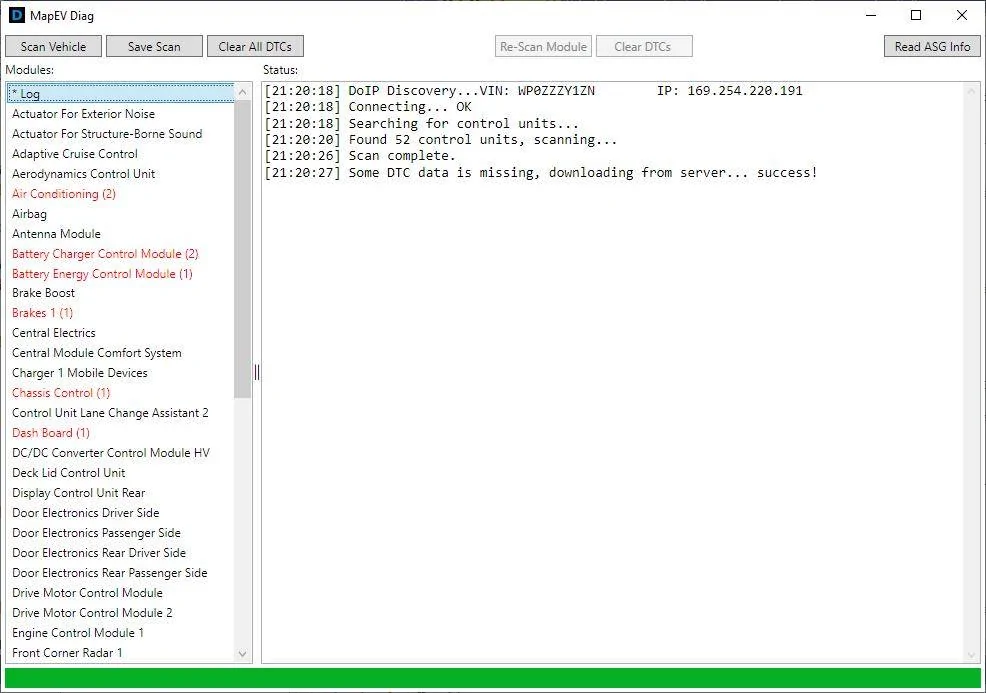
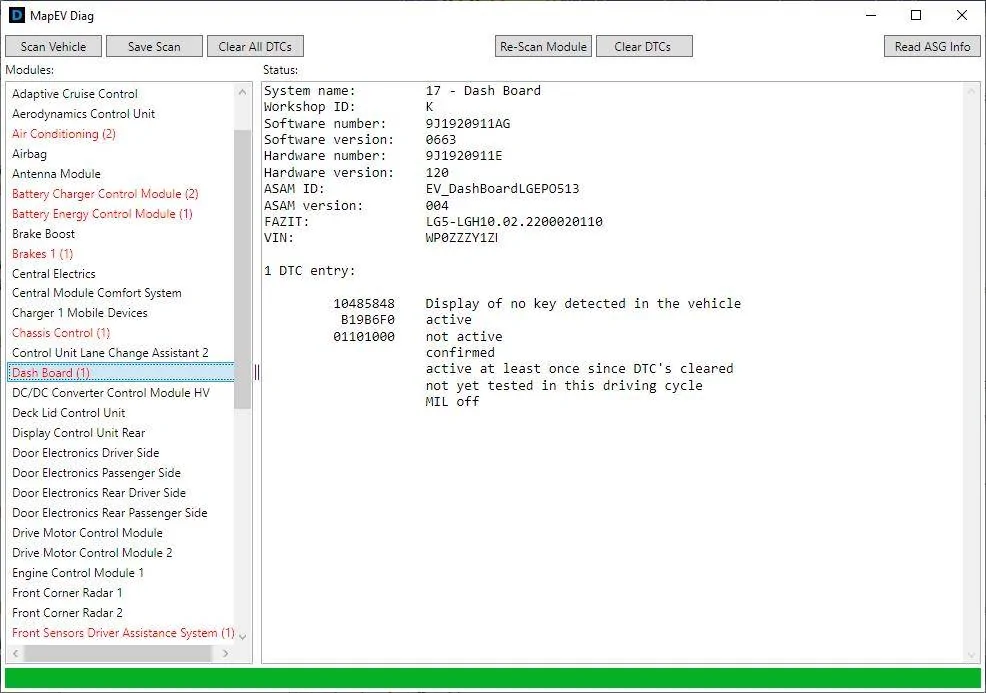
As Part 1, I am releasing a free diagnostics tool for the J1.1 platform. All the modules in the car are scanned in under 10 seconds, the fault codes fully decoded according to OEM data, and displayed to the user. The full scan can also be saved to a text file for easy sharing.
Here is the download link:
https://mapev.net/download/mapevdiag/setup.exe
2. Screenshots
It is said a picture tells more than a hundred words, so without further ado:

3. Requirements
You need a couple of things to run the application:
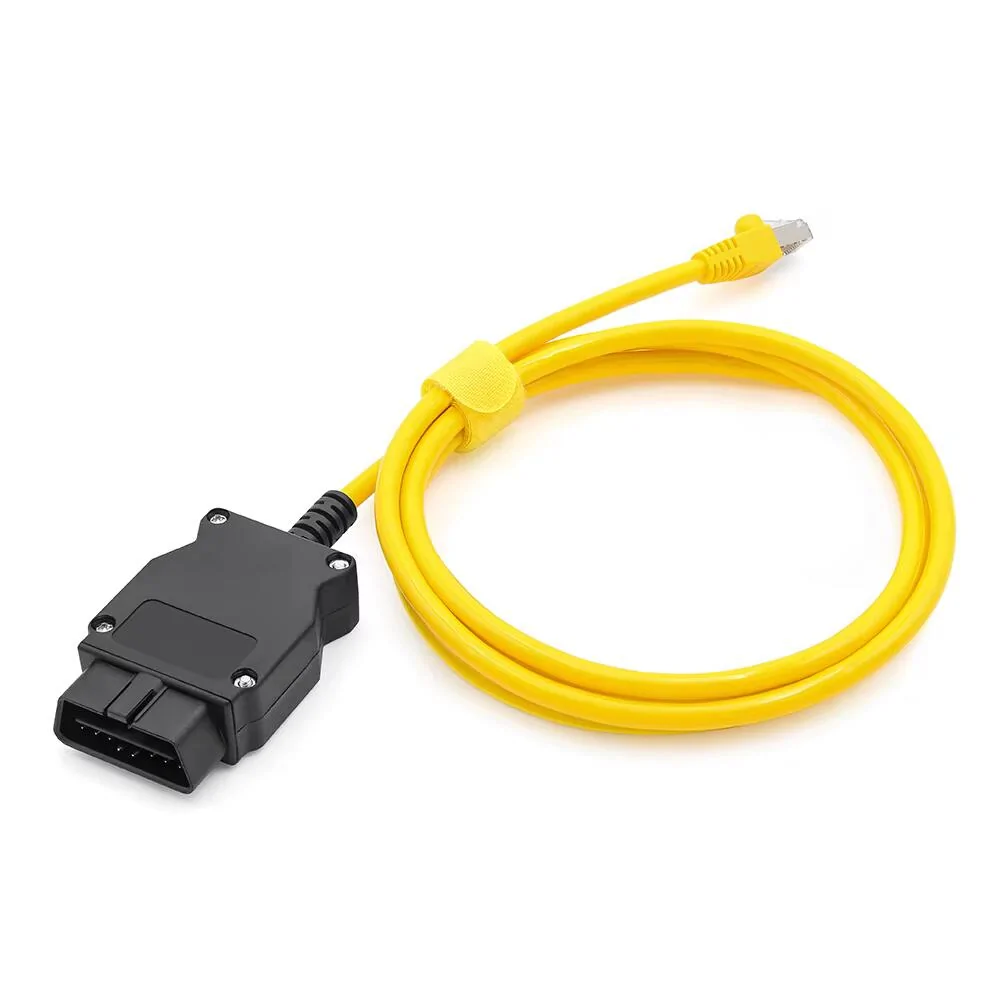
The cable used is the "BMW ENET" cable. You can find it on AliExpress or Amazon under $10, a typical one looks like this:
- An OBD II to Ethernet cable (e.g. BMW ENET Cable), more about that below.
- A Windows PC running Windows 10 or later.
- An internet connection the first time you connect to the car.

If your laptop does not have an Ethernet port, then you will additionally need an USB to Ethernet adapter. Just search "USB to Ethernet adapter" on Amazon, you should find some below $10 as well.
4. Mechanism of action
The J1 platform has a fully ISO 13400 (also called DoIP) compliant Gateway inside. This means that instead of expensive interfaces, all the modules can be queried using ethernet. The tester (PC) communicates with the Gateway, and the Gateway takes care of converting the requests to Flexray and CAN, communicating with the modules directly.
An additional benefit is, that the Gateway allows communications to a large amount of modules in parallel. This is how the tool is able to scan the whole car in under ten seconds. It talks to over a dozen modules simultaneously.
After the fault codes and the identifiers of all the modules have been read out, the app needs a dictionary to translate the 32 bit code of each DTC to something actually useful to the user. This information is stored on the server, because there are over 700 different variants of data for the J1 platform as of writing, there will no doubt be new variants as updates come out, and it did not make sense to download everything, as each car needs less than 10% of that.
The first time you scan your car, the tool downloads the required dictionaries for the modules in your actual car and caches them locally. On subsequent scans, as long as the dictionaries are present the tool no longer connects to the MapEV server apart from checking for updates on startup.
5. Downloading software from the internet
Downloading software from the internet can be dangerous. Especially when said software is unsigned. In case of MapEV diag, the software is signed by my business, and my company has enough smartscreen reputation with Microsoft, that it does not trigger any warnings. I create tools used by thousands of tuners daily - you can see some of my software here: https://www.vehical.net/
I have explained exactly what the software does to the best of my ability. The software is completely free to use, and if I ever decide to not support the infrastructure behind it anymore, I promise that I will make the software fully open source, so that it can live on.
6. What is the catch?
They say when something is free then you are the product. This is not the case here. There are a few reasons why I have created this software, and I will outline them below:
The first reason is that unlike VCDS for the E-tron, there is no good alternative for the Taycan. Many modules can not be scanned with VCDS, as the ODX variants used are Porsche specific. Because I have commercial software that already has all the DTC information, it was not very difficult to create a spinoff variant just for the Taycan and E-tron GT.
The second reason is, that in my experience the dealers do not proactively fix faults. Every single Taycan I have scanned has had quite a few issues, which the dealer will never acknowledge, unless you tell them. From defect and degraded battery chargers, to simple things, such as the aircon flaps being stuck and blowing cold air all the time. The car knows about all these problems, but the dealer will not do anything until you tell them that something is wrong.
And the final reason - the more keen of you probably noticed the "Upload ASG Data" in the upper right corner. After "Part 2" and "Part 3", which will deal in-depth with the battery, inverters, motors and the ASG, you will be able to order a plug and play ASG controller with more power right from the app.
7. How do I contact you?
You can find a contact e-mail on the website: https://www.mapev.net
Please do not ask me how to fix something on your car though, I probably can not help with that. If something does not work in the app, do let me know.


I am glad it worked. Most likely you did not have the pre-requisites installed, and then the ClickOnce installer installs those as well.I just tried this for the first time and it is very nice: it simply works! (much easier to use than my OBD reader).
I installed in Windows 11 Pro and it complained and wanted to delay installation until it could do a deeper scan - but ultimately it got installed).
I am looking forward to Parts 2 and 3 (and would love it to cover Battery SOH).
Your work on this really appreciated!


If you can, would be useful to edit and link part 2 in the first post of part 1.I am glad it worked. Most likely you did not have the pre-requisites installed, and then the ClickOnce installer installs those as well.
I use the most standard deployment method that exists done by Microsoft - this ensures maximum compatibility.
Part 2 can be found here:
https://www.taycanforum.com/forum/threads/part-2-the-j1-powertrain.25796/
For Battery SoH, I can add that readout, no big deal.

Agree. Done.If you can, would be useful to edit and link part 2 in the first post of part 1.
Yes, I think so too. I will think how to do this, and add this after Part 3.And battery SoH readout and any other battery info that can be read will definitely be nice


I cannot wait! Sounds very interesting. Keep it coming. This kind of sharing is very useful to the forum. Great work.The read ASG function reads out some data from the controller that I need to ship a brand new tuned ASG to the customer.
I developed flashing software and have calibrated the Turbo S, Turbo, 4S with both small and large battery, the Etron GT and the Etron GTRS.
I make my living creating factory level calibration data logging software, and I have done that for the Taycan as well. It needs an unlocked ECU with a patch though. But after that I can see and log a little over 33000 parameters from the ASG.
Hence me being able to develop calibrations that surpass what is on the market at the moment. And none of the fake "estimated" numbers, because the car knows exactly how much power and torque it is making on each axle.
I was also able to put the car into factory dyno mode and run it on my 4x4 dyno. It is very much possible.
But more about that in Part 2 and Part 3. Including the power and torque graphs for all the inverter and motor combinations and much more.
You can thank UN regulations 155 and 156.Will the tool work at all with the J1.2 platform? As I understand it, the gateway has to be unlocked even to pull fault codes on the newer cars, due to SFD, and unlocking requires a PPN subscription and PIWIS 4. It's not clear to me whether it's possible for a regular owner to get a PPN subscription. Can you shed any light on this situation?


Yes, it was asked for already, and I will do it.Would it be possible to read the SoH value and display it at part of the Scan results?
It is a useful parameter; and if it is an easy option to code - it would be much appreciated.
I have an old 2017 MacBook Pro that still works great. I just used Boot Camp (part of MacOS) to partition the drive and create a bootable windows partition. It requires you to download a Win10 iso file (you get this directly from the Microsoft site). The process was super easy and now I have Win10 running on my Mac. My OBD cable arrives tonight so I will test it and report back with results.Any chance to get it for MacOS?
I have the exact same setup and can confirm that the program works without any problem.... exactly as it would work on any native Windows laptop.I have an old 2017 MacBook Pro that still works great. I just used Boot Camp (part of MacOS) to partition the drive and create a bootable windows partition. It requires you to download a Win10 iso file (you get this directly from the Microsoft site). The process was super easy and now I have Win10 running on my Mac. My OBD cable arrives tonight so I will test it and report back with results.