Sponsored

whitex

Well-Known Member
Joined
Jul 30, 2021
Threads
87
Messages
8,193
Reaction score
7,236
Location
WA, USA
Vehicles
2023 Taycan TCT, 2024 Q8 eTron P+
Country flag
there is no-correlation of EVSE charging logs w/vehicle charging that I've seen/experienced - the Tesla EVSE logs just report "raw" charging sessions - duration and total kWh's…it's as simple as simple can be…you'd have to sit in the car and view any "in car" charging logs and manually find the same entry in the EVSE logs to see what there are for any differences - I do not currently have a Tesla - but have some in my family but they are not easily accessable to me - I'll check it out more thoroughly when my son visits next…

I've included a screen shot from the Tesla.app for a Tesla Gen3 EVSE charging log - based on the kWh amounts I think this is the one I primarily use w/2021 Cayenne eHybrid - very few kWh's and charging times not restricted to "off peak" (small battery I suffer the cost of "peak" rates in order to keep the Hybrid topped off when possible)

there is no integration between vehicle & EVSE that I've observed - but I might be missing something.

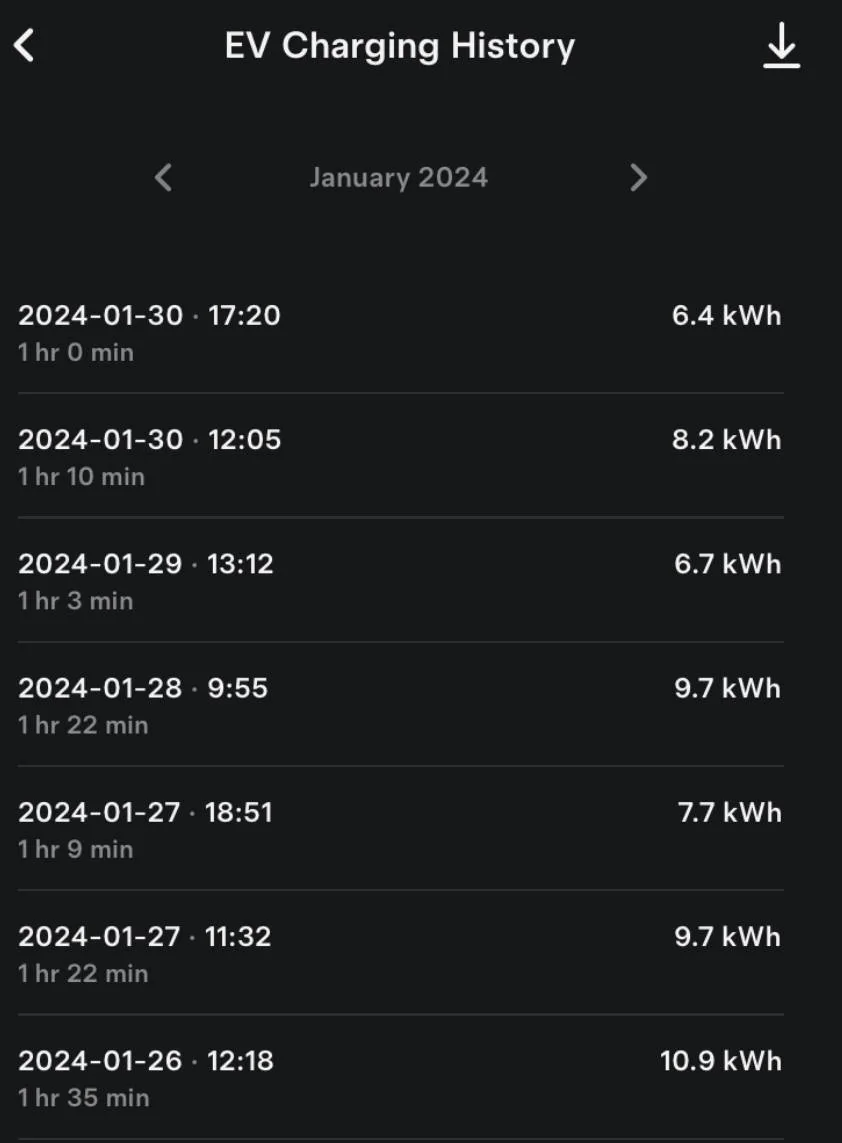
IMG_2069.jpeg
Thanks Dave. I know the Tesla app used to have charging history from the (Tesla) car too, including nice graphs and cost calculations, etc - did they remove that once you add an EVSE? That is by the way what I thought would make sense to correlate, especially that Tesla EVSE can get a VIN number of the car charging via the Tesla protocol.
Sponsored


daveo4EV

Well-Known Member
First Name
David
Joined
Jan 28, 2019
Threads
192
Messages
7,003
Reaction score
10,473
Location
Santa Cruz
Vehicles
Cayenne Hybrid, 911(s) GT3/Convertable
Country flag
Thanks Dave. I know the Tesla app used to have charging history from the (Tesla) car too, including nice graphs and cost calculations, etc - did they remove that once you add an EVSE? That is by the way what I thought would make sense to correlate, especially that Tesla EVSE can get a VIN number of the car charging via the Tesla protocol.
none that I've found but i do not "own" a Tesla and I don't have a Tesla EV in my app that uses my EVSE's

the EVSE's in my case are associated with a "home" and more closely related to my Solar/Powerwall setup - from my perspective the home and vehicles are not "integrated" to correlate any given charging session with one another

you can control Tesla-EV charging with Powerwalls to charge your Tesla when you have "excess" Solar power and limit how much charging you do that would drain your Powerwalls when the grid is down…

but no apparent "integration" to de-duplicate any given EV charging session stats from the EV correlated with the EVSE log entry - but again I could be wrong as I'm not longer a "full" Tesla "victim" - just solar+powerwalls+EVSE (their strongest products vs. competion these days in my opinion).
 

snstevens

Well-Known Member
First Name
Sam
Joined
Jul 10, 2020
Threads
31
Messages
1,334
Reaction score
1,739
Location
Kirkland, WA United States
Vehicles
Taycan 4S
Country flag
now that they are confiscating 240V cables from all PMCC's
I heard about this earlier, but nothing in a long time, and no one has contacted me about replacing the pigtails connectors from the NEMA 14-50 to the PMCC.

Does anyone know what is going on with this?

UPDATE - Apparently I fell behind on my reading. The status update I requested is HERE.
 
Last edited:

24Neptune

Well-Known Member
First Name
Cheryl
Joined
Jan 16, 2024
Threads
2
Messages
58
Reaction score
71
Location
Texas
Vehicles
2024 Porsche Taycan RWD, 2024 Audi SQ5 Prestige
Country flag
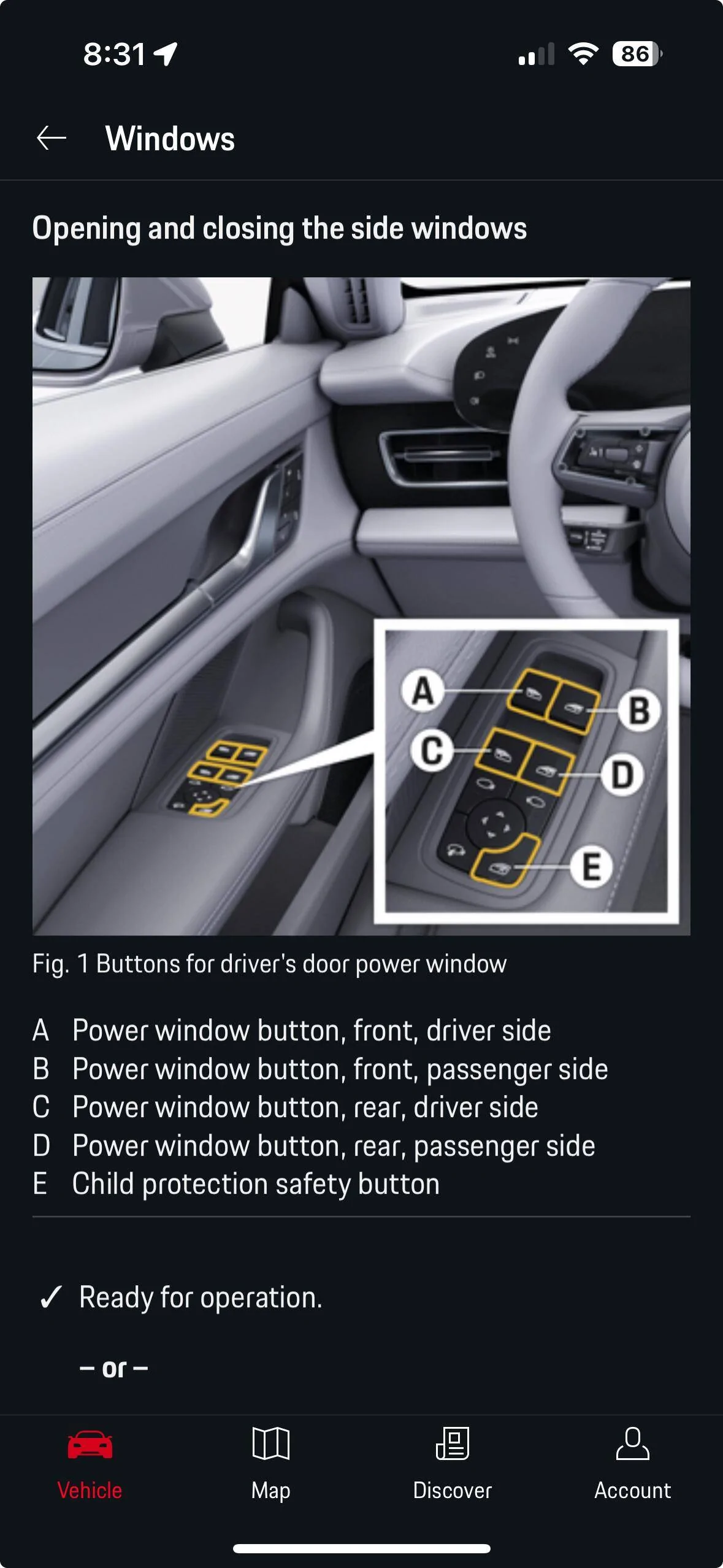
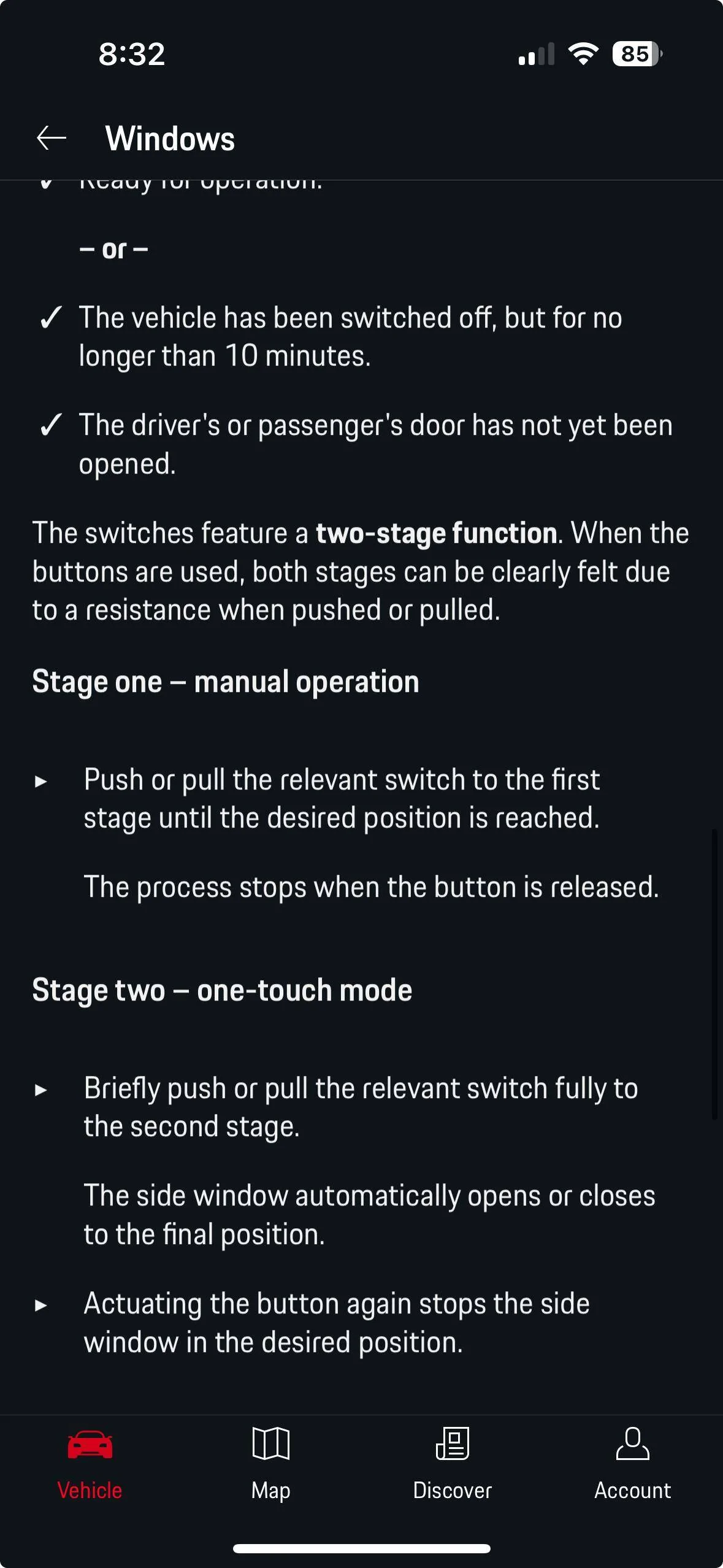
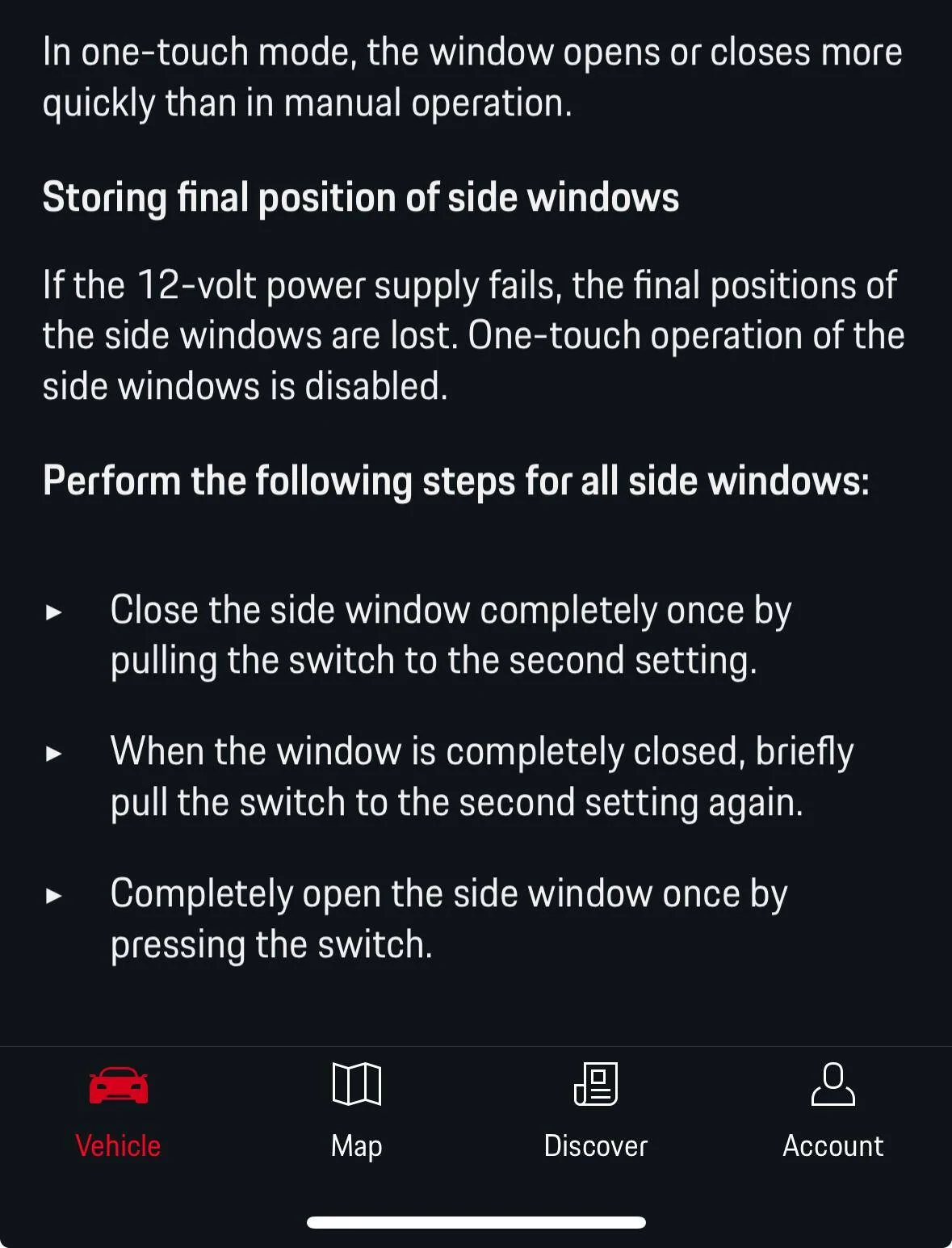
This may help (or not ?). See the three screenshots of the My Porsche mobile app on the page "Opening and closing the side windows".

Screenshot 2024-01-29 at 8.31.20 PM.png
Screenshot 2024-01-29 at 8.32.05 PM.png
Screenshot 2024-01-29 at 8.32.30 PM.png


The information of interest is on the third page - "Storing final position of side windows". This refers to the situation that can occur (probably during a service visit) when the location of the side window is "lost", disabling the Stage two - One touch mode.

After dealing with the "Left/Right Rear Window" unlocked message, I tried following the instructions by following the last 3 bullets on the third page. The key appears to be the second bullet - pulling the windows switch up to the second setting - to signal to the car that the window position is Closed.

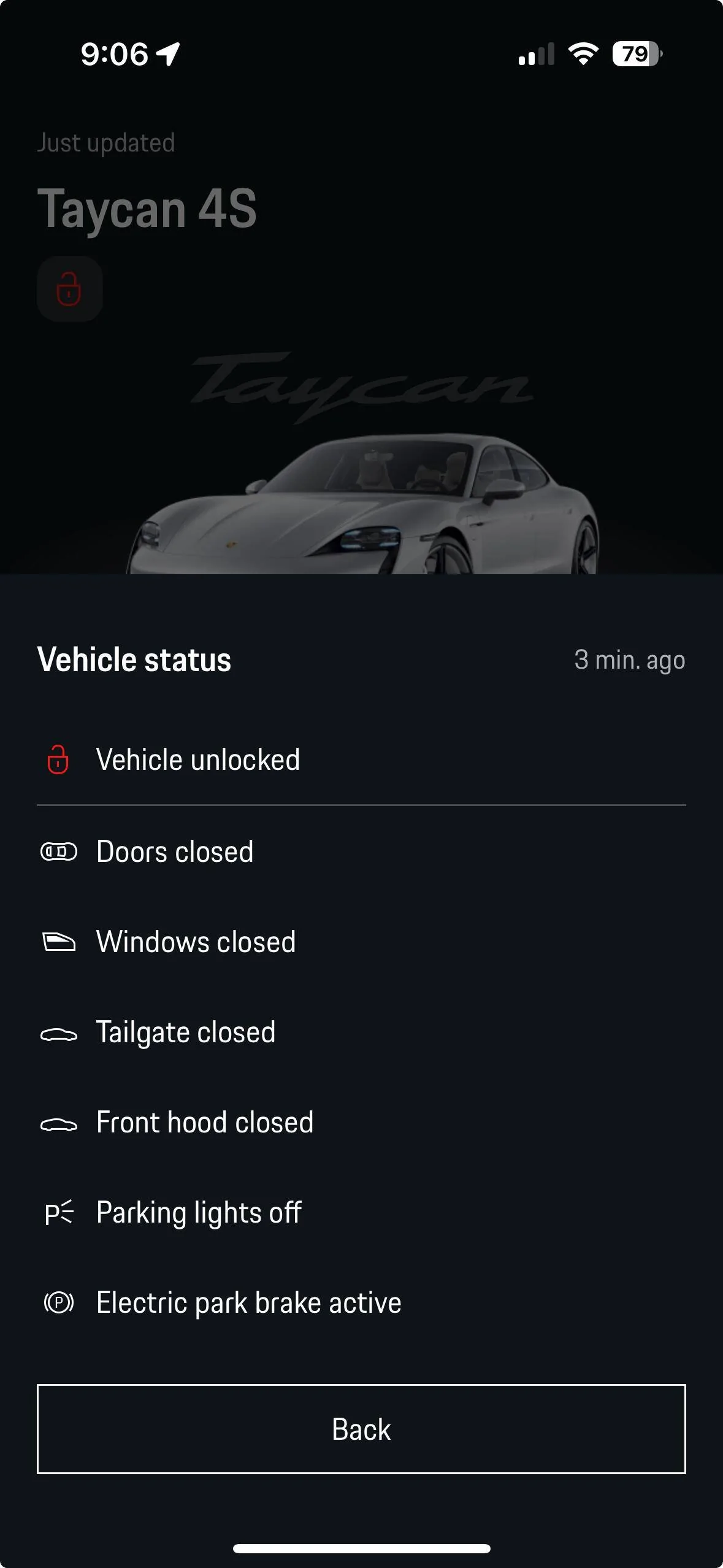
As I walked away from the car I checked the Lock Icon status in the My Porsche App and it changed 2-3 times before stabilizing as shown below. I think it was picking up the status from me opening the car (Left Door Open), then eventually it showed all the windows closed and the car itself unlocked (I don't lock it in the garage).

Screenshot 2024-01-29 at 9.06.16 PM.png


I have no idea if this will stick or not, but I'm encouraged. Good luck!
Wow lol I just started a thread bc my vehicle status in upper left corner of app disappeared today and I had seen the “Left/Right rear window” unlocked message last night which didn’t mean anything to me until I read your post in this thread.

I followed the bullets and my status in the app came back so thank you!?
 

PorscheCH

Well-Known Member
Joined
Nov 3, 2021
Threads
11
Messages
298
Reaction score
213
Location
Switzerland
Vehicles
taycan turbo CT
Country flag
Posting here because it seems related to the app update. While it s faster and has an improved layout, it broke the remote parking feature. Specifically, it broke the connection to the car. It stopped working right after the update. It shows “no connection“ for 3-4 times, then it hangs on “establishing connection” indefinitely. Everything else seems ok. Has anyone with remote parking experienced the same? Thanks
Porsche Taycan [Updated] My Porsche App updated w/ new interface and functions IMG_2141


snstevens

Well-Known Member
First Name
Sam
Joined
Jul 10, 2020
Threads
31
Messages
1,334
Reaction score
1,739
Location
Kirkland, WA United States
Vehicles
Taycan 4S
Country flag
Posting here because it seems related to the app update. While it s faster and has an improved layout, it broke the remote parking feature. Specifically, it broke the connection to the car. It stopped working right after the update. It shows “no connection“ for 3-4 times, then it hangs on “establishing connection” indefinitely. Everything else seems ok. Has anyone with remote parking experienced the same? Thanks
Although I have a ParkAssist feature in my 4s, I've never had any access to parking via the app. This is probably something implemented in Switzerland, so hopefully someone else can offer a solution.
 

Argo

Well-Known Member
Joined
Sep 26, 2023
Threads
0
Messages
89
Reaction score
240
Location
Switzerland
Vehicles
Cross Turismo Turbo S
Country flag
Posting here because it seems related to the app update. While it s faster and has an improved layout, it broke the remote parking feature. Specifically, it broke the connection to the car. It stopped working right after the update. It shows “no connection“ for 3-4 times, then it hangs on “establishing connection” indefinitely. Everything else seems ok. Has anyone with remote parking experienced the same? Thanks
IMG_2141.webp
Posting here because it seems related to the app update. While it s faster and has an improved layout, it broke the remote parking feature. Specifically, it broke the connection to the car. It stopped working right after the update. It shows “no connection“ for 3-4 times, then it hangs on “establishing connection” indefinitely. Everything else seems ok. Has anyone with remote parking experienced the same? Thanks
IMG_2141.png
Hello from Switzerland, my remote parking is also broken.
I have had exactly the same issue and the "establishing connection" screen since the app updated.
The other remote functions (pre heat, door locking, battery status etc) all work fine.
I have tried all options I could find to rectify (privacy mode on/off, log out of car, different phone SIM, different mobile provider, PCM reboot etc etc). My LTE is working, emergency light green, car otherwise all OK.
In car bluetooth connected fine, plays music when connected.
In car park assist appears to be operable, no dash warnings or failure lights.

Its not a deal breaker for driving, just frustrating, a solution would be most welcome
 

whitex

Well-Known Member
Joined
Jul 30, 2021
Threads
87
Messages
8,193
Reaction score
7,236
Location
WA, USA
Vehicles
2023 Taycan TCT, 2024 Q8 eTron P+
Country flag
This may help (or not ?). See the three screenshots of the My Porsche mobile app on the page "Opening and closing the side windows".

Screenshot 2024-01-29 at 8.31.20 PM.webp
Screenshot 2024-01-29 at 8.32.05 PM.webp
Screenshot 2024-01-29 at 8.32.30 PM.webp


The information of interest is on the third page - "Storing final position of side windows". This refers to the situation that can occur (probably during a service visit) when the location of the side window is "lost", disabling the Stage two - One touch mode.

After dealing with the "Left/Right Rear Window" unlocked message, I tried following the instructions by following the last 3 bullets on the third page. The key appears to be the second bullet - pulling the windows switch up to the second setting - to signal to the car that the window position is Closed.

As I walked away from the car I checked the Lock Icon status in the My Porsche App and it changed 2-3 times before stabilizing as shown below. I think it was picking up the status from me opening the car (Left Door Open), then eventually it showed all the windows closed and the car itself unlocked (I don't lock it in the garage).

Screenshot 2024-01-29 at 9.06.16 PM.webp


I have no idea if this will stick or not, but I'm encouraged. Good luck!
Update. It was a very very good suggestion, however I went through the windows final position storing for the rear windows twice in the last couple of days. It did not fix it. The only time the app didn't tell me my windows were still open was when the app couldn't connect to the car, so it decided to fake it and tell me car is all closed, including windows. I started a separate thread on this.

EDIT: I checked the car status aging just as I was typing the above, windows showed open. But I just went back to the app, 20 minutes later, to screencap the "Remote Parking" button, and wow, the app showed windows all closed. The car has been parked in my driveway undisturbed during those 20 minutes. I even flashed the turn signals via the app to make sure it's not faking the car status, and the lights flashed, so it seems to have some connectivity to the car. So the windows status still seems random. :confused:
 
Last edited:


whitex

Well-Known Member
Joined
Jul 30, 2021
Threads
87
Messages
8,193
Reaction score
7,236
Location
WA, USA
Vehicles
2023 Taycan TCT, 2024 Q8 eTron P+
Country flag
Although I have a ParkAssist feature in my 4s, I've never had any access to parking via the app. This is probably something implemented in Switzerland, so hopefully someone else can offer a solution.
It's a feature available in the US too, on the app it shows up as this icon:
Porsche Taycan [Updated] My Porsche App updated w/ new interface and functions 1707043341931
 

Hirschaj

Well-Known Member
First Name
Jim
Joined
Sep 5, 2021
Threads
68
Messages
2,223
Reaction score
2,617
Location
Austin TX
Vehicles
2022 Taycan CT4 - Mamba Green, 2022 Challenger
Country flag
Posting here because it seems related to the app update. While it s faster and has an improved layout, it broke the remote parking feature. Specifically, it broke the connection to the car. It stopped working right after the update. It shows “no connection“ for 3-4 times, then it hangs on “establishing connection” indefinitely. Everything else seems ok. Has anyone with remote parking experienced the same? Thanks
IMG_2141.png
Same here. This used to work fine for me, now it hangs on “Establishing Connection“.
 

sbalaji

Member
First Name
Sid
Joined
Jan 11, 2023
Threads
4
Messages
19
Reaction score
1
Location
US
Vehicles
MB
Country flag
Same here. This used to work fine for me, now it hangs on “Establishing Connection“.
I also have this connection issue with recent app update.

When I do “Account login” from my vehicle I get this error screen after it says “Preparing Registration..” message on screen - any help ? Or do I need to take it dealer ? I am logged into the account itself - in the app my SOC or other status is not updating for the last several days.

Porsche Taycan [Updated] My Porsche App updated w/ new interface and functions IMG_9702
 

sbalaji

Member
First Name
Sid
Joined
Jan 11, 2023
Threads
4
Messages
19
Reaction score
1
Location
US
Vehicles
MB
Country flag
I also have this connection issue with recent app update.

When I do “Account login” from my vehicle I get this error screen after it says “Preparing Registration..” message on screen - any help ? Or do I need to take it dealer ? I am logged into the account itself - in the app my SOC or other status is not updating for the last several days.

IMG_9702.jpeg
do want to add that on the vehicle News, Weather etc are all grayed out ( disabled) -
 

Hirschaj

Well-Known Member
First Name
Jim
Joined
Sep 5, 2021
Threads
68
Messages
2,223
Reaction score
2,617
Location
Austin TX
Vehicles
2022 Taycan CT4 - Mamba Green, 2022 Challenger
Country flag
Man, I don’t get it. Is this a different feature than ParkAssist?
This is called Remote Park Assist. It’s a different feature from park assist.
 

TaycanEagle

Member
First Name
Biron
Joined
Sep 25, 2022
Threads
0
Messages
9
Reaction score
7
Location
Texas
Vehicles
Taycan 4S
Country flag
Is there anyone with a MY2020 that has the ability to lock/unlock the vehicle using the app? Although I have comfort access, I don’t see this option in the app.
Sponsored


Top